A Flight Sim Enthusiast's Notebook
-
X-Plane 11 DVD Set
I just noticed that the official DVD version of X-Plane 11 has also been released. It includes 8 DVDs covering global scenery, plus 11 aircraft with high-resolution 3D cockpits, priced at $59.99 excluding shipping.
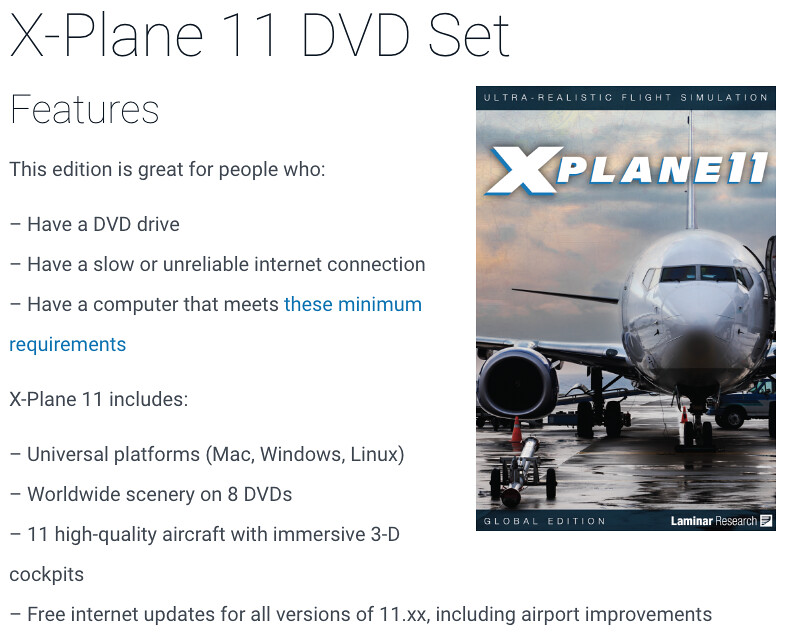
I went straight to the official website to purchase and paid via PayPal.
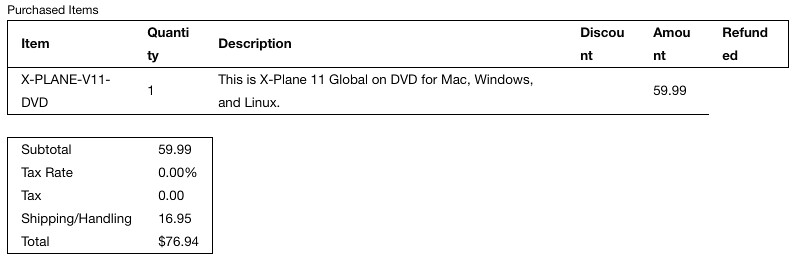 The shipping fee is shown as $16.95, bringing the total cost to $76.94.
Really looking forward to the DVDs arriving soon, even though my old iMac is already struggling to keep up…
-
Close-up Shot of Boeing 787 Air Conditioning Intake
On that day, during the ANA and JAL Maintenance Factory Tour, I was able to observe many details of the 787 airframe up close, such as the intake of the cabin air conditioning system.
In the past, when shooting from the observation deck at the airport terminal, it was difficult to see clearly due to the angle, but this time I was finally able to take satisfactory photos.
 Top: Heat exchanger inlet
Bottom: Deflector door and cabin air compressor inlet
Top: Heat exchanger inlet
Bottom: Deflector door and cabin air compressor inlet -
China Aeronautical Charts EAIP Updated to 201706
Spent several hours upgrading all files to the June 2017 version,
Aeronautical Information Publication (AIP) and Airport Charts of China
Please enjoy.
For specific updates over the past few months, please see the briefs below: 2017 5th Issue NAIP Revision Information Brief 2017 4th Issue NAIP Revision Information Brief 2017 3rd Issue NAIP Revision Information Brief 2017 2nd Issue NAIP Revision Information Brief
In addition, standard Airway regulations have been updated to 201706: <a href=/x-plane10/view.php?file=doc/International_Flights_from_Mainland_of_China_Nr1705.pdf>International Flight Routes from Mainland of China Nr1705 <a href=/x-plane10/view.php?file=doc/International_Flights_to_Mainland_of_China_Nr1705.pdf>International Flight Routes to Mainland of China Nr1705 <a href=/x-plane10/view.php?file=doc/Overflying_Flight_Routes_Form_Operation_Center_Nr1705.pdf>Overflying Flight Routes Nr1705 <a href=/x-plane10/view.php?file=doc/Regional_Flight_Routes_Nr1705.pdf>Regional Flight Routes Nr1705
-
Visiting the ANA and JAL Maintenance Hangars
A long time ago, I wrote a post about visiting the JAL Maintenance Hangar at Haneda Airport. By the way, this tour has become increasingly popular recently, surprisingly ranking #1 on TripAdvisor for option tours in Tokyo among foreign visitors!
ANA Maintenance Hangar Tour Reservation Website (Japanese) JAL Maintenance Hangar Tour Reservation Website (Japanese)
Recently, an enthusiastic colleague at the company booked the schedule online well in advance. A group of aviation enthusiasts gathered to visit both the ANA and JAL maintenance hangars. So, on this day, 8 of us met at Haneda Airport’s “New Maintenance Field” (Seibijo) station.
-
Introducing Some Cool New Airports for X-Plane 11
Laminar Research has released quite a few videos introducing new airports for X-Plane 11 on YouTube. I’ve posted them here for everyone to enjoy. Keep in mind that these airport sceneries are all free!
New York KJFK John F. Kennedy Airport for X-plane 11
Charlotte KCLT Charlotte Douglas Intl Airport for X-plane 11
Melbourne YMML Melbourne Airport for X-plane 11
Shenzhen ZGSZ Shenzhen Baoan International for X-plane 11
-
Which Aircraft Type Has the Most Beautiful Thrust Reverser Spray?
Spotting planes in the rain is quite interesting. After landing, when the engines deploy reverse thrust, the powerful airflow blasting backward kicks up standing water on the ground, creating a spectacular mist effect.
On this day, I was spotting at Haneda Airport just as a shower began, and I managed to capture several basic aircraft types. So, here is a small ranking to see which aircraft type produces the best effect.
-
How to Set Up Multi-Monitor Displays in X-Plane 11
I have previously written about the multi-monitor display settings for X-Plane 10 and affordable external monitors for X-Plane. Below is a brief overview of the multi-monitor settings in X-Plane 11. Here, “multi-monitor” refers to settings when two or more monitors are connected to a single computer.
Once two monitors are connected to the OS, open the Graphics settings screen in X-Plane 11. You will see that there are setting options for both the MAIN MONITOR and MONITOR1.
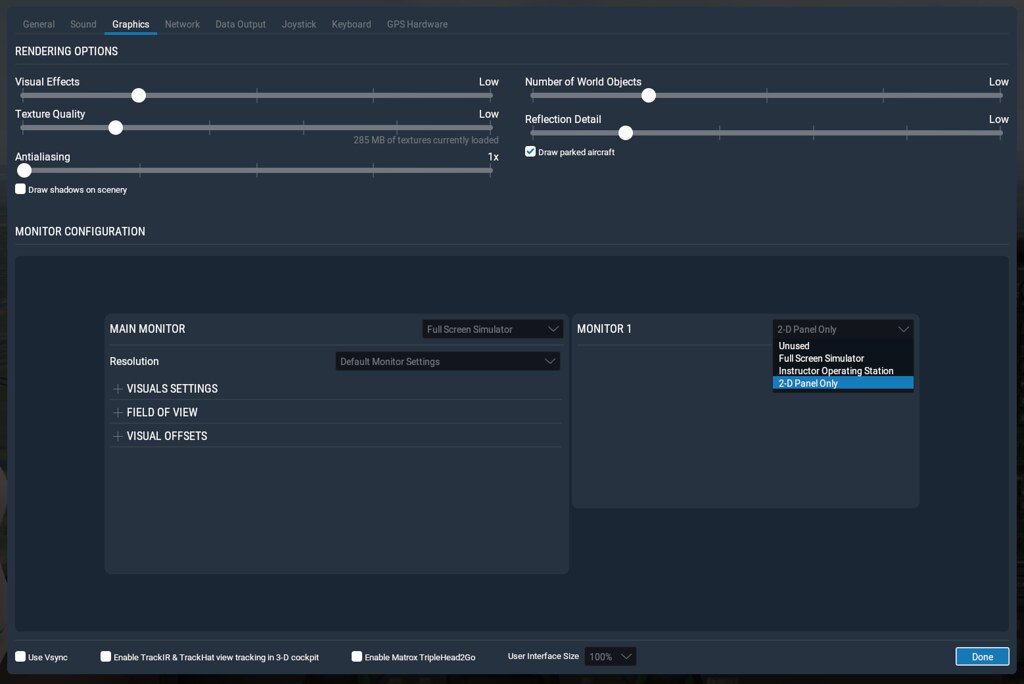 First, let’s try setting the second monitor, MONITOR1, as a “2-D Panel Only” instrument panel.
 -
High Quality, Not Cheap: Airbus Sidesticks
I saw an Airbus A320 Sidestick – A320PROSRV2.0 by ACC.WORLD on SimMarket, The appearance is very realistic, but the price is also staggering, It costs 900 euros, and I don’t know how its performance is.
I couldn’t find any videos about this product on YouTube either, and I don’t know why. Here, let’s just take a look at some beautiful pictures from SimMarket.
I can’t find any product reviews, so I really don’t dare to buy such an expensive peripheral, So I will just give a brief introduction here. If you buy this product, please be sure to let this site know your user experience.
-
Clearing Discontinuous Waypoints
Here is a very short memo, simply summarizing information previously recorded in the guestbook.
- A discontinuity appeared on the Boeing CDU, specifically ROUTE DISCONTINUITY. For example, if a Waypoint at line 3L in the LEGS page is not connected, You can first press 3L to copy it to the Scratch Pad input area, and then press 3L again, and it should connect.
You can refer to this video on YouTube:
-
The Affordable and High-Quality Gladiator Joystick
I saw a Gladiator MK II Joystick launched by VKB SIM on xplane.org. It is priced at only $99.95, but it looks beautiful, and it has a lot of buttons—17 in total—including dedicated buttons for engine start, Throttle, and Flaps control. With mode switching, it effectively offers 27 buttons, which is basically sufficient for general flying.


This joystick is named after the Gloster Gladiator fighter, indicating that it was originally designed for playing combat flight games, so it also features numerous buttons for weaponry. The Gladiator was a British biplane Spiral fighter produced in the 1930s; the Chinese Air Force once used it during World War II to shoot down 48 invading Japanese aircraft.
-
X-Plane 11 is available now
Last night, the official version of X-Plane 11 was finally released, and it is also available on Steam. I really didn’t expect this speed.
I haven’t had time to update yet, because according to the developer blog, its UI and functionality are exactly the same as RC1. You can check the X-Plane 11 Free Demo Installation and First Look for details. Additionally, the Professional version has been launched, priced at $750 USD.
-
Renewing the Let's Encrypt Certificate
The electronic certificate is about to expire, so I’m playing with Let’s Encrypt again.
First, execute the command: $ certbot –config-dir ~/letsencrypt/etc –work-dir ~/letsencrypt/lib –logs-dir ~/letsencrypt/log certonly –manual -d yinlei.org -d www.yinlei.org -d yinlei.net -d www.yinlei.net Then, just like last time, a prompt will appear asking you to create the authentication file under .well-known/acme-challenge/ on the server. Once done, you get the following information: IMPORTANT NOTES:
- Congratulations! Your certificate and chain have been saved at ~/letsencrypt/etc/live/yinlei.org/fullchain.pem. Your cert will expire on 2017-06-28. To obtain a new or tweaked version of this certificate in the future, simply run certbot again. To non-interactively renew all of your certificates, run “certbot renew”
Let’s look under etc/live/yinlei.org/ $ ls -l total 32 lrwxr-xr-x 1 laoyanhunhua staff 34 3 30 19:07 cert.pem -> ../../archive/yinlei.org/cert2.pem lrwxr-xr-x 1 laoyanhunhua staff 35 3 30 19:07 chain.pem -> ../../archive/yinlei.org/chain2.pem lrwxr-xr-x 1 laoyanhunhua staff 39 3 30 19:07 fullchain.pem -> ../../archive/yinlei.org/fullchain2.pem lrwxr-xr-x 1 laoyanhunhua staff 37 3 30 19:07 privkey.pem -> ../../archive/yinlei.org/privkey2.pem
-
X-Plane 11.0 Release Candidate 1
X-Plane 11 has finally moved past beta testing and entered the official Release Candidate RC1 phase. According to the Release Notes, after fixing numerous bugs in beta 16, beta 17 addressed a few more minor bugs. It seems the functionality has been quite stable in recent versions, so the RC version was finally released. It looks like we should be able to get the official release before summer.
Update and install immediately. Opened the 737 and saw this. .
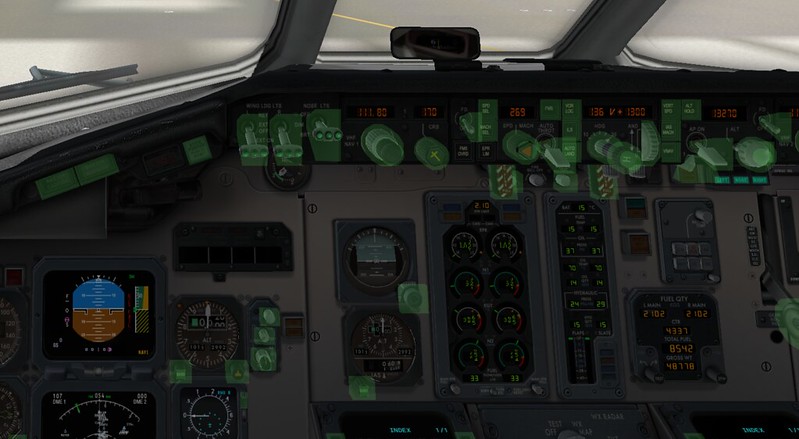 The buttons on the overhead panel have all moved to the bottom,
looks like I’d better wait for the next version before the test flight. .
The buttons on the overhead panel have all moved to the bottom,
looks like I’d better wait for the next version before the test flight. . -
Comment Feature Restored
I just discovered a couple of days ago that the comment function on this site was broken. Users using Facebook could neither login nor leave comments, which is pretty incredible.
So I used the most basic debugging method to trace the logs bit by bit, and found that the response for the access token had changed.
The handling until now was like this:
    my $content = $response->decoded_content();
    return $app->errtrans("Invalid request.")
        unless $content =~ m/^access_token=(.*)/m;

    my $access_token = $1;
    $access_token =~ s/\s//g;
    $access_token =~ s/&.*//;
But recently it changed to a JSON format, so I commented out all the above code,
-
ANA Star Wars Livery Jet No. 4 C-3PO
The ANA Star Wars livery series is finally complete, with the fourth aircraft, C-3PO, officially entering commercial operation this week on March 21.
One and a half years ago, I captured the first aircraft, R2-D2, on its first passenger flight and another look at the R2-D2 special liner’s takeoff. One year ago, I photographed ANA Star Wars Livery 2nd Jet JA604A. Half a year ago, I captured the 3rd Jet BB-8. Yesterday, I finally got the 4th jet as well, fulfilling a wish.
-
Go Around Right Before My Eyes
One day, while taking photos at the observation deck on the roof of Terminal 2 at Haneda Airport, I watched helplessly as a Boeing 787 (registration JA809A), while landing, suddenly pulled up and went around just a few meters off the ground directly above the Runway.
This site has introduced quite a few topics about go-arounds, such as Airline Pilot Confidential 6.6 Go Around, Watching Go Arounds from Downtown Tokyo, Investigation Report on the JAL 777 Tail Strike, Did a Near Miss Occur Near Haneda Airport Today?, etc., but none were experienced on the scene.
-
X-Plane 11.00 Beta 15
The X-Plane 11 beta has reached version 15, but the official release is still nowhere in sight. Judging by the recent release history, the developers are indeed working hard, so let’s continue to wait and see.
March 12th Beta15 March 11th Beta14 March 1st Beta13 February 25th Beta12 February 11th Beta11 February 11th Beta10 January 27th Beta9 January 24th Beta8 January 13th Beta6
At the Beta 15 stage, due to changes in cloud rendering processing, slow display speeds remain a significant issue. Therefore, it is advisable for friends eager to use X-Plane 11 to wait a bit longer before making the move.
-
Making Plugin Management Easy with X-Updater
How to upgrade aircraft addons and other plugins purchased from x-plane.org?
Redownloading everything is indeed a pain, so using the X-Updater tool is a great solution.
Here is how to use X-Updater. First, visit http://update.x-plane.org/, where you will see the text:
Download the latest version of the X-Updater client. download
Click download to get the X-Updater-Client.jar file.Then, double-click X-Updater-Client.jar, and the following window will pop up.
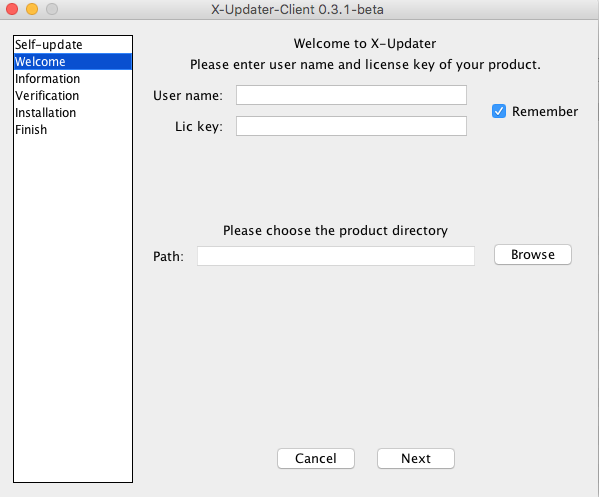 (If your jar file cannot be executed, please check here for instructions on installing the Java Runtime Environment)
 -
X-Plane 11 FMS Usage Tutorial
An X-Plane 11 FMS Manual has been released on x-plane.org. It states: “This document may be copied and distributed by Laminar Research customers for entertainment only.” So, let’s introduce it here.
Regarding the simulation fidelity of this Flight Management System, the manual states: “Due to the immense complexity of a real-life Flight Management System, the version modelled in X-Plane 11 is simplified, and does not support every capability. However, the functions necessary to program and execute a flight plan are present, including the use of published arrival and departure procedures (SIDs and STARs) and instrument approaches.”
-
Filming the Hummingbird Departure Procedure Takeoff
About a year ago, I introduced the Hummingbird Departure Procedure at Tokyo International Airport. I mentioned that the reason this departure is extremely popular is that “you can capture a photo of the aircraft with Mount Fuji.” However, the shooting conditions are quite difficult because “the conditions require a winter morning, a north wind, taking off from RWY 34L, and limited to flights before 8:00 AM. Even if the weather meets these conditions, there are only 3 flights per day that can use this procedure.”