Airliner Cockpit Secrets 5.1 Descent Preparation
As the aircraft continues to approach the destination airport, the Captain and the First Officer must begin preparing for the Descent.
Generally, Descent preparation and the Approach/Go-around Briefing should be completed within 10 minutes prior to the Top of Descent (TOD) to avoid missing the optimal timing to begin the descent.
First, it is necessary to understand information regarding the destination. If local weather conditions are severe, such as a typhoon making landing impossible, or if an earthquake has just occurred making it impossible to ensure the safety of the airport Runway, the crew must consider diverting to an Alternate Airport.
Local airport information can be obtained through ATIS. The Automatic Terminal Information System (abbreviated as ATIS or Information Broadcast) is an automatically continuous information broadcast service at busy airports, usually broadcast on a separate radio frequency. It includes major flight-related information such as weather, active Runways, barometric pressure, and Altimeter settings.
Under normal circumstances, the broadcast is updated every half hour or hour, but it can be updated at any time if the weather changes rapidly. They are identified sequentially by letter codes A, B, C… Z, and are read according to the ICAO-published standard letter pronunciation.
Pilots can obtain ATIS via the ACARS data link system or by listening directly to the radio voice service.
The ACARS system consists of an avionics computer known as the ACARS Management Unit (MU) and a Control Display Unit (CDU). The MU is used to send and receive VHF radio digital messages from the ground. The data is displayed via the display unit, and can also be printed out using a printer in the cockpit. (If a personal PC is equipped with ACARS decoding software, one can actually receive ACARS information at home, such as the aircraft’s flight speed, altitude, longitude, latitude, etc. I personally recommend the free software KG-ACARS; if you are interested, you can find it and try it out.)
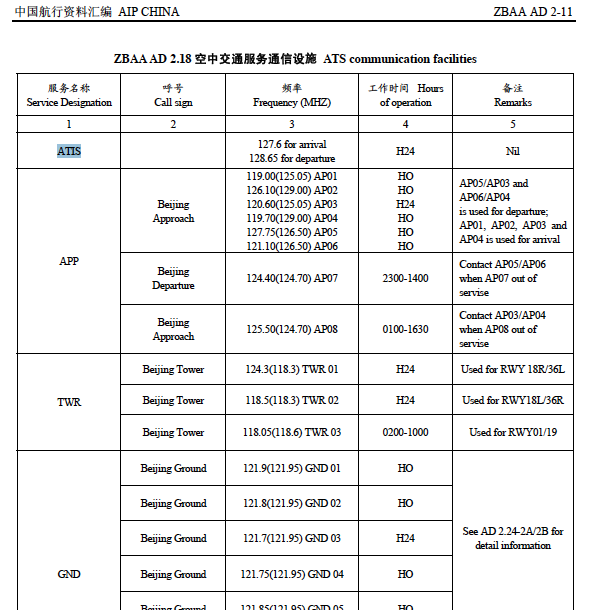
To listen to the voice directly, just like listening to general Air Traffic Control conversations, look for the ATIS frequency in the destination airport information, tune the aircraft’s communication radio to that frequency, and listen via the speaker or headphones. Below is the communication facility information for Air Traffic Services at Beijing Capital International Airport. You can see that ATIS has two frequencies: 127.6MHz and 128.65MHz.
As long as you have a radio that supports the aviation band and are within a certain range of the airport, you can hear the airport’s ATIS service. Generally speaking, its content is like this (taking Haneda Airport near my home as an example):
“Tokyo International Airport, information Kilo, 2130, ILS Zulu Runway 34L approach, Landing Runway 34L, Departure Runway 05 and 34R, Departure Frequency, 126.0 Runway05, 123.8 Runway34R Wind 180 degrees 6 knots, Direction variable between 160 and 230 degree, Visibility 9 km, Few 1 thousand 5 hundred cumulus, Bkn 14 thousands altocumulus Temperature 20, dewpoint 15 QNH 29.80 inches Advise you have information Kilo”
Here is a simple translation of the meaning:
Airport Name: Tokyo International Airport Information Code: information Kilo (Information code is K) Observation Time: 2130 (Issued at 21:30 GMT) Expected Approach Type: ILS Zulu Runway 34L approach (Using Instrument Navigation ILS Z Runway 34L Approach procedure) Active Runway: Landing Runway 34L, Departure Runway 05 and 34R (Takeoff Runway 34L, Landing on 05 and 34R) Notices (Departure Frequency, etc.): Departure Frequency, 126.0 Runway05, 123.8 Runway34R (Departure Tower Frequency, Runway 05 uses 126.0MHz, Runway 34R uses 123.8MHz) Other Important Matters (Runway surface condition, braking action, failure information, etc.): None Weather Information Wind Direction and Speed: Wind 180 degrees 6 knots (Wind direction 180 degrees [South wind], Wind speed 6 knots) Wind Direction and Speed Variations: Direction variable between 160 and 230 degree (Direction varies between 160 and 230 degrees) Visibility, RVR: Visibility 9 km (Units in meters if below 5 km, above that in km) 9 km Current Weather Cloud Cover, Ceiling: Few 1 thousand 5 hundred cumulus, Bkn 14 thousands altocumulus (Few clouds at 1500 feet Cumulus, Broken Altocumulus at 14000 feet) Air Temperature, Dew Point: Temperature 20, dewpoint 15 (Temperature 20 degrees, Dew point 15 degrees) Altimeter Setting: QNH 29.80 inches Weather Trend Special Information Information Code: Advise you have information Kilo
※ The Dew Point refers to the temperature to which air containing water vapor must be cooled to become saturated and condense into liquid water. At this temperature, the condensed water floating in the air is called fog, while when it adheres to a solid surface it is called dew, hence the name dew point. The higher the relative humidity, the closer the dew point is to the air temperature; when relative humidity reaches 100%, the dew point equals the air temperature. The dew point is used to calculate the likelihood of engine icing and fog, so it is an important piece of data for pilots.
It is important to note that the pronunciation of individual letters in aviation communication is quite specific. To avoid confusion and misunderstanding, specific nouns are used to represent the 26 letters. These words are as follows: A Alfa B Bravo C Charlie D Delta E Echo F Foxtrot G Golf H Hotel I India J Juliett K Kilo L Lima M Mike N November O Oscar P Papa Q Quebec R Romeo S Sierra T Tango U Uniform V Victor W Whiskey X X-ray Y Yankee Z Zulu
Therefore, the information code “information Kilo” above is actually “K”, but on the broadcast, it must be read as “Kilo”. The “Z” in the approach procedure “ILS Z 34L” must also be read as “Zulu”. Also, the number “9” is not read as “nine”, but as “niner”. Listen carefully to the pronunciation of “Visibility 9 km” above. Many native English speakers are also at a loss when listening to Air Traffic Control or ATIS for the first time because of these specific terms and rules, but once you understand them, it is not difficult to understand.
Regarding cloud conditions, the meanings of the abbreviations are as follows: FEW Few SCT Scattered BKN Broken OVC Overcast
Additionally, cloud shapes are sometimes explained in the ATIS, as shown below: Cumulus Cumulonimbus Stratus Nimbostratus AltoStratus Altocumulus Towering cumulus Stratocumulus Cirrus And so on.
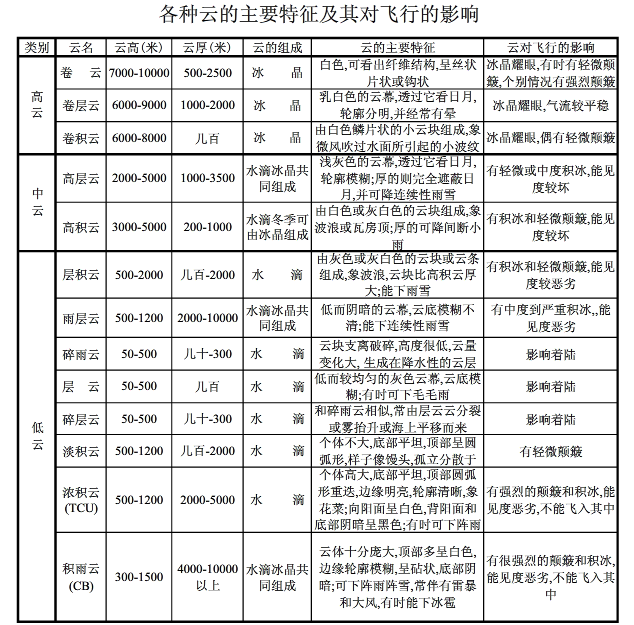
If clouds are present, they not only affect the flight’s visibility but also bring turbulence during the flight, so this information is very important to pilots. The image below briefly illustrates the impact of various clouds on flight.
If the pilot has confirmed that the destination is clear, and knows the weather, Runway, and Approach and landing information, then they can proceed to the next operational procedure. The next section summarizes the Approach Briefing.
Prev: Inside the Cockpit TOC: Table of Contents Next: Approach Briefing
End