A Flight Sim Enthusiast's Notebook
-
Title: Precautions for Using ATC Functions
X-Plane 11 is now available. Please check the latest article Installing X-Plane 11 Free Demo and First Handson!
-
Be sure to set the frequency correctly when communicating with ATC.
-
Be sure to reply as soon as possible.
-
For the Flight Plan route, use the ICAO format. Use VOR/NDB/FIX names or coordinates for each navigation node (use dd degrees mm minutes for latitude and longitude, in “ddmmNdddmmE” format).
-
Currently, the system does not support SID (Standard Instrument Departure), so you will constantly receive “You are off course” warnings. You can ignore this warning for now, or input detailed node information in the flight plan. Additionally, the system’s support for flight plan routes is not very smart; if the aircraft is not flying on a straight line between the takeoff and landing points, the system will still issue a “You are off course” warning.
-
-
Title: Regarding Time Adjustment
During long flights, especially after engaging the autopilot and entering cruise, things can get a bit quiet. Do you often find yourself gazing at the scenery, glancing at the instruments, or even dozing off to pass the time? Fortunately, since this is a flight simulator, there is a much more convenient way to pass the time: the time acceleration feature. Additionally, it is said that flight simulators certified by the Federal Aviation Administration (FAA) must also possess this functionality.
-
Title: X-Plane 10 Stunning 747-400 Internal View
X-Plane 11 is out now. Please check out the latest article: Installing and Trying the X-Plane 11 Free Demo!
Welcome to 2012! I wish everyone a happy New Year. May you continuously improve your flying skills and better enjoy the various pleasures that flight simulation brings us in the coming year.
I basically stick to light propeller aircraft in X-Plane 10, but occasionally flying a large airliner still brings many surprises. Although these big birds are difficult to fly, the modeling is indeed very exquisite; just looking at the interior space is a pleasure in itself. Let’s take a look at the interior views of the 747-400, which is the default aircraft in X-Plane 10. These images are screenshots I took myself.
-
Plugin Introduction: Google Maps Display GMAP FOR X-PLANE (FREE MOVING MAP)
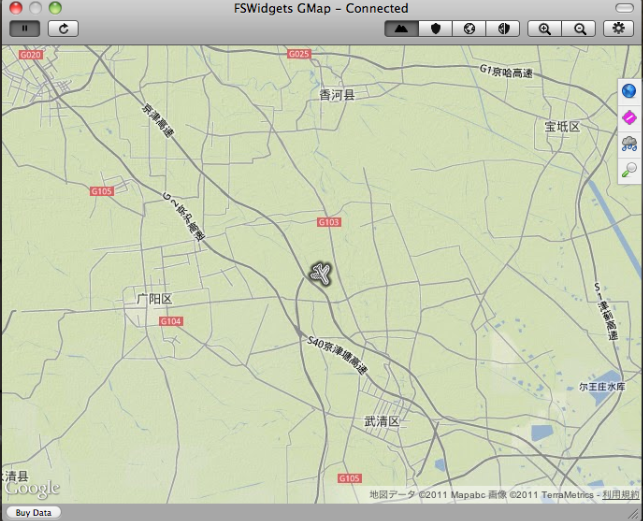
While X-Plane allows you to switch to map mode at any time, it interrupts the flight every time, which isn’t very convenient. Is there a Plugin/Addon that allows you to view the map while flying? It would be even better if it could display Google Maps. I recently found a nice Plugin/Addon online—let me introduce it—GMAP FOR X-PLANE.
This Plugin/Addon can display Google Maps based on the aircraft’s current position. You can choose between satellite imagery or standard administrative maps, making it quite similar to a GPS navigation unit. It can also download airport, navigation station, and weather data from the internet. Most importantly, this is free software.
-
Plugin Introduction: COM1RadioTuner
When accepting ATC commands, having to constantly use the mouse to change radio frequencies is not only inconvenient but also diminishes the realism of the flight simulation.
Recently, I found this convenient Plugin online that can alleviate the hassle of mouse operations.
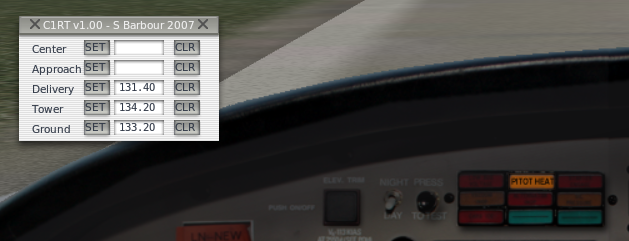
As shown in the figure, before the flight, you can pre-input the frequencies for Clearance, Ground, Tower, Approach, and Center. Then, simply press the SET button when needed, and the COM1 frequency will be set instantly. It is extremely convenient.
-
X-Plane 10.03 Beta 7 Released
Today Laminar Research released the latest version of X-Plane — X-Plane 10.03 Beta 7. The developers are still working efficiently, pushing out an update so quickly just after Christmas. http://wiki.x-plane.com/Beta
In this update, the following fixes were mainly implemented:
ATC
- Fixed a bug where incorrect instructions were issued while taxiing
- Fixed a bug where clearance was issued despite holding at the gate due to weather
- Runway traffic flow is more stable
- AI aircraft destination selection is smarter
- Soundless mode now works correctly
- Submit flight plan menu item can be disabled when necessary
- Clouds do not display from the inside
- Stars do not display when flying inside clouds
General
-
Training Cessna 172 Available on the Official Website
The Cessna 172 is surely an introductory model familiar to beginners. As one of the aircraft provided for free with X-Plane, it has accompanied me through countless hours. Upon learning that a Cessna 172 dedicated for flight schools was available on the official website, I immediately downloaded it to give it a try.
Download Link: http://forums.x-plane.org/index.php?app=downloads&showfile=12634
Installation is very simple. Just extract the downloaded archive to generate the “X-PPL Cessna 172SP” directory, and copy the entire directory to
Aircraft/General Aviation/in your main directory. -
# How to Use ATC Air Traffic Control
X-Plane 11 is out now! Check out the latest coverage for the X-Plane 11 Free Demo Installation and First Look!
Overview
X-Plane 10’s Air Traffic Control (ATC) system can powerfully simulate the busy communications of real-world aviation, or it can quietly accompany you on a solo flight. AI aircraft absolutely obey ATC commands, so if you don’t want to contact ATC, these aircraft will simply ignore your existence and move freely. ATC sound settings are configured in the Sound section of the Settings menu.
-
Title: New Features and Controls in X-Plane 10
X-Plane 11 is already out, please check the X-Plane 11 Chinese Tutorial summarized on this site! X-Plane 11 Keyboard Instructions
New Default Keyboard Shortcuts
W: Forward view with instrument panel SHIFT W: Forward view with HUD CONTROL W: Forward view without instruments
SHIFT 1: View from moving point, same as ! key SHIFT 2: View from set position, same as @ key SHIFT 3: View from Runway, same as # key SHIFT 4: Circular view around aircraft, same as $ key SHIFT 5: View from Tower, same as % key SHIFT 6: Look inside aircraft, like a camera mounted anywhere on the aircraft, use ^ key to aim camera direction, can rotate up, down, left, right to look around SHIFT 7: Track weapon view, can use &, <, > keys to switch between aircraft and various weapons SHIFT 8: Tracking view, same as * key SHIFT 9: 3D Cockpit view, can move and rotate SHIFT 0: 3D Cockpit view, can operate instruments with mouse
-
Title: X-Plane 10 Flight Simulation Software Introduction, Acquisition, Installation, and Flight Control Beginner's Guide Tutorial
X-Plane 11 has been released. Please check out the latest articles: Installing and Trying the X-Plane 11 Free Demo and X-Plane Chinese Tutorial!
What is X-Plane 10?
According to the official description, X-Plane is the world’s most comprehensive and powerful flight simulation software for personal computers, offering the most realistic flight model experience. X-Plane is not a game; it has no levels or puzzles for you to conquer. With this software, you only do one thing: experience flight piloting. This is because X-Plane is a software tool capable of simulating and predicting aircraft handling characteristics with incredible precision.
 X-Plane 10 is the latest version of this flight simulation software. It includes 8 DVDs and provides global terrain maps.