A Flight Sim Enthusiast's Notebook
-
Starflyer Kansai-Haneda Route Flight Review
Starflyer is a very small budget airline in Japan that began operations in 1996. They only have a total of 10 Airbus A320 aircraft, and naturally, their routes are few, so their business situation isn’t great.
While the company has low public recognition, it is quite well-known among aviation enthusiasts, mainly because their design is very distinctive, earning them the 1996 Good Design Award. One of their features is the use of a black基调 with white accents, making it very easy to recognize. The cabin equipment is also unified in black; not just the seats, even the lavatories are designed in black. When the company was first established, even the toilet paper was black, which sparked huge interest among aviation enthusiasts. Everyone would secretly take the toilet paper home as a souvenir; it was very popular. However, the airline couldn’t sustain the losses, so they eventually had to switch to using regular toilet paper.
-
A Visit to Kansai Airport RJBB
I went to Osaka on another business trip recently. On my way home, I decided to fly back to Tokyo from Kansai Airport, taking the opportunity to wander around the airport and take some photos.
I departed from Osaka Station in the morning and took the “Kanku Rapid” train bound for the airport from Platform 1. It takes just over an hour to get there. It is important to note that some train services split at an intermediate station; the front 4 cars go to the airport, while the rear cars go elsewhere, so be sure not to board the wrong carriage. On the train, I met Mr. Dong and his family from Taiwan, who were traveling to Osaka and Kyoto. We chatted all the way and had a very pleasant conversation.
-
A Dispatcher's Blog & FAA Pilot Weather (Chinese Edition)
Today, I’d like to recommend a blog—seemingly written by a dispatcher—called Flying Apple Pie.
I first noticed it because the blogger translated FAA AC 00-6A Aviation Weather For Pilots and Flight Operations Personnel (Chinese version). This book comes highly recommended; I’ve saved it on my Kindle and have already read it twice in a month.
Many thanks to the translator for their hard work!
Additionally, the blog features accounts of real-world issues encountered in the blogger’s work along with investigation reports. The content is a valuable reference for aviation enthusiasts, so I’m happy to give it a special recommendation.
-
How to Create a VFR Flight Plan
I previously wrote a guide for IFR flying; today, having some free time, I thought I’d write another one, this time on creating a flight plan for Visual Flight Rules (VFR) in a small aircraft.
First, select a flight target. I’ve been on business trips to Osaka quite often recently, so I’m quite familiar with the area. Let’s start from Osaka and do a sightseeing flight. Osaka has a general aviation airport — Yao Airport RJOY — so we will take off from here. For the Destination, let’s choose Tokushima Airport RJOS in the south. This route allows us to pass over the bustling cities of Osaka and Kobe, see the famous Akashi Kaikyo Bridge and Naruto Bridge over the sea, as well as the beautiful natural scenery of Awaji Island. It is perfectly suitable for a sightseeing flight.
-
Aviation Theory Study and Exam Question Bank
Here are the Boeing 757/767 aircraft theory study and exam questions from the Shanghai Airlines Flight Operations Department. You can use them to test your aviation knowledge and see what score you can get. These are actual questions for the 757/767 pilot license exam.
http://fly.shanghai-air.com/flyiis/main/salplms/lab/salplms20090527-1.htm
-
Principles and Usage of the Pressure Altimeter
Altimeter Barometer
1. The Altimeter requires Standard Atmospheric Pressure as a reference
The principle of the pressure Altimeter is based on measuring atmospheric pressure and converting that pressure into altitude readings. However, the relationship between atmospheric pressure and altitude is not simple enough to be expressed by a single formula. For example, the closer to the ground, the higher the air density; the higher from the ground, the lower the air density. Additionally, at the same atmospheric pressure, temperature changes have a significant effect on altitude. Therefore, it is impossible to obtain a reliable altitude figure solely from a pressure reading.
-
New Version 2.21 of the Xsaitekpanels (lin+win+mac+32/64) Plugin
I have previously introduced the setup method for the Saitek Pro Flight Radio Panel. Recently, I checked the org store again and found that the plugin version has been updated rapidly, upgrading from 2.04 to 2.21. It seems quite a few bugs have been fixed, so I downloaded and updated it again to give it a try.
The new version feels slightly more stable than before. Previously, if used for a longer period, the data on the display might appear garbled. After the upgrade, it feels like this issue has been resolved.
-
METAR Aviation Routine Weather Report Format Study Notes
Here is a review note summarizing the format of the METAR (Meteorological Terminal Aviation Routine Weather Report).
For example, today’s weather at Haneda Airport: METAR RJTT 230900Z 18011KT 9999 VCSH FEW020TCU SCT030 BKN100 24/19 Q1005 NOSIG RMK 1TCU020 4CU030 6AC100 A2970 TCU 10KM N MOV UNKNOWN
Format
1. Report Type Divided into routine METAR reports (METAR) and special weather reports (SPECI). e.g., “METAR”
2. Station Identifier Each station is identified by a four-letter code determined by the International Civil Aviation Organization (ICAO). e.g., “RJTT” represents Haneda Airport.
-
Unveiling Airliner Cockpit Secrets 6.8 Post-Landing Procedures
In the previous section, we reduced the ground speed to below 10 knots and prepared to exit the active Runway. At this point, the Tower should have issued instructions for the taxi route to the parking gate. Continuing with flight Air System 115 as an example:
Tower: “Air System 115, Turn Right B9, Taxi Down Runway 19L, A10” Pilot: “Right, B9, Taxi Down Runway 19L, A10, Air System 115”
The taxi route here involves turning right at exit B9, taxiing down Runway 19L to exit A10.
-
Secrets of Airliner Flying 6.6 Go-around
Before landing, if unexpected circumstances occur that lead the flight crew to determine that continuing the Descent for landing would pose safety issues, the pilot must decisively execute the Go Around procedure.
These situations include:
- After reaching the Decision Height (DH) (for Precision Approach) or the Missed Approach Point (MAPT) (for Non-Precision Approach), the Runway and indicator lights are still not visible, and the required visual reference cannot be established.
- A failure in airborne equipment or ground navigation equipment prevents the provision of normal navigation accuracy.
- The Runway Visual Range (RVR) during the landing process cannot meet landing requirements, such as due to the influence of advection fog. Advection fog is formed when warm, moist air moves over colder land or water surfaces, cooling from below. It usually occurs in winter, lasts for a relatively long time, covers a large area, and is dense with significant thickness, sometimes reaching several hundred meters.
- When crosswinds or headwinds are too strong.
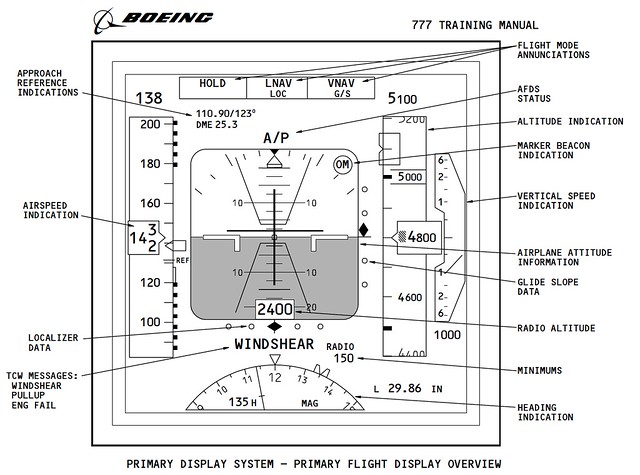
- When a wind shear warning occurs during the Approach. Modern airliners are generally equipped with wind shear detection and warning systems. If the aircraft suddenly starts shaking violently, or the wind direction and speed change significantly, the wind shear warning in the cockpit will sound, with the voice prompt “WIND SHEAR, GO AROUND,” and the warning text “WINDSHEAR” will also appear on the Primary Flight Display (PFD).
- When the Air Traffic Controller issues a Go Around instruction.
- When there are other aircraft or ground vehicles on the Runway, posing a risk of collision. Etc.
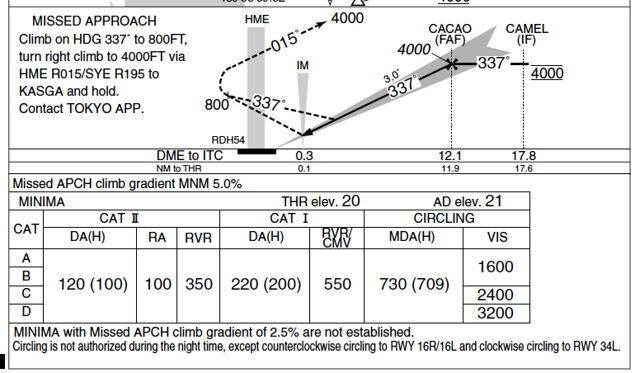
The Go Around flight path was summarized in the 5.4 Instrument Approach Charts section, so it will not be repeated here.
-
PAPI Brightness Adjustment Plugin
In the default installation of X-Plane 10, the PAPI lights are always quite dim, making it very difficult to see clearly when far from the airport. Therefore, I looked online and found a plugin that adjusts the lighting, which solved this problem. The plugin is called “Replacement Day and Night Lighting (lights.txt) for X-Plane”. The URL is here. <img src=http://forums.x-pilot.com/index.php?app=downloads&module=display§ion=screenshot&record=6316&id=435&full=1 width=680>
After logging into this website, you can download the compressed package. The file inside is very simple—it is just lights.txt. This plugin provides four types of lighting, located in four separate directories: 1 lights.txt-normal-distance-bloom 2 lights.txt-high-distance-bloom 3 lights.txt-4XSSAA-normal-distance-bloom 4 lights.txt-4XSSAA-high-distance-bloom You can choose any one of them according to your personal preference.
-
Free Supercritical Simulations B747-8 2.0
The Boeing 747-8 aircraft addon developed by SSG version 2.0 has been released. Key features include:
- Provides both Freighter and Passenger aircraft variants
- Optimized for X-Plane 10
- Consulted with real 744 and 748 pilots
- 748 panels and lighting effects based entirely on real-life production
- Custom FADEC logic and Thrust
- Nose cargo door can be opened
- Improved external lighting (supports HDR)
- Higher resolution used for 748i
- Detailed Pilot Reference Manual and tutorial flight
The most critical point is that this aircraft is free. I downloaded it to fly around and felt the workmanship was quite good, so I am recommending it here.
-
How to Check NOTAMs
It turns out you can check this on the official FAA website. Simply enter the airport code or the Flight Information Region (FIR) code, and you can query information for up to 50 airports at once. https://www.notams.faa.gov/dinsQueryWeb/ It really is convenient.

You can see that after entering the Fukuoka FIR (RJJJ), even U.S. military training information was found. Although this is flight simulation, let’s keep our distance. J2770/13 - MULTIPLE U.S.MIL ACT WILL BE CONDUCTED WI FUKUOKA FIR AS FLW, BOUNDED BY THE POINTS 2541N12852E 2548N12902E 2544N12926E 2544N13011E 2543N13036E 2541N13045E 2453N13004E TO POINT OF ORIGIN. ATC WILL NOT CLEAR NON-PARTICIPATING IFR FLT THRU THIS AREA. RMK/MISSION NAME:MIKE. FL055 - FL400, 0900/1500, 10 JUN 09:00 2013 UNTIL 14 JUN 15:00 2013. CREATED: 03 JUN 03:19 2013
-
Querying Flight Information Region FIR
I discovered that querying Flight Information Region (FIR) information is very easy on this website: http://gis.icao.int/Flexviewer/
 Simply by clicking the mouse on a location on the map, the local FIR information will pop up in a dialog box. The method of use is very simple, and it is highly recommended.
End
-
Free Weather Information Provided by NOAA
The free weather information website from NOAA (National Oceanic and Atmospheric Administration) Aviation Weather Center
If you don’t quite remember the detailed explanations for the various data in METARs, you can refer to the notes I wrote: METAR Aviation Routine Weather Report Format Summary.
Simply by entering the 4-letter airport code here, you can obtain the Aviation Routine Weather Report METAR and Terminal Aerodrome Forecast TAF information. For example, for Beijing Capital International Airport, enter ZBAA and the results are here, such as
-
PA28 181 ARCHER II V2.1
Last month, I just upgraded Carenado’s Piper PA-28 to version 2.0. Over the weekend, I noticed a notification that version 2.1 was released, so I downloaded it yesterday to take a look. It turns out it wasn’t just this product; several others received updates as well, including:
- Carenado Mooney M20J v2.1
- Carenado PA32 Saratoga SP v2.1
- Carenado ArcherII v2.1
- Carenado C152II v2.1
If you have purchased any of these products, don’t forget to download the update.
-
Various Speeds
Vs0 -- The stall speed or minimum steady flight speed in the landing configuration. In small aircraft, this is the power-off stall speed at maximum landing weight in the landing configuration (gear and flaps fully deployed). The lower limit of the white arc on the Airspeed Indicator.
Vfe -- The maximum speed with flaps extended.
Vs1 -- The stall speed or minimum steady flight speed obtained in a specific configuration. For most aircraft, this is the power-off stall speed at maximum takeoff weight in a clean configuration (gear retracted, and flaps retracted if retractable). The lower limit of the green arc on the Airspeed Indicator.
-
Commercial Cockpit Secrets 6.5 Landing Procedures
The Landing Procedure executed by the pilot actually begins with the ILS setup introduced in Section 6.3; this section summarizes the remaining operations.
First, the pilot notifies the cabin crew to prepare for landing, requiring passengers to stow tray tables, fasten seatbelts, return seats to the upright position, and complete all safety preparations before landing. Next, the Captain calls out Flap settings according to the Flap Schedule, and the First Officer sets the Flap lever as instructed while monitoring that the Flaps and Slats are correctly deployed.
-
Airliner Cockpit Secrets 6.4 Traffic Pattern
The Traffic Pattern (also known as circuit flying) defines the standard traffic flow for aircraft taking off and landing at an airport. This path forms a rectangular route relative to the Runway and is flown at a specific altitude. It allows pilots to anticipate and locate the position of other pilots flying near the airport. The Traffic Pattern is also a crucial training curriculum; pilots can learn essential flight skills such as Departure, Climb, Turn, Level Flight, Descent, and Landing from circuit flying.
-
Most Popular Plugins on x-plane.org in May
The most popular addons on x-plane.org for May have been released. I haven’t installed them yet, but after reading some introductions and watching videos, I think they are pretty good. Here is a brief overview.
Best Aircraft
A new version 1.1 of the Spanish ELA07-S Autogyro. The previous version 1.0 was introduced here before and was rated as one of the best aircraft addons of 2012.