A Flight Sim Enthusiast's Notebook
-
Front View of the Aircraft
A while ago, a project for a travel website at my company was征集 aircraft photos as material. I provided a head-on shot of a 787, and to my surprise, it was selected.
Thinking back, that kind of photo is indeed quite difficult to take. After all, most shooting locations only allow you to capture the side of the aircraft. There are very few spots where you can grab a shot of the “face,” and even then, it’s just for an instant. Clear, high-resolution images are genuinely rare.
-
The Blog Has Been Redesigned
They say it’s a redesign, but it basically just changed the style, switched to the Movable Type Rainier template, because this template offers better support for mobile devices, optimizing display for phones and tablets via Media Queries. Also added a comment section to the blog posts, so readers can give feedback and ask questions directly on the site, hoping this will help improve communication.
If you find any issues after the redesign, please let me know. Thanks.
-
Real-time Thunderstorm and Lightning Map Website: Blitzortung.org
For aircraft, thunderstorms and lightning are always the most dangerous natural phenomena; the farther away you can stay, the safer it is. However, finding information on where exactly in the world thunderstorms are located is actually quite difficult. Fortunately, we now have Blitzortung.org, which allows you to view current thunderstorm and lightning activity on a world map. It is truly a great website.
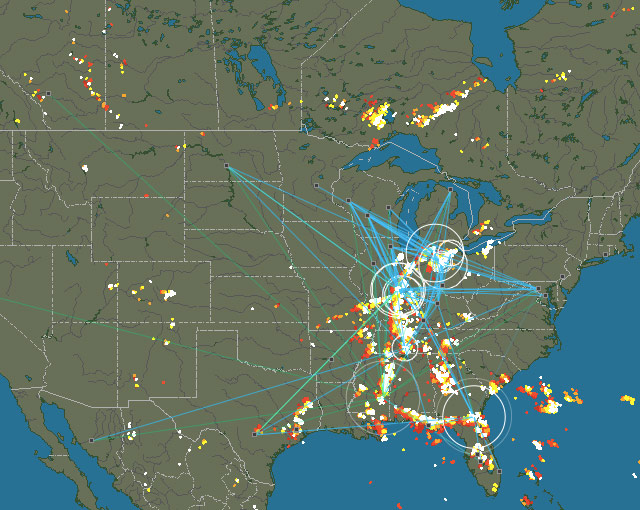
I won’t explain the specific usage of the website in too much detail; suffice it to say, it is very simple. Just select a region, such as Europe, Oceania, or the Americas, and you can see the local locations of thunderstorms and lightning.
-
October 25, 1999 Lear Jet Crash in South Dakota, USA
Around 12:13 Central Time on October 25, 1999, a Learjet 35 operated by Sunjet Aviation crashed in South Dakota, killing the captain, first officer, and four passengers.
The Learjet 35 is a business jet equipped with twin turbofan engines capable of carrying 8 passengers. The accident aircraft was manufactured in 1976 and was purchased by Sunjet Aviation in January 1999.

"NTSB-N47BA-slide0013 background" by NTSB - http://www.ntsb.gov/Events/2000/aberdeen/Opening%20Presentation.htm. Licensed under Public domain via Wikimedia Commons. -
Recent Log: Accidentally Flew to the Mysterious Area 51 KXTA
I haven’t been flying much in X-Plane lately, averaging about 1-2 hours a week. It’s mostly just to relax and enjoy the scenery.
For example, this time I took a leisurely flight from San Jose in the heart of Silicon Valley, still using the Cessna 152. Every hour or so, I’d find an Airport to stop at, hopping along the way.
First, I headed southeast into the Central Valley, then slowly continued south. When I got near Los Angeles, I decided to swing by Las Vegas. So, after resting at Edwards Air Force Base, I turned northeast.
-
Analysis of Korean Air HL7724 Landing on Taxiway at Akita Airport
After seeing the news about a flight mistakenly landing on a Taxiway yesterday, I looked up some information on this topic. I found a report from the Japan Transport Safety Board regarding the Korean Air incident involving a mistaken landing on a Taxiway at Akita Airport. I decided to study it briefly. (The original report is 30 pages long; here, I have only translated and excerpted a small portion.)
The report is dated November 28, 2008, and the incident occurred on January 6, 2007. The investigation took one year and ten months. The summary of this serious incident is that on that day, a Korean Air Boeing 737-900, registration HL7724, took off from Incheon. When landing on Runway 10 at Akita Airport, it mistakenly landed on a Taxiway parallel to the Runway. This Taxiway is located on the south side of the Runway.
-
Aviation Safety Reporting System ASRS
Let’s start by introducing two terms: the Aviation Safety Reporting System (ASRS) and the Confidential Aviation Safety Reporting System.
The Confidential Aviation Safety Reporting System collects a large number of reports from frontline personnel such as pilots, air traffic controllers, and maintenance personnel. It identifies defects or loopholes in the current civil aviation operation system and serves as primary data for human factors research, helping to improve the civil aviation system and ensure its safe operation.
-
BGAN and Swift Broadband
More and more people are able to access the internet during commercial flights recently. At airports, it is common to see many passenger aircraft equipped with large satellite communication antenna domes on the upper fuselage.
 For example, on the Indonesia Air Boeing 777-300ER above, the one directly above the text “Indonesia” is it; the photo was taken at Narita Airport.
Take another look at this Qatar Airways Airbus A330-200, the photo was taken at Beijing Capital International Airport.
For example, on the Indonesia Air Boeing 777-300ER above, the one directly above the text “Indonesia” is it; the photo was taken at Narita Airport.
Take another look at this Qatar Airways Airbus A330-200, the photo was taken at Beijing Capital International Airport.

-
About Supercooled Water
I first learned about the phenomenon of supercooled water while studying aviation meteorology: Because water lacks condensation nuclei, it can remain in a liquid state even below 0℃. Such water is called supercooled water. When an aircraft flies through a cloud layer containing supercooled water, the supercooled water in the cloud encounters the aircraft and immediately freezes into ice upon contacting condensation nuclei. The aircraft fuselage acts as the condensation nucleus, which alters the aerodynamic shape of the wings. This results in insufficient Lift, making the aircraft prone to accidents.
-
Recent Reading Memo 201406
The rainy season isn’t exactly the best time to go out, so I’ve been staying home reading. I thought I’d record a few aviation-related books I’ve finished or am currently reading over the past two or three months. I generally buy used books, either from second-hand bookstores or via auctions on Amazon or Yahoo Japan. Since the quality of used books here in Japan is excellent—clean, with no writing or marks, and printed on good paper—even books from a decade ago look brand new. Lately, I rarely buy new books. (Also to save money.)
-
Flight Sim Hardware Stand: Wheel Stand Pro Stand for Saitek Pro Flight Yoke System
I found this hardware stand on Amazon - Wheel Stand Pro Stand for Saitek Pro Flight Yoke System
It allows you to integrate the Saitek flight yoke, throttle quadrant, rudder pedals, trim wheel, radio panel, and other peripherals all together.
It is absolutely perfect. Plus, the price isn’t too expensive. Including shipping, it’s just 250 to 300 USD, which is quite attractive to me. I’m considering whether to get one…
-
X-Plane 10.30 Beta 3 Is Out
Today (10/30), I upgraded to Beta 3. According to the official blog, this version fixes many bugs, so I believe stability will be improved.
On my machine, I encountered two minor issues while running Beta 2; specifically, crash reports appeared when closing X-Plane. Although it didn’t affect the actual operation of the software, it was still quite annoying. I’ll upgrade to Beta 3 in a bit to see if there is any improvement.
-
Using phpVMS and xacars to Log Flight Records
XACARS is a free plugin for X-Plane. It simulates the use of the ACARS protocol to transmit basic aircraft information—such as departure and arrival airports, altitude, speed, heading, etc.—via HTTP to a web server and records it into a server-side database.
phpVMS is open-source software (a web application) for simulating virtual airlines. It allows you to open an airline on the internet where flight simulation enthusiasts can join to execute simulated commercial flight missions and continuously improve their flight ratings.
-
X-Plane 10.30 Beta 1 Usage Test
Watching the Champions League final while browsing the web early in the morning, I discovered that X-Plane’s latest version, 10.30 Beta 1, has finally been released. At first, I was worried that the new version might not be stable enough and hesitated about whether to install it. However, since the previous developer blog mentioned that this version had already undergone some external testing, the quality shouldn’t be too bad, so I decided to go ahead and install it.
-
X-Plane Flight Simulation FAQ7: Flight Planning
X-Plane 11 is out now. Please check the latest articles: X-Plane 11 Free Demo Installation and First Look and X-Plane Chinese Tutorial!
Q: How do I execute a flight mission in X-Plane? Q: X-Plane 10 flight plan files Q: Which folder holds the FMC in X-Plane 10? Q: x-plane flight plan Q: x_plane flight plan route setting Q: How to navigate in x-plane? Q: X-Plane 10 Waypoint settings Q: x-plane10 route input Q: How to set a flight plan to reach a Destination in Flight Simulator 10? Q: X-Plane10 Boeing 747 navigation settings Q: How to set an Airway in x plane A: This site’s X-Plane 10 747-400 Takeoff & Landing, ATC, IFR Practice Full Tutorial provides a case study of a Boeing 747 flying from Tokyo to Hokkaido. First, please refer to this tutorial to familiarize yourself with how to execute a flight plan in X-Plane. For how to create a new flight plan, you can refer to the following articles on this site. Summary of x-plane flight plan route setting methods Introduction to a free flight plan management website Haneda - Hong Kong Route File RJTT_VHHH.fms Manually adding navigation information The most powerful route query tool simbrief.com How to create a VFR flight plan Official route query method published by the Air Traffic Management Bureau of the Civil Aviation Administration China Aeronautical Information Publication AIP China
-
X-Plane Flight Simulation Software FAQ 6 Autopilot
X-Plane 11 has been released. Please check the latest articles: Installing and Trying the X-Plane 11 Free Demo and X-Plane Chinese Tutorial!
Q: How to engage the autopilot on the Cessna 172 in X-Plane 10? Q: Cessna 172 Autopilot in xplane 10 Q: How to adjust the N71FS ILS flight instruments A: Please refer to the following blog posts on this site: Introduction to Small Aircraft Autopilot and ILS ILS (Instrument Landing System) Landing Introduction to VOR and NDB Instrument Navigation for Small Aircraft
-
X-Plane Flight Simulation Software FAQ 5 - Plugins
X-Plane 11 is out now. Please check the latest updates at X-Plane 11 Free Demo Installation and First Look and X-Plane Chinese Tutorial!
Q: Why is my X-Plane installation still bare except for the Runway and grass after installing all 8 discs? A: X-Plane does not include airport Scenery by default. You can install a Plugin/Addon for 25,000 airport sceneries, which will make most airports look much better.
Q: How to install X-Plane Scenery plugins? Q: Which folder should I install the X-PLANE 10 map into? A: Search for and download Plugin/Addon packages from the official website. There are over 3,700 scenery packages available there. Note: Please register an account before use. After extracting the files, copy the plugin directory to the
Custom Sceneryfolder within your main X-Plane directory. After installing the Scenery, you also need to add the plugin directory to the configuration filescenery_packs.ini, for example: SCENERY_PACK Custom Scenery/ruscenery/ SCENERY_PACK Custom Scenery/ZSSS_Hongqiao/ etc. This site also introduces some excellent free Scenery. For details, please see the directory page. -
X-Plane Flight Simulator FAQ4 Basic Flight
X-Plane 11 is now available. Please check the latest reports: Installing and Trying the X-Plane 11 Free Demo and X-Plane Chinese Tutorial!
Q: How do you fly the first level in x-plane? Q: x-plane 10 Missions A: X-Plane is a flight simulator software for home use. Compared to Microsoft’s Flight Simulator game FSX, X-Plane is less entertaining; it has no game levels, no game missions, and purely focuses on flying.
Q: Are small propeller planes easy to fly? A: It’s really simple, provided you have some aviation knowledge. If you don’t understand these basics, it is recommended to learn them. Installing or waiting for the X-Plane disc to arrive takes time, so I recommend you read this excellent introductory book while you wait--Rod Machado’s Ground School.
-
Estimation Formulas - True Airspeed, Descent Rate, Descent Altitude, Cloud Ceiling, and Drift Angle
1. Cloud Base Ceiling Cloud Base (ft) = 4 * (Surface Temperature - Surface Dew Point) * 100 Example: Surface temperature 25°C, dew point 20°C, Cloud Base = 2000 ft 2. Rate of Descent Rate of Descent (ft/min) = Ground Speed * 5 Example: Ground Speed is 140 knots, Rate of Descent is 700 ft/min. 3. Estimating Altitude Based on Distance to Touchdown (3° Descent Angle) Altitude (ft) = Distance (nm) * 300 Example: 5 nm * 300 = 1500 ft. This means when the aircraft is 5 nm from the airport, the altitude should be 1500 ft. 3 nm * 300 = 900 ft, and so on. 4. Track Angle Error TKE Track Angle Error = XTK (Cross-track deviation) * 60 / Distance between two check points For example, if flying 20 nm from A to B, and the cross-track deviation at point B is 2 nm, the Track Angle Error is 6 degrees. The method above is suitable for mental calculation. Of course, if you have a scientific calculator, simply calculating the inverse tangent is easier. For example: tan TKE = XTK / D = 0.1 Therefore, the calculator gives a TKE of 5.7 degrees. 5. True Airspeed and Indicated Airspeed At low to medium altitudes, for every 1000 meters of altitude gained, True Airspeed is approximately 5% higher than Indicated Airspeed. This corrects for the error caused by changes in air pressure. If IAS is 370 and flight altitude is 5000 meters: TAS = 370 + 370 * 5 * 5% = 463 6. Wind Speed Conversion 1 m/s = 1.944 kt ≈ 2 kt Example: A wind speed of 8 m/s is approximately 16 knots. 7. Maximum Drift Angle The Drift Angle is maximum when the Wind Angle (WA) is 90 degrees. DA max ≈ 60 / TAS * Wind Speed Example: True Airspeed 120 knots, Wind Speed 12 knots, Maximum Drift Angle is 6 degrees. 8. Drift Angle DA = DA max * sin WA Example: Magnetic Course (MC) is 90 degrees, TAS is 180 knots, Wind Direction is 135 degrees, Wind Speed is 40 knots. Then DA max = 60 / 180 * 40 = 13 degrees DA = 13 * sin 45 = 13 * 0.7 = 9 degrees 9. Ground Speed GS = TAS + WS * cos WA = TAS + WS * sin (90 - WA) Using the previous example, GS = 180 + cos 45 * 40 = 180 + 0.7 * 40 = 208 knots -
X-Plane Flight Simulator FAQ 3: Basic Operations
X-Plane 11 is now available. Please check the latest coverage: Installing and Trying the X-Plane 11 Free Demo and X-Plane Chinese Tutorial!
Q: How do I view the aircraft’s flight route (route) in X-Plane? Q: How do I see the map of my current location? Q: How do I find nearby airports? Q: How do I find nearby navigation facilities? A: Just open the map. Select Local Map from the Location menu. If you are using hardware buttons, map/show_current in Buttons: Adv within Joystick & Equipment. Keyboard shortcuts include Ctrl i, Ctrl r, Ctrl t, Ctrl w, etc.


