X-Plane 10 Tutorials
-
Title: X-Plane Simulates Fuel Consumption from Left and Right Tanks Realistically
There was a discussion on a BBS I frequent regarding fuel consumption between the left and right fuel tanks. One user observed that after flying a Cessna 172 for a period, the remaining fuel levels in the left and right tanks were unbalanced.
A pilot explained that if the aircraft cannot maintain Level Flight during cruise and constantly wobbles left and right, it will cause an imbalance in fuel consumption between the tanks.
-
Cloud Color Adjustment
If you think the clouds in X-Plane always look dark and unattractive, try the following settings. I suspect that when cloud layers are set thick and there are many layers, they tend to turn into gloomy dark clouds.
First, check the cloud layer settings on the left side of the Weather menu.
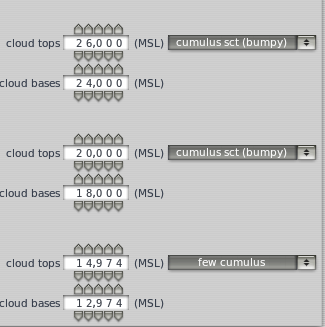 In the three altitude layers, I set a small amount, fewer, and fewer cumulus clouds respectively,
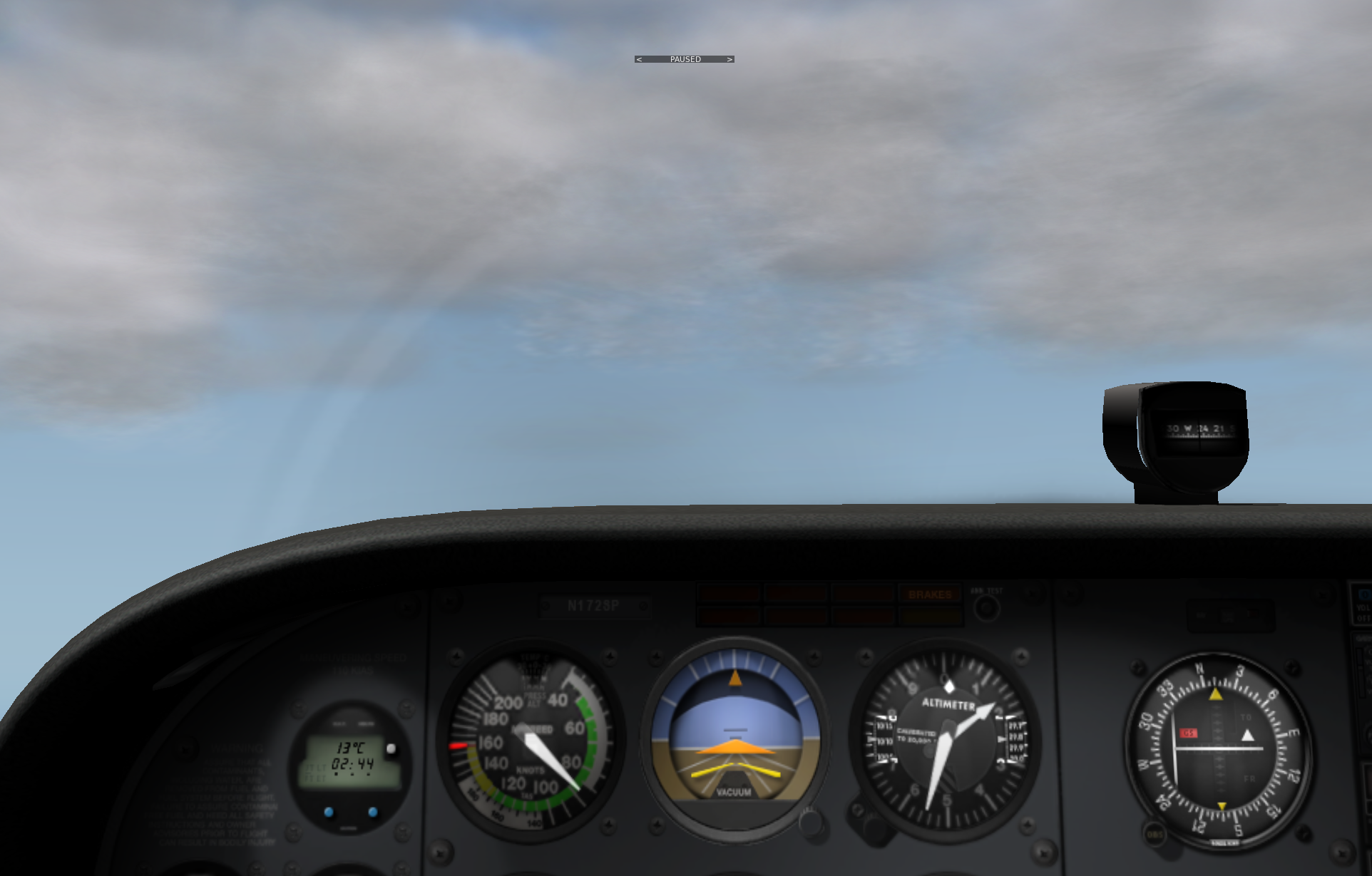
but from the cockpit, the clouds still feel quite gloomy.
In the three altitude layers, I set a small amount, fewer, and fewer cumulus clouds respectively,
but from the cockpit, the clouds still feel quite gloomy.
-
Title: X-Plane Display Rendering Settings
X-Plane has powerful display capabilities. If you are pursuing various spectacular scenery and beautiful skies, the hardware requirements are quite high; you definitely need to buy a high-end graphics card with a large amount of video memory. However, since I mainly pursue the realism of flight, I have turned off many settings. Below are my personal settings for your reference (click to enlarge).
-thumb-660x500.png) You can see that basically none of the special effects settings are checked, and the number of objects on the ground is also set to very low. This is mainly to ensure smooth flight movements.
You can see that basically none of the special effects settings are checked, and the number of objects on the ground is also set to very low. This is mainly to ensure smooth flight movements. -
Title: A Brief Discussion on the Use of Mixture Control in Small Aircraft
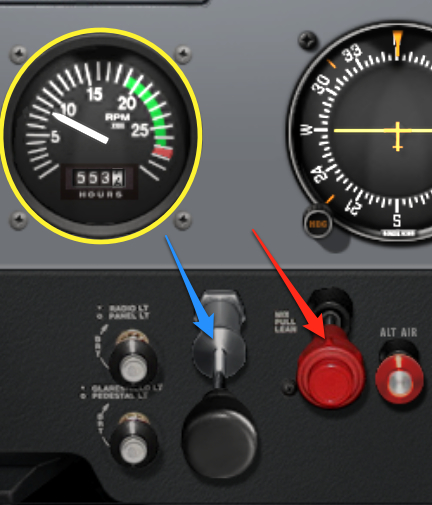
As altitude increases, the air becomes thinner, reducing the amount of air entering the engine. If the amount of fuel delivered remains constant, the fuel mixture becomes too rich, which not only wastes fuel but also reduces engine output. This is where the Mixture Control valve comes in; it allows pilots to control the air-to-fuel ratio, giving you more precise control over the engine. This magical valve is the red handle indicated by the red arrow in the image below (Cessna 172SP in X-Plane 10).
-
Title: Summary of X-Plane 10/11 Flight Route Query and Setup Methods
User “CALL..ME..V!” asked about setting up flight routes when creating a flight plan in X-Plane. Here is a brief summary; I hope it helps.
0 How to submit a flight plan? Please refer to How to use ATC (Air Traffic Control) 1 The Issue X-Plane has built-in information for a large number of airports, Runways, and radio navigation stations (DME, VOR, NDB, ILS), and there is plenty of Waypoint information as well. However, the coverage of Waypoints used by general airlines is not very high. Therefore, if you input a route found online into the X-Plane FMC, it will likely result in an error.
-
Title: x-plane 10 Small Aircraft Autopilot Basics
X-Plane 11 is out now, please check the latest coverage Installing and Trying the X-Plane 11 Free Demo!
The autopilot feature in X-Plane is simple to use and highly recommended. Here is a brief summary of how to use it. Today, I will start by introducing the usage for small aircraft, using the Cessna 172 as an example. The images might be a bit small; don’t forget to click on them to see the full-size version.
-
How to Make the Sky Bluer in X-Plane 10? Sky Color Settings
Recently, when running X-Plane 10, I felt the sky color was always gloomy and gray, which was quite uncomfortable. After all, soaring through the air feels best amidst blue skies and white clouds, right? So, I checked the settings and found it’s actually quite simple to modify it back to a blue sky. Below, I will introduce the method.
First, open the Special menu and select the Show Sky Colors option.
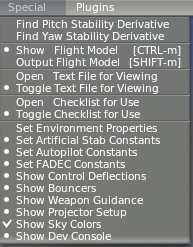
-
Title: Real Weather Update Issues
Suddenly noticed that real-world weather wouldn’t update. For flight sim players pursuing realism, this is a major issue. So I checked the forums on the official website, found a workaround that works, and jotted it down immediately.
Actually, the method is very simple, just add one line to the hosts file. 203.167.141.155 weather.noaa.gov Originally, the real-time weather data is located at this URL from the National Oceanic and Atmospheric Administration (NOAA), http://weather.noaa.gov/pub/data/observations/metar/cycles/ but for some reason, the X-Plane program just can’t retrieve it via DNS. So after adding the IP directly to the hosts file, it skips the DNS step, and the data retrieval is successful.
-
An Interview with Ben Supnik, X-Plane 10 Graphics Engine Developer
It’s been over a month, and between business trips and a busy work schedule, I’ve barely had any time to practice with X-Plane, and this blog hasn’t been updated for a long time. My apologies.
Today, I came across an interview on aerosoft.com with Ben Supnik, the graphics engine developer for X-Plane 10. http://asn.aerosoft.com/?page_id=5878 I’ve selected a few interesting topics from the interview to share with everyone.
-
Continuing liveatc.net Listening Practice
A few days ago, I introduced liveatc.net. Listening in real-time indeed has a great sense of presence, but the speech rate is too fast. After trying for a few days, I felt it was still very hard to understand. Is there a better method?
I continued to search and found that liveatc.net has a very useful archive function. Past ATC recordings can be downloaded. This is very useful. For example, the archive page for Kennedy Airport, http://www.liveatc.net/archive.php?m=kjfk_twr After selecting the date and time, you can enter the MP3 playback and download page. Very convenient, right?
-
An Interview Video with Austin Meyer
I found a precious interview video with Austin Meyer (the author of X-Plane) on YouTube, where he personally demonstrates X-Plane 10, providing a detailed commentary while flying; this is extremely convincing. If you are not blocked by the firewall, you must watch it.
-
X-Plane 10 747-400 Takeoff and Landing, Air Traffic Control ATC, Instrument Flight Rules IFR Practice Beginner Full Tutorial
X-Plane 11 is out now, please check the latest coverage X-Plane 11 Information Summary!
Today, we will use the Boeing 747-400 to perform an Instrument Flight Rules (IFR) flight from Tokyo Haneda Airport (RJTT) to Hokkaido New Chitose Airport (RJCC). This will help you better understand the ATC functions in X-Plane 10 and the usage of the Boeing 747-400’s 3D cockpit. This article is adapted from the free support documentation provided by the Japanese software dealer MGJ SHOP. All graphics in this article were created by me.
-
ATC Practice Methods--liveatc.net
With X-Plane 10 significantly enhancing its ATC functionality, I’ve developed quite an interest in air traffic control. I had some basic knowledge before, but it was just scratching the surface. So, I looked up some information online and found a great website worth recommending: http://www.liveatc.net/
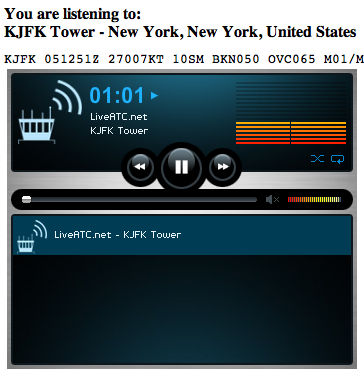
As the domain name suggests, this is a website for listening to live ATC. Search for the airport you want to monitor (mainly in the US and Canada), select the feed you want to listen to, such as Tower or Ground, click its “Listen” button, and a new window will pop up. Put on your headphones and listen carefully to the live feed.
-
Title: Precautions for Using ATC Functions
X-Plane 11 is now available. Please check the latest article Installing X-Plane 11 Free Demo and First Handson!
-
Be sure to set the frequency correctly when communicating with ATC.
-
Be sure to reply as soon as possible.
-
For the Flight Plan route, use the ICAO format. Use VOR/NDB/FIX names or coordinates for each navigation node (use dd degrees mm minutes for latitude and longitude, in “ddmmNdddmmE” format).
-
Currently, the system does not support SID (Standard Instrument Departure), so you will constantly receive “You are off course” warnings. You can ignore this warning for now, or input detailed node information in the flight plan. Additionally, the system’s support for flight plan routes is not very smart; if the aircraft is not flying on a straight line between the takeoff and landing points, the system will still issue a “You are off course” warning.
-
-
Title: Regarding Time Adjustment
During long flights, especially after engaging the autopilot and entering cruise, things can get a bit quiet. Do you often find yourself gazing at the scenery, glancing at the instruments, or even dozing off to pass the time? Fortunately, since this is a flight simulator, there is a much more convenient way to pass the time: the time acceleration feature. Additionally, it is said that flight simulators certified by the Federal Aviation Administration (FAA) must also possess this functionality.
-
Title: X-Plane 10 Stunning 747-400 Internal View
X-Plane 11 is out now. Please check out the latest article: Installing and Trying the X-Plane 11 Free Demo!
Welcome to 2012! I wish everyone a happy New Year. May you continuously improve your flying skills and better enjoy the various pleasures that flight simulation brings us in the coming year.
I basically stick to light propeller aircraft in X-Plane 10, but occasionally flying a large airliner still brings many surprises. Although these big birds are difficult to fly, the modeling is indeed very exquisite; just looking at the interior space is a pleasure in itself. Let’s take a look at the interior views of the 747-400, which is the default aircraft in X-Plane 10. These images are screenshots I took myself.
-
# How to Use ATC Air Traffic Control
X-Plane 11 is out now! Check out the latest coverage for the X-Plane 11 Free Demo Installation and First Look!
Overview
X-Plane 10’s Air Traffic Control (ATC) system can powerfully simulate the busy communications of real-world aviation, or it can quietly accompany you on a solo flight. AI aircraft absolutely obey ATC commands, so if you don’t want to contact ATC, these aircraft will simply ignore your existence and move freely. ATC sound settings are configured in the Sound section of the Settings menu.
-
Title: New Features and Controls in X-Plane 10
X-Plane 11 is already out, please check the X-Plane 11 Chinese Tutorial summarized on this site! X-Plane 11 Keyboard Instructions
New Default Keyboard Shortcuts
W: Forward view with instrument panel SHIFT W: Forward view with HUD CONTROL W: Forward view without instruments
SHIFT 1: View from moving point, same as ! key SHIFT 2: View from set position, same as @ key SHIFT 3: View from Runway, same as # key SHIFT 4: Circular view around aircraft, same as $ key SHIFT 5: View from Tower, same as % key SHIFT 6: Look inside aircraft, like a camera mounted anywhere on the aircraft, use ^ key to aim camera direction, can rotate up, down, left, right to look around SHIFT 7: Track weapon view, can use &, <, > keys to switch between aircraft and various weapons SHIFT 8: Tracking view, same as * key SHIFT 9: 3D Cockpit view, can move and rotate SHIFT 0: 3D Cockpit view, can operate instruments with mouse
-
Title: X-Plane 10 Flight Simulation Software Introduction, Acquisition, Installation, and Flight Control Beginner's Guide Tutorial
X-Plane 11 has been released. Please check out the latest articles: Installing and Trying the X-Plane 11 Free Demo and X-Plane Chinese Tutorial!
What is X-Plane 10?
According to the official description, X-Plane is the world’s most comprehensive and powerful flight simulation software for personal computers, offering the most realistic flight model experience. X-Plane is not a game; it has no levels or puzzles for you to conquer. With this software, you only do one thing: experience flight piloting. This is because X-Plane is a software tool capable of simulating and predicting aircraft handling characteristics with incredible precision.
 X-Plane 10 is the latest version of this flight simulation software. It includes 8 DVDs and provides global terrain maps.