X-Plane 10 Tutorials
-
Let's Play with Boeing 777 Cold & Dark Start
Last time, a netizen asked about cold engine starting, and I remembered I had some screenshots from when I was testing the VMAX-777-Pro Boeing 777 Worldliner Professional. So, I decided to put together a quick guide based on the 777 Pilot’s Handbook included with the addon. This manual is authorized by Boeing to the software developer, so its authority is beyond doubt.
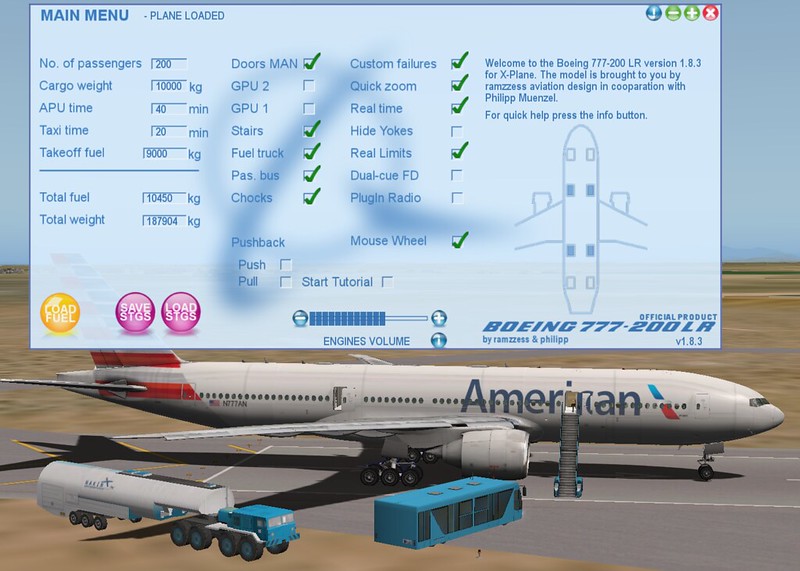
First, let’s look at the main menu of this 777 addon. This is where fueling is done.
-
Garmin Pilot now supports X-Plane 10
Garmin Pilot is a renowned iPad app for pilots, offering features such as charts, flight planning, terrain maps, PFD, and ADS-B receiver connectivity. The latest version 8.1, released this month, began supporting X-Plane 10, allowing you to practice using Garmin Pilot at home. Therefore, I installed it immediately and briefly learned how to use it.
The setting in X-Plane is located within Net Connections.
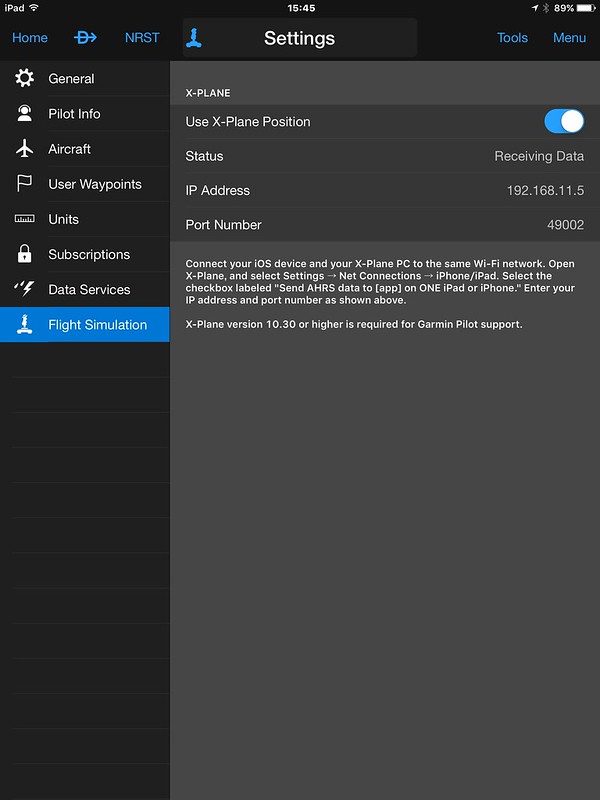
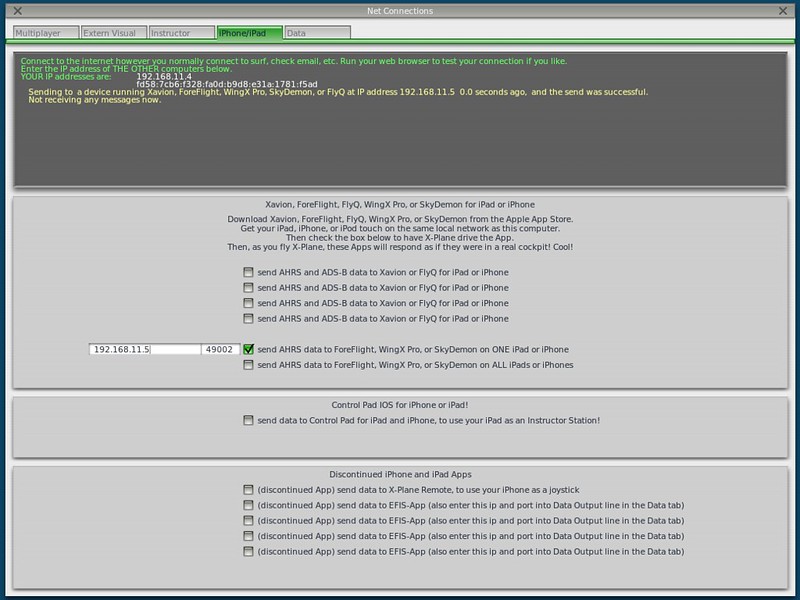 The setting in the app is as follows; simply turn on “Use X-Plane Position”. It is very simple.
-
Inexpensive X-Plane External Displays
A few years ago, I introduced a method for X-Plane multi-monitor display settings, which involved connecting multiple computers via a local area network. However, having to boot up two machines every time is quite a hassle, so I generally don’t use this method.
Later, I thought, wouldn’t it be more convenient to connect an iPad to a Mac and use the iPad as an instrument display?
Generally speaking, when using an additional display, the free plugin XHSI is the most common choice; it is very convenient for displaying glass cockpit instruments like the ND. However, since I usually fly small propeller aircraft, I don’t really need such advanced instruments, so there was no need to spend money on a new monitor.
-
Hardware Setup Notes on 10.40
After upgrading to 10.40RC1, I noticed that quite a few settings have changed, so here is a re-summary. The equipment used includes: Saitek Pro Flight Yoke Saitek Three Level Pro Throttle Quadrant Saitek Pro Flight Rudder Pedal Saitek Pro Flight Cessna Trim Wheel Saitek Pro Flight Radio Panel Saitek Pro Flight TPM System Saitek Pro Flight Switch Panel PZ55
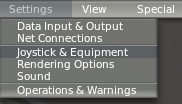
The configuration method is in the Settings menu.
1 Saitek Pro Flight Yoke Elevator pitch control / pitch: Y-axis telescopic axis moving forward and backward Aileron roll control / roll: X-axis telescopic axis moving left and right Move view up, down, left, right / general/tilt up, tilt down, pan left, pan right: Left 8-way hat switch View zoom / general/zoom in, zoom out: Left A1/A2 buttons Aileron trim / flight_controls/Aileron trim left, Aileron trim right: Right B1/B2 buttons Nav1 OBS / radios/Obs 1 up, Obs 1 down: Right C1/C2 buttons Brakes / flight_controls/Toggle brakes regular effort: Right red D button View switching (2D fwd, 3D fwd, chase mode) / view/fwd with panel, 3D cockpit cmd-look, chase: Mode switch roller (Left, Center, Right) NAV2 HSI / raidos/OBS 2 down: Left red E button
-
Free Airport Addon for Sun 'n Fun Airshow
Second only to EAA AirVenture, the second-largest general aviation show and fly-in in the US, “Sun ’n Fun”, is held every April at Lakeland Airport (KLAL) in Florida, with thousands of planes attending and viewing each time!
Although I have never been to this mecca for aviation enthusiasts, experiencing it in the world of flight simulation is a nice alternative. In a timely manner, the XP official website has released a free scenery of Lakeland Airport (KLAL) developed by Jan Vogel. This is definitely a must-install.
-
X-Plane 10 The Official Guide User Guide
Calling all X-Plane 10 fans! PC Pilot magazine’s Official Guide is now on sale (for less than $10), so don’t miss out if you’re interested.
The PC Pilot Official X-Plane guide goes on sale today! Be sure to order it here! https://t.co/tXfKEC3NIW pic.twitter.com/i5id4MSwrh
— X-Plane (@XPlaneOfficial) October 30, 2014The contents of the book are as follows: Produced by the editorial team behind PC Pilot magazine, X-Plane 10 - The Official Guide, is a 100-page publication giving a comprehensive profile of Laminar Research’s advanced flight simulator and the aircraft, scenery and add-ons, which make it one of the most significant developments in flight simulation history.
-
alpilotx.net Releases Japan Scenery
A few months ago, I recommended the AlpilotX.net terrain mesh addon. Yesterday, I noticed they released Japan HD Scenery. This is a must-have! The file date is July 23, 2014, offering a brand-new scenery.
Here are the installation steps. First, download all the files from the URL above. Note that the total file size is nearly 2GB, so it will take some time.
Next, install the Treelines files. Unzip
Treelines_Japan_v2.zipand copy the entirezzz_Treelines_Japan_v2directory to the “Custom Scenery” folder. -
X-Plane Flight Simulation FAQ7: Flight Planning
X-Plane 11 is out now. Please check the latest articles: X-Plane 11 Free Demo Installation and First Look and X-Plane Chinese Tutorial!
Q: How do I execute a flight mission in X-Plane? Q: X-Plane 10 flight plan files Q: Which folder holds the FMC in X-Plane 10? Q: x-plane flight plan Q: x_plane flight plan route setting Q: How to navigate in x-plane? Q: X-Plane 10 Waypoint settings Q: x-plane10 route input Q: How to set a flight plan to reach a Destination in Flight Simulator 10? Q: X-Plane10 Boeing 747 navigation settings Q: How to set an Airway in x plane A: This site’s X-Plane 10 747-400 Takeoff & Landing, ATC, IFR Practice Full Tutorial provides a case study of a Boeing 747 flying from Tokyo to Hokkaido. First, please refer to this tutorial to familiarize yourself with how to execute a flight plan in X-Plane. For how to create a new flight plan, you can refer to the following articles on this site. Summary of x-plane flight plan route setting methods Introduction to a free flight plan management website Haneda - Hong Kong Route File RJTT_VHHH.fms Manually adding navigation information The most powerful route query tool simbrief.com How to create a VFR flight plan Official route query method published by the Air Traffic Management Bureau of the Civil Aviation Administration China Aeronautical Information Publication AIP China
-
X-Plane Flight Simulation Software FAQ 6 Autopilot
X-Plane 11 has been released. Please check the latest articles: Installing and Trying the X-Plane 11 Free Demo and X-Plane Chinese Tutorial!
Q: How to engage the autopilot on the Cessna 172 in X-Plane 10? Q: Cessna 172 Autopilot in xplane 10 Q: How to adjust the N71FS ILS flight instruments A: Please refer to the following blog posts on this site: Introduction to Small Aircraft Autopilot and ILS ILS (Instrument Landing System) Landing Introduction to VOR and NDB Instrument Navigation for Small Aircraft
-
X-Plane Flight Simulation Software FAQ 5 - Plugins
X-Plane 11 is out now. Please check the latest updates at X-Plane 11 Free Demo Installation and First Look and X-Plane Chinese Tutorial!
Q: Why is my X-Plane installation still bare except for the Runway and grass after installing all 8 discs? A: X-Plane does not include airport Scenery by default. You can install a Plugin/Addon for 25,000 airport sceneries, which will make most airports look much better.
Q: How to install X-Plane Scenery plugins? Q: Which folder should I install the X-PLANE 10 map into? A: Search for and download Plugin/Addon packages from the official website. There are over 3,700 scenery packages available there. Note: Please register an account before use. After extracting the files, copy the plugin directory to the
Custom Sceneryfolder within your main X-Plane directory. After installing the Scenery, you also need to add the plugin directory to the configuration filescenery_packs.ini, for example: SCENERY_PACK Custom Scenery/ruscenery/ SCENERY_PACK Custom Scenery/ZSSS_Hongqiao/ etc. This site also introduces some excellent free Scenery. For details, please see the directory page. -
X-Plane Flight Simulator FAQ4 Basic Flight
X-Plane 11 is now available. Please check the latest reports: Installing and Trying the X-Plane 11 Free Demo and X-Plane Chinese Tutorial!
Q: How do you fly the first level in x-plane? Q: x-plane 10 Missions A: X-Plane is a flight simulator software for home use. Compared to Microsoft’s Flight Simulator game FSX, X-Plane is less entertaining; it has no game levels, no game missions, and purely focuses on flying.
Q: Are small propeller planes easy to fly? A: It’s really simple, provided you have some aviation knowledge. If you don’t understand these basics, it is recommended to learn them. Installing or waiting for the X-Plane disc to arrive takes time, so I recommend you read this excellent introductory book while you wait--Rod Machado’s Ground School.
-
X-Plane Flight Simulator FAQ 3: Basic Operations
X-Plane 11 is now available. Please check the latest coverage: Installing and Trying the X-Plane 11 Free Demo and X-Plane Chinese Tutorial!
Q: How do I view the aircraft’s flight route (route) in X-Plane? Q: How do I see the map of my current location? Q: How do I find nearby airports? Q: How do I find nearby navigation facilities? A: Just open the map. Select Local Map from the Location menu. If you are using hardware buttons, map/show_current in Buttons: Adv within Joystick & Equipment. Keyboard shortcuts include Ctrl i, Ctrl r, Ctrl t, Ctrl w, etc.
-
X-Plane Flight Simulator FAQ2: Settings
X-Plane 11 is out now. Please check the latest coverage: Installing and Trying the X-Plane 11 Free Demo and X-Plane Chinese Tutorial!
Q: xplane10 setup method Q: Where are the x-plane settings? Q: How to open the x-plane menu bar Q: x-plane has no menu A: Settings always start from the menu, but you really can’t see the menu when XP starts. However, just move your mouse to the very top of the screen, and the menu will automatically pop up.
-
How to create X-Plane flight animation video on Mac
First, you need to download a middleware called Soundflower. This free software allows you to control audio and route it freely between various applications. Soundflower system extension for interapplication audio routing. In other words, it allows you to pass audio as input to an app, or read audio from an app, simply by routing it through Soundflower.
You can download Soundflower from here. The latest version is Soundflower-1.6.6b.dmg. After installation, a Soundflower subdirectory will appear in your Applications folder. The executable file inside is called Soundflowerbed.app. Once you double-click to launch it, the Soundflower icon will appear in the top status bar of Mac OS, as shown below.

-
X-Plane Flight Simulation Software FAQ Part 1: Installation
X-Plane 11 is now available! Please check out the latest reports: Installing and trying the X-Plane 11 free demo and X-Plane Chinese Tutorials!
Q: What is the difference between X-Plane 10 and Microsoft’s FSX? Which is more fun? Which is more realistic? A: Overall, FSX is a flight game with flight missions and rich Air Traffic Control features, making it slightly more entertainment-oriented. X-Plane can be called a home flight simulator, with very low entertainment value, purely focused on flight. Therefore, its support for terrain, roads, railways, and aerodynamic models is slightly better.
-
X-Plane Flight Simulation Software FAQ Plan
Recently, due to the impact of the disappearance of Malaysia Airlines Flight 370, the flight simulation equipment used by that flight’s captain has become a hot topic. I checked the traffic to this site via search engines over the past month and found that many keywords were about basic usage questions regarding X-Plane.
To help more flight simulation enthusiasts learn to use X-Plane better, I plan to summarize several FAQ posts, divided into Installation, Settings, Basic Operations, Basic Flight, Plugins/Addons, Autopilot, and Flight Planning. These will be released one after another in the coming days. Please stay tuned.
-
Introduction to Setting Weather Conditions in X-Plane 10
X-Plane 10 features powerful weather simulation capabilities. Not only can it download the latest real-world weather from the internet, but it also allows for the manual configuration of wind, clouds, visibility, wind shear, thermal updrafts, runway conditions, and more. Below is a brief guide on how to use these features.
To configure these settings, click on the Environment / Weather menu to open the settings page,
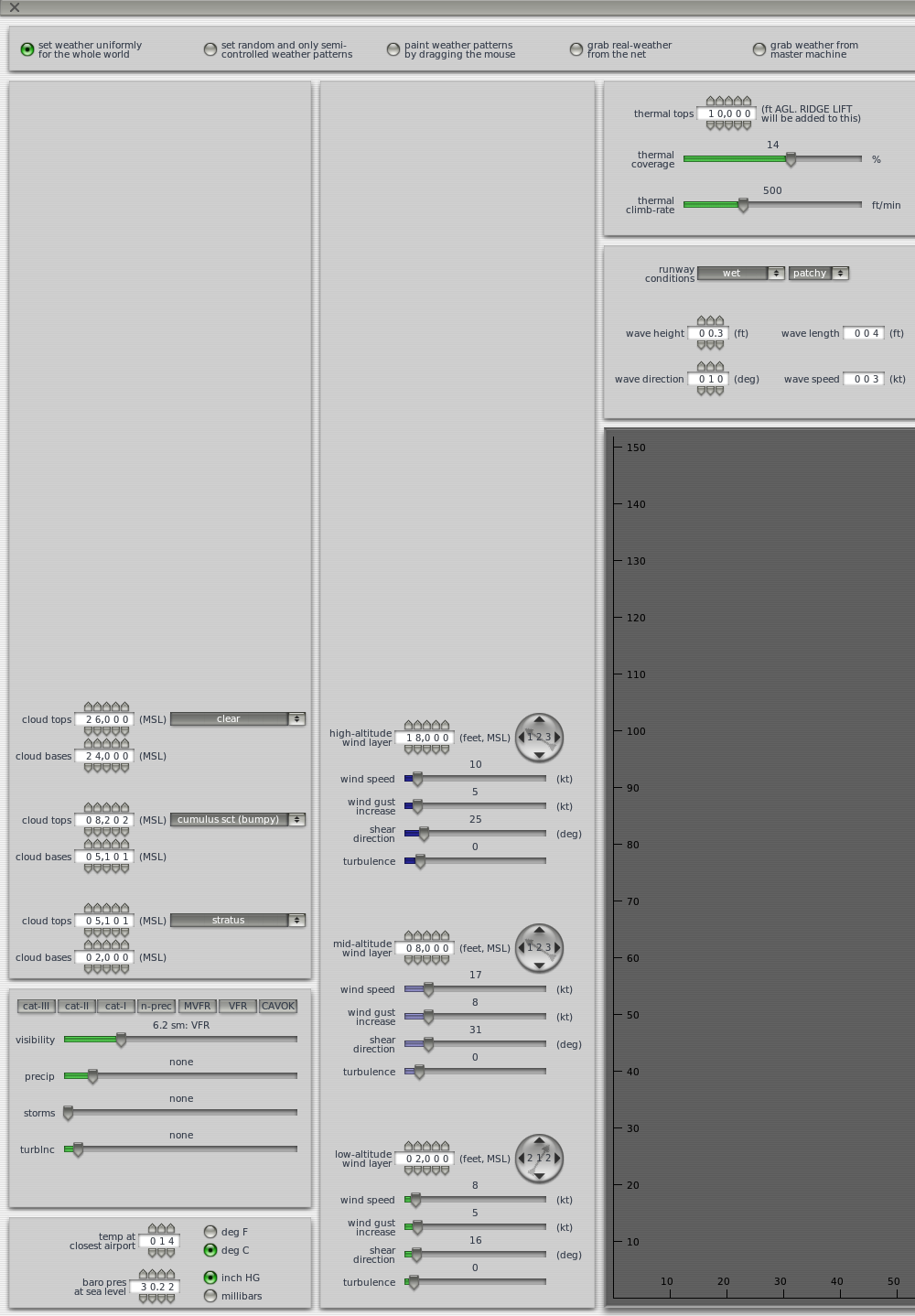 as shown in the image above.
 -
X-Plane Multi-Monitor Display Configuration Guide
X-Plane natively supports multi-screen display functionality. If you could have four monitors displaying the left, center, and right cockpit windows respectively, and dedicate a fifth monitor specifically for instruments, it would greatly enhance the fun of flight simulation. Unfortunately, I don’t have that many monitors; mainly, even if I could afford them, I have no place to put them. Also, driving 4 monitors with a single computer requires a very powerful hardware environment. Since iMacs do not support expandable graphics cards, the frame rate wouldn’t be smooth even with multiple screens. Therefore, here is a guide on setting up Multi-Monitor Display using Multiple Computers.
-
Rewriting the X-Plane 10 Beginner's Guide
The article “X-Plane 10简介 入手方法 安装方法 飞行控制入门攻略 教程” was written a year ago. I found that some of the instructions were a bit outdated and differ from the latest version in some places. So today, I spent half a day rewriting it. The main updates cover the installation method and a detailed list of keyboard controls. I hope this helps everyone.
End
-
Recommended Article Introducing X-Plane
There aren’t many good articles about X-Plane online, but today I found a pretty decent review. It covers every aspect of X-Plane quite comprehensively, so I’m recommending it here.