Flight Control
-
Practice Landing Using X-Plane's 3D Flight Path
I see people frequently asking how to practice ILS approaches, how to align with the navigation station, and questions about the glideslope. Actually, X-Plane has prepared a very thoughtful tool for players——the 3D Flight Path. As long as you enable this feature, ILS approach practice becomes very simple.
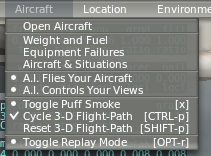
The usage is simple. In X-Plane 10, select “Cycle 3-D Flight-Path” from the Aircraft menu. In X-Plane 11, select X-Plane Menu –> View –> “Cycle 3-D Flight Path”.
 Then tune the NAV1 frequency to the ILS frequency of the Runway.
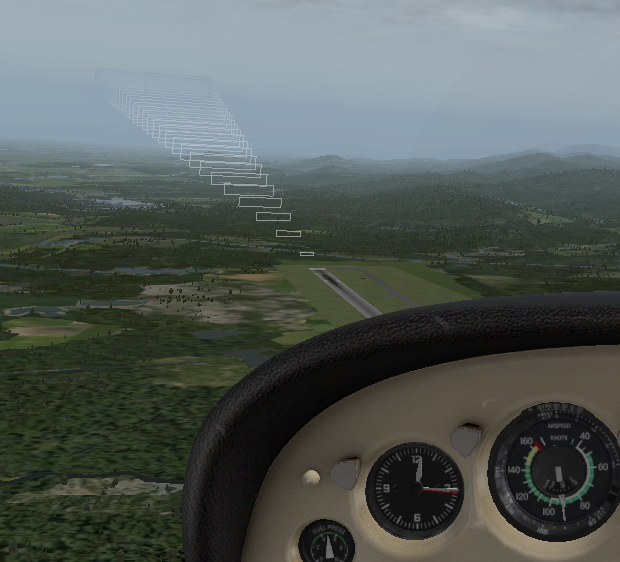
Looking from the other side of the Runway, X-Plane draws a schematic of the descent path in the air based on the ILS signal.
Then tune the NAV1 frequency to the ILS frequency of the Runway.
Looking from the other side of the Runway, X-Plane draws a schematic of the descent path in the air based on the ILS signal.
-
Five-Star Free Flight Simulation Training Website Aviator90
Today I discovered a flight simulation training website called Aviator90. It provides a vast amount of free training content and is likely one of the best online resources available. Highly recommended!!
Through simple, easy-to-understand animations, this website covers everything from the basics of flight and piloting techniques to flight planning and cross-country flights. I am truly impressed. Of course, the content is currently entirely in English, but I look forward to the release of Chinese and Japanese versions in the future.
-
Helicopter Flight Tutorial in Flight Simulator
Note: This article uses U.S.-manufactured single-rotor helicopters as examples, meaning the rotor rotates counter-clockwise. European-manufactured aircraft generally rotate clockwise; to counteract the rotational torque, the operation of the anti-torque pedals (tail rotor) is the opposite of U.S. aircraft.
To practice helicopter flying, I recently bought a joystick CH Products Fighterstick USB,

I also bought a book on helicopter flying basics to cram up on theory. After over a dozen hours of practice, I’ve finally made some progress. Let me explain it step by step.
-
x-plane 10 Small Aircraft VOR and NDB Instrument Navigation Introduction
X-Plane 11 is now available! Please check out the latest article: Installing and Trying the X-Plane 11 Free Demo!
Let’s take the Cessna 172 as an example to introduce how to use VOR and NDB navigation in X-Plane.
First, let’s look at the relatively simple NDB and ADF. The ADF (Automatic Direction Finder) equipped on the aircraft is a simple navigation device. It indicates the direction of the ground-based NDB (Non-Directional Beacon) station. An NDB is a simple radio transmitter. Since the NDB signal contains bearing data, the ADF automatically finds the direction and displays the Heading from the nose of the aircraft to the NDB station on the instrument.