X-Plane Flight Simulator FAQ2: Settings
X-Plane 11 is out now. Please check the latest coverage: Installing and Trying the X-Plane 11 Free Demo and X-Plane Chinese Tutorial!
Q: xplane10 setup method Q: Where are the x-plane settings? Q: How to open the x-plane menu bar Q: x-plane has no menu A: Settings always start from the menu, but you really can’t see the menu when XP starts. However, just move your mouse to the very top of the screen, and the menu will automatically pop up.
Q: What peripherals does x-plane10 need? What peripherals are fun for x-plane10? Can x plane 10 be played with a keyboard? A: You do need peripherals. Although you can fly the plane in XP using just a keyboard or mouse, our goal is ultimately flight simulation, so creating a more realistic flight environment will definitely increase realism. I suggest buying a joystick (yoke) at the very least. Once you have a joystick, if possible, be sure to buy rudder pedals as well. Below is an introduction to the equipment I use for your reference: Peripheral List
Q: Why do you recommend using rudder pedals? A: Please refer to this article: A Brief Discussion on Propeller Wash and P-Factor Effects in Small Single-Engine Propeller Aircraft — Why Does My Plane Always Veer Left?
Q: How to configure the x plane 10 joystick?
A: It was introduced in the “Getting Started & Installation Guide” on this site: ,
which can be found in Settings / Joystick & Equipment / Axis menu.
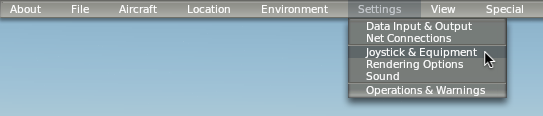 The specific settings screen is this:
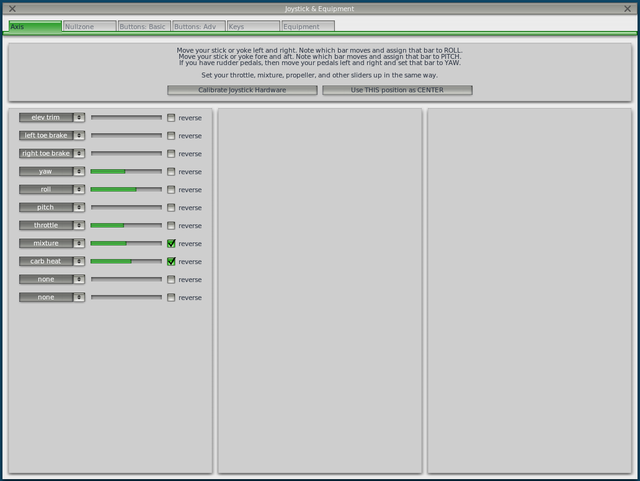 Roll and pitch, which change the flight Attitude, are definitely required. If you have rudder pedals, add yaw and the left toe brake and right toe brake.
Thrust (Throttle) is throttle, and Fuel Mixture Control is mixture.
For details, please refer to Memo on Hardware Device Settings.
Roll and pitch, which change the flight Attitude, are definitely required. If you have rudder pedals, add yaw and the left toe brake and right toe brake.
Thrust (Throttle) is throttle, and Fuel Mixture Control is mixture.
For details, please refer to Memo on Hardware Device Settings.
Q: Where can I find all the joystick setting names? A: Resources/plugins/Commands.txt and DataRefs.txt contain all setting names and descriptions, for example: sim/operation/toggle_yoke Toggle yoke visibility
sim/cockpit2/EFIS/map_mode int y enum Map mode. 0=approach, 1=vor,2=map,3=nav,4=plan sim/cockpit2/EFIS/map_mode_is_HSI int y boolean Map is in HSI mode, 0 or 1. sim/cockpit2/EFIS/map_range int y enum Map range, 1->6, where 6 is the longest range.
Q: How to set weather in x-plane? How to change default weather settings? A: Please refer to this dedicated article on simulated weather settings on this site.
Q: xplane 10 reset keyboard Q: x-plane 10 keys Q: x-plane 10 keyboard operation A: It was introduced in the “Getting Started & Installation Guide” on this site: , which can be found in Settings / Joystick & Equipment / Keys menu.
Q: x-plane 10 resolution Q: How to modify resolution in X plane10 Q: How to adjust resolution in X plane10 Q: X PLANE 10 rendering settings Q: x-plane display settings A: Please refer to the description of X-Plane Display Rendering Settings Rendering Options on this site.
Q: How to zoom in screen in x-plane10? A: Refer to the instructions above, open the Rendering Options screen, and find the “lateral field of view” option. This option sets the size of the forward field of view, such as 60 degrees, 80 degrees, etc. Additionally, you can use the field of view zoom buttons on your hardware device (general/zoom_in, zoom_out), or use the shortcut keys on the numeric keypad: + / - to zoom in and out.
Q: How to set x-plane to fullscreen? Q: How to set windowed x-plane to fullscreen? A: In the Settings menu, select Rendering Options, find “run full-screen at this resolution” in the top left corner, and check it.
Q: x plane multiple screens Q: xplane10 dual screen setup Q: x-plane10 multi-screen display settings Q: How to display multi-screen in x-plane Q: x plane 10 multi-screen extension Q: xplane split screen display Q: x-plane multiple screens A: Please refer to the instructions on x-plane multi-screen display settings on this site.
Q: x plane change night to day
Q: Why is my X-PLANE at night when I enter?
Q: How to set night flight mode in X-PLANE 10
A: In the Environment Menu, select the Date & Time option.
 Change the time to the desired time period for your flight.
Q: How to adjust communication frequency in x-plane? A: This question is too general; it depends on what aircraft airframe you are flying. Look carefully on the screen for the COM1, COM2, NAV1, NAV2 equipment. However, there are also some shortcut keys, such as: CTRL 9 NAV1 standby frequency toggle CTRL 0 NAV2 standby frequency toggle CTRL - COM1 standby frequency toggle CTRL = COM2 standby frequency toggle which can be used.
Q: X-PLANE 10 jet throttle A: The shortcut keys are F1 to decrease throttle, F2 to increase throttle. If you are using hardware like the Saitek Three Level Pro Throttle Quadrant, simply set it under “throttle” in Settings / Joystick & Equipment / Axis.
Q: How to adjust x-plane 10 cockpit view Q: x-plane interface is 2D Q: X-plane10 3D pilot view issue Q: x plane 10 switch view A: Commonly used views are the 2D and 3D cockpits, and sometimes the external view. Their shortcut keys are: CTRL O Show 3D cockpit SHIFT W Forward view, no HUD SHIFT 4 Side view. If using hardware, please use these three: View toggle forward 2D, forward 3D, chase mode / view/forward_with_panel, 3d_cockpit_cmnd_look, chase. For details, please refer to Hardware Device Settings Memo.
Q: How to view recordings in x-plane? A: The replay function is in replay/replay_toggle; just use the shortcut key “,” to toggle it.
Q: What to do if x-plane10 aircraft are stacked together? How to change the number of system AI aircraft? A: This is a system bug; just ignore it. If it bothers you, you can change the number of AI aircraft. Open the Aircraft menu, select Aircraft and Situations, open Other Aircraft Selection, and change the number of aircraft to 0.
Q: How to turn off the blackout (tunnel vision) under high G-load?
A: In the display settings, turn off “dim under high G-load or hypoxia”.
-thumb-660x500.png)
Q: What if the airport ground in x-plane is uneven? A: In the display settings, turn off “Runway follow terrain”.
Q: Is there a Chinese version of x-plane? A: There is no official version, but there are some methods provided by individuals online, such as How to localize the X-Plane 10 User Manual and X-Plane 10 Aircraft Manufacturer Manuals, X-Plane 11 Localization Patch 1.0 Instructions and Localization Patch 1.0. You can give them a try.
End