x-plane 10 Small Aircraft VOR and NDB Instrument Navigation Introduction
X-Plane 11 is now available! Please check out the latest article: Installing and Trying the X-Plane 11 Free Demo!
Let’s take the Cessna 172 as an example to introduce how to use VOR and NDB navigation in X-Plane.
First, let’s look at the relatively simple NDB and ADF. The ADF (Automatic Direction Finder) equipped on the aircraft is a simple navigation device. It indicates the direction of the ground-based NDB (Non-Directional Beacon) station. An NDB is a simple radio transmitter. Since the NDB signal contains bearing data, the ADF automatically finds the direction and displays the Heading from the nose of the aircraft to the NDB station on the instrument.
Taking the area near Beijing Capital International Airport as an example, open the map mode to see the Huairou NDB.
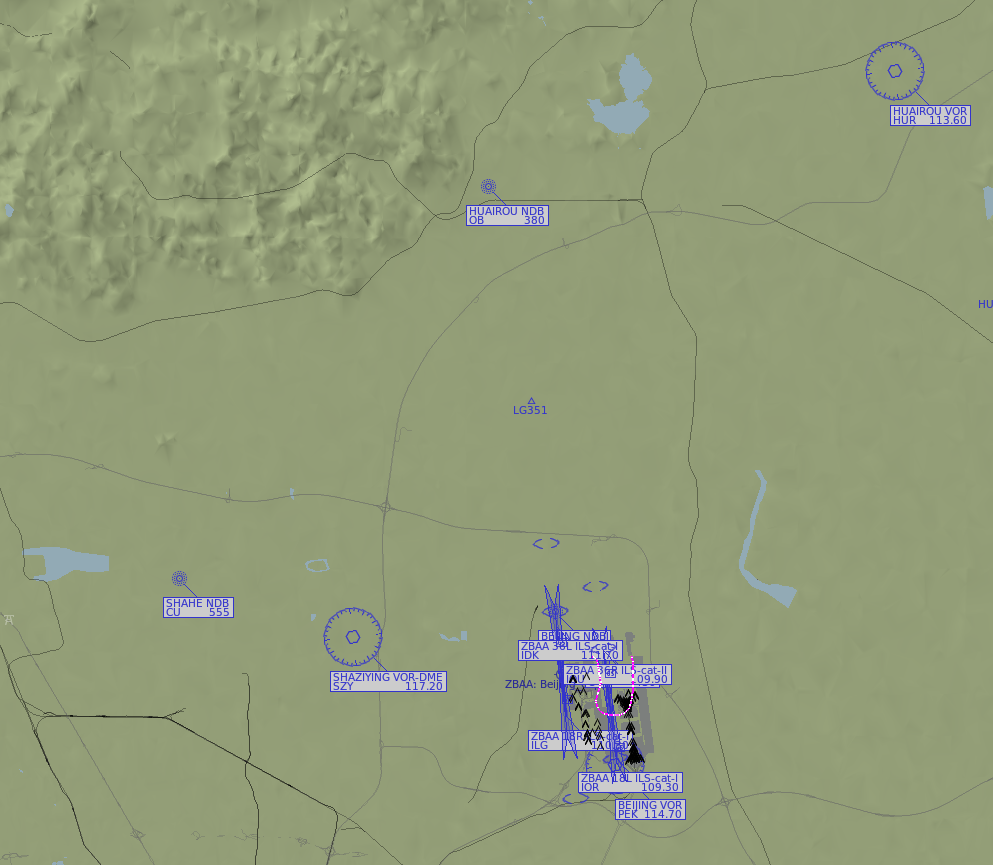 The frequency of the HUAIROU NDB is 380 kHz, so tune the frequency of the ADF receiver on the Cessna 172 to 380 as well.
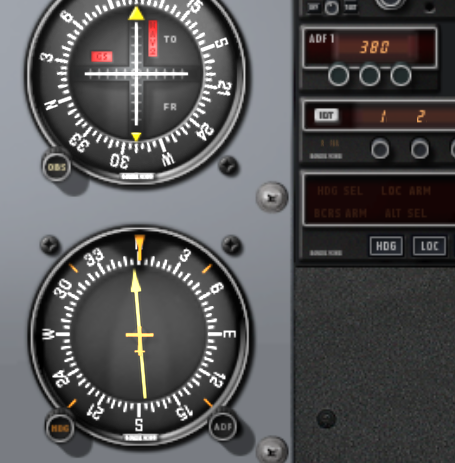 The ADF frequency display and tuning knob are in the upper right of the image above, where you can see the ADF1 label.
Once the frequency is tuned and the aircraft is within radio reception range of the NDB, you will see the ADF needle start to move (lower left of the image above).
The needle arrow points towards the location of the NDB station.
You simply need to control the aircraft to keep flying in the direction indicated by the arrow, and you will arrive over the NDB station.
The ADF frequency display and tuning knob are in the upper right of the image above, where you can see the ADF1 label.
Once the frequency is tuned and the aircraft is within radio reception range of the NDB, you will see the ADF needle start to move (lower left of the image above).
The needle arrow points towards the location of the NDB station.
You simply need to control the aircraft to keep flying in the direction indicated by the arrow, and you will arrive over the NDB station.
Regarding VOR (Very High Frequency Omni-directional Range), it operates in the Very High Frequency band of 108.00 MHz to 117.95 MHz, hence its name.
The signals transmitted by the VOR transmitter consist of two parts: one is a reference signal with a fixed phase; the phase of the other signal changes continuously with the circumferential angle around the beacon. This means that the phase of the signal transmitted at each angle is different. The signal transmitted towards 360 degrees (pointing to Magnetic North) is in phase with the reference signal (phase difference is 0), while the signal transmitted towards 180 degrees (pointing to Magnetic South) has a phase difference of 180 degrees with the reference signal.
The VOR receiver on the aircraft calculates the angle of the signal relative to the beacon based on the phase difference between the two received signals. This allows the aircraft to determine its bearing relative to the VOR station.
The frequency of the Huairou VOR near the Capital Airport is 113.6 MHz.
Therefore, tune the frequency of the navigation receiver NAV1 (there are two in total, NAV1 and NAV2) on the Cessna 172 to 113.6.
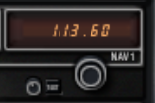 Now look at the NAV1 indicator below,
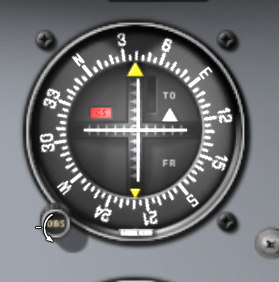 You can adjust the OBS (Omni Bearing Selector) knob
to center the Course Deviation Indicator (CDI) needle (the white vertical line) in the circular indicator.
At this point, the number pointed to by the yellow “TO” arrow on the course index indicates the bearing to the VOR station.
For example, the image above indicates that the Huairou VOR is at the 40-degree direction of the aircraft (actually slightly off-center, requiring further adjustment).
Therefore, as long as the aircraft flies along the 40-degree course, it will reach the VOR.
You can adjust the OBS (Omni Bearing Selector) knob
to center the Course Deviation Indicator (CDI) needle (the white vertical line) in the circular indicator.
At this point, the number pointed to by the yellow “TO” arrow on the course index indicates the bearing to the VOR station.
For example, the image above indicates that the Huairou VOR is at the 40-degree direction of the aircraft (actually slightly off-center, requiring further adjustment).
Therefore, as long as the aircraft flies along the 40-degree course, it will reach the VOR.
Regarding VOR navigation, it is more often used to fly along a specific radial of a VOR (for details, please refer to this explanation of navigation charts). The piloting method in this case is to adjust the OBS so that the yellow arrow of the course index points to the bearing of the radial you wish to fly. For example, to fly the 120-degree radial of the HUAIROU VOR, adjust the OBS arrow to point to 120 degrees. Since the aircraft is definitely deviating from this bearing initially, the CDI needle (white vertical needle) in the NAV1 indicator will also be off-center. Therefore, you need to constantly adjust the Heading to bring the aircraft gradually closer to this line, and then maintain the aircraft’s flight along the center.
For instance, if the CDI needle in the NAV1 indicator is to the right of the center line, it means the 120-degree radial of that VOR is to the right of the aircraft’s current position. You need to steer the aircraft to the right (Turn) to bring it as close as possible to the 120-degree radial, and at the appropriate time, turn the aircraft to a 120-degree Heading, then strive to keep the aircraft from deviating from the center line.
Flying along a radial indeed requires some flight skills, but practice makes perfect. As long as you practice more, you will gradually master it.
End