Title: x-plane 10 Small Aircraft Autopilot Basics
X-Plane 11 is out now, please check the latest coverage Installing and Trying the X-Plane 11 Free Demo!
The autopilot feature in X-Plane is simple to use and highly recommended. Here is a brief summary of how to use it. Today, I will start by introducing the usage for small aircraft, using the Cessna 172 as an example. The images might be a bit small; don’t forget to click on them to see the full-size version.
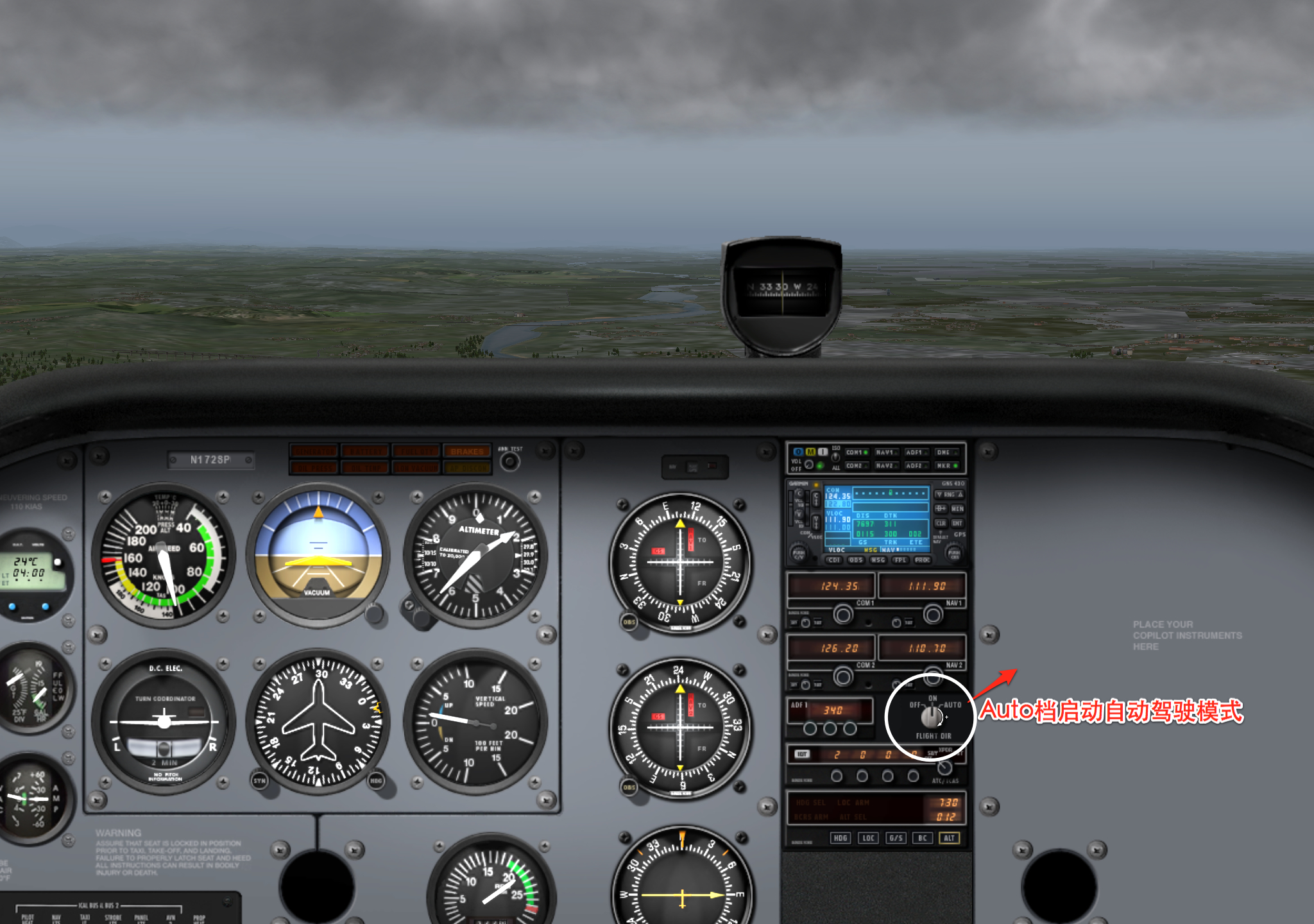
First, to engage the autopilot, see the image below. Simply turn the Flight Dir knob to the AUTO position. It’s simple, isn’t it?
Controlling the Heading is also very simple.
Press the HDG button, then adjust the heading knob so the yellow arrow points in the direction you want to go. The aircraft will automatically start to Turn.
It saves so much trouble.

The ALT button on the far right of the HDG row is for altitude lock. Once the aircraft reaches your desired altitude, press ALT to make the autopilot remember this altitude. Afterward, no matter how strong the wind is or how much Turbulence there is, you don’t need to worry about adjusting and trimming the altitude; it’s all handled automatically.
Once you’ve mastered the two moves above, automatic Cruising should be a piece of cake for you, right? The computer manages the flight attitude, so you can focus on enjoying the great scenery. Back when I used X-Plane 9, I spent a little over a month playing a crossing of the American continent. Flying from the West Coast all the way to the East Coast, flying a bit every day. After Takeoff, I would turn on the autopilot, and then just watch the local scenery.
Next, I’ll introduce something a bit more difficult: using the ILS (Instrument Landing System) to make the Cessna 172 perform a Blind Landing. Landing is the most difficult operation for beginners, right? However, with the autopilot, the landing process becomes very simple. Once you learn this, I believe you won’t crash the plane anymore.
First, open the map mode and check the ILS radio signal frequency for the Runway at the airport where you want to land.
For example, in the image below, I plan to land at Tokyo Haneda Airport (RJTT) on Runway 34R,
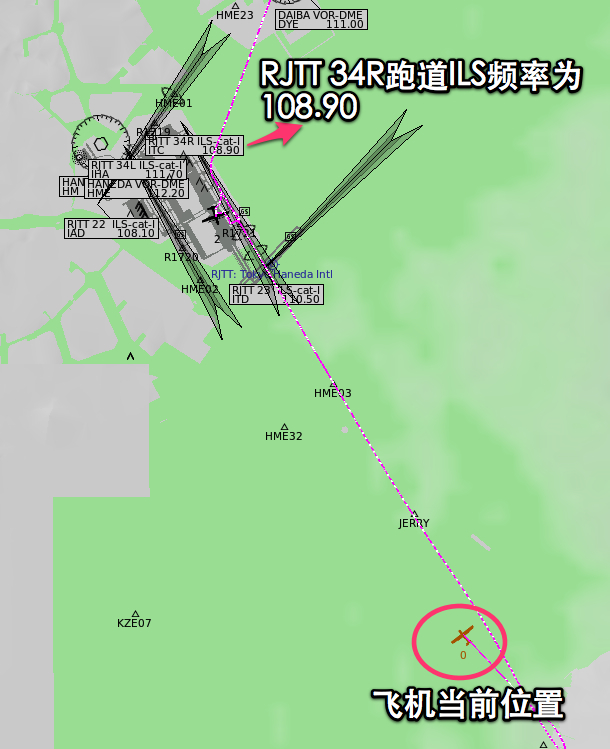 Its frequency is 108.90.
I use NAV1 to receive the ILS signal, so I first tune it to 108.90, as shown below.
Its frequency is 108.90.
I use NAV1 to receive the ILS signal, so I first tune it to 108.90, as shown below.
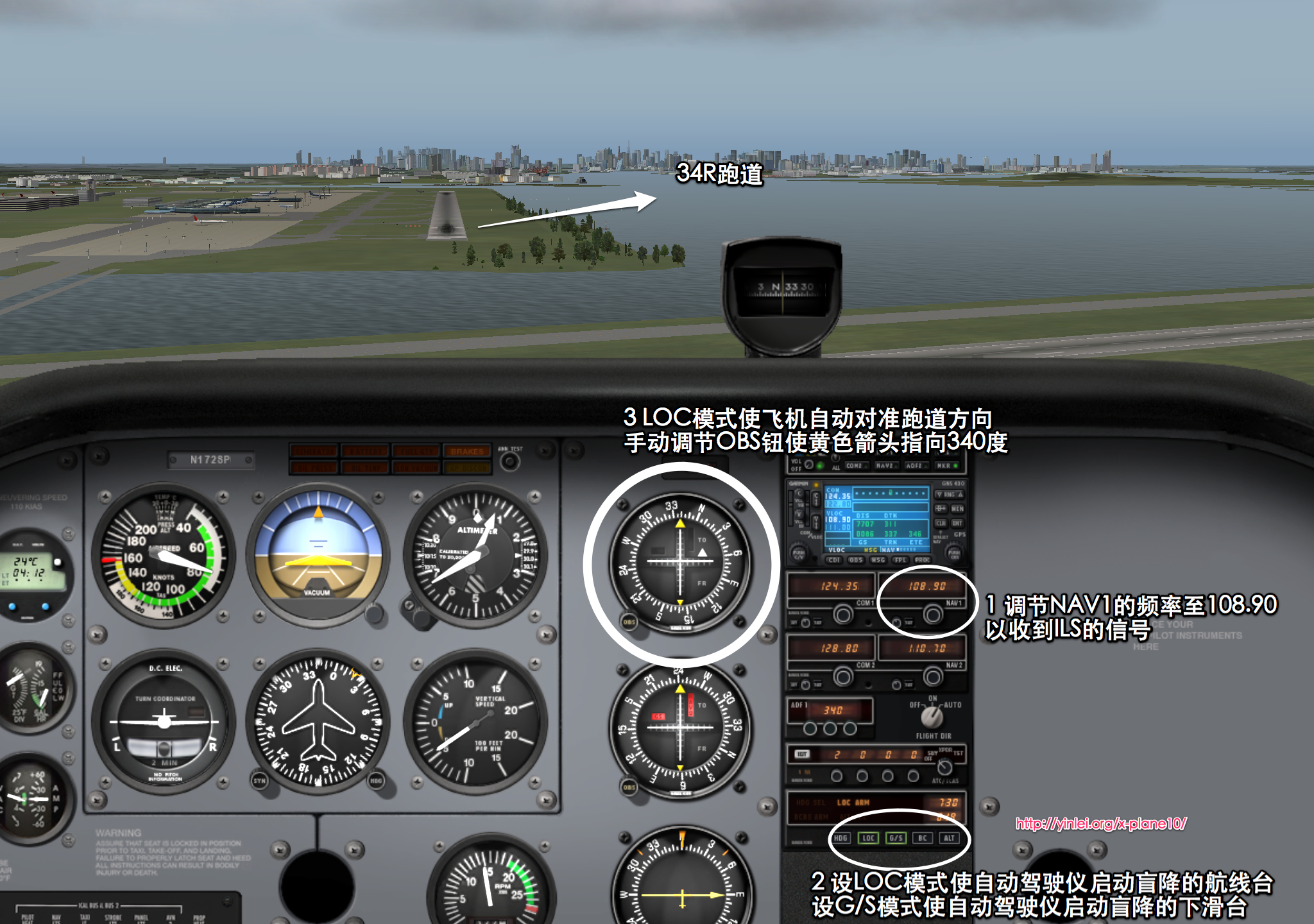 Then press the LOC and G/S buttons, and you will see the aircraft automatically start to adjust its nose to align with the Runway Heading.
Adjust OBS1 so the needle points to the 340-degree direction of the Runway. Do you see both the horizontal and vertical lines centered?
The Blind Landing is really worry-free, isn’t it?
At this point, all you need to do is lower the Flaps, adjust and reduce the Throttle to make the aircraft continuously Descend,
keeping the horizontal line (Glide Slope) in the OBS centered.
Then press the LOC and G/S buttons, and you will see the aircraft automatically start to adjust its nose to align with the Runway Heading.
Adjust OBS1 so the needle points to the 340-degree direction of the Runway. Do you see both the horizontal and vertical lines centered?
The Blind Landing is really worry-free, isn’t it?
At this point, all you need to do is lower the Flaps, adjust and reduce the Throttle to make the aircraft continuously Descend,
keeping the horizontal line (Glide Slope) in the OBS centered.
Note: Localizer (LOC/LLZ), Glide Slope (GS or Glide Path, GP).
Additionally, when “Flight Dir” is set to the “On” position (inside the red circle in the image below), the flight is not controlled by the computer, but the computer calculates the control inputs required to fly to the Destination and displays them on the Attitude Indicator (inside the green circle in the image below).
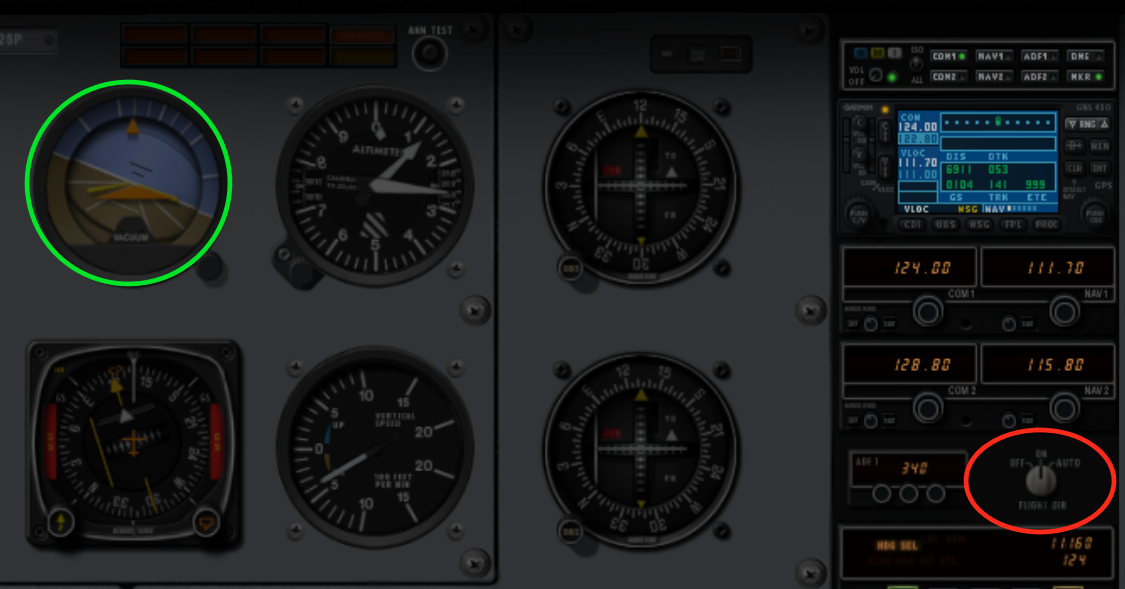
The orange triangle in the center of the Attitude Indicator represents your own aircraft. The attitude value that the computer calculates the aircraft should adjust to is shown by the yellow polyline. The pilot should adjust the control stick up, down, left, and right to try and overlap the two upper edges of the orange triangle with the yellow line. This way, the aircraft will fly along the route set by HDG, LOC, etc. In fact, when you turn Flight Dir to Auto, you can see that the computer controls the flight attitude in exactly this way. If you turn Flight Dir to the Off position, which means turning off the flight computer, this yellow polyline will disappear. So, if you feel that automatic flight is boring, you can keep Flight Dir set to On every time, and then control the aircraft yourself according to the calculated adjustments from the computer. This way, you won’t get lost, and you can enjoy the fun of flying yourself—killing two birds with one stone, right.
The End