A Flight Sim Enthusiast's Notebook
-
Airliner Cockpit Secrets 4.6 About Fuel Consumption and Center of Gravity
As previously introduced, in autopilot navigation mode, the aircraft automatically flies along the pre-set route, but pilots cannot be idle. They must constantly monitor flight instruments and record the passing time and remaining fuel quantity after passing each waypoint.
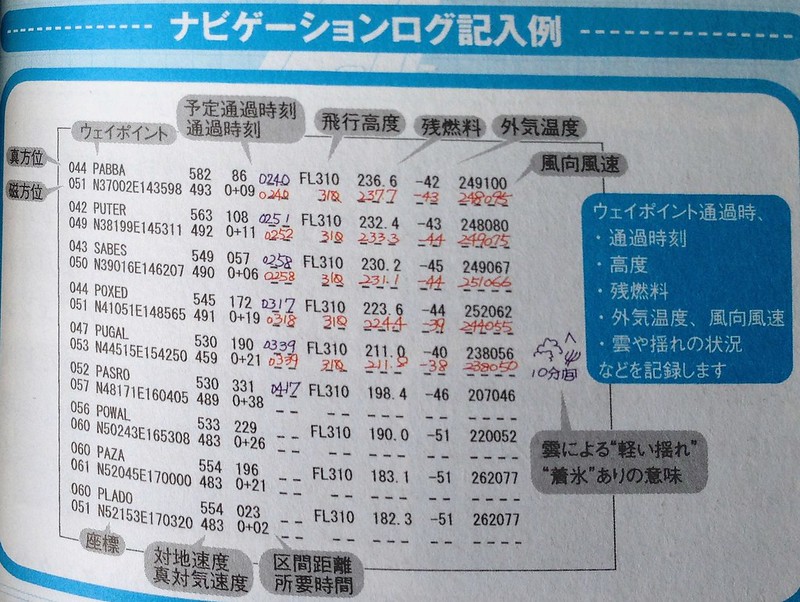 The above is an example of a flight log. You can see that for each waypoint, pilots record the passing time, flight altitude, remaining fuel, outside temperature, and wind direction/speed information. In the fifth line, information about 10 minutes of light turbulence during the journey is also recorded.
In this series 1.3 Flight Preparation Briefing, detailed flight planning was introduced. This plan is calculated based on the following information:
-
Inside the Cockpit 4.6 - Fuel Consumption and Center of Gravity
Previously, we introduced that in autopilot mode, the aircraft will automatically fly along a pre-set route. However, pilots cannot just sit idle; they must constantly monitor the flight instruments and record the passage time and remaining fuel quantity after passing each waypoint.
Above is an example of a flight log. You can see that for each waypoint, the pilot recorded the time of passage, flight altitude, remaining fuel, outside temperature, and wind direction/speed information. In the fifth line, information about 10 minutes of light Turbulence encountered during the journey is also noted.
In this series 1.3 Flight Preparation Briefing, a detailed flight plan was introduced. This plan is calculated based on the following information: Aircraft weight (calculated from the number of reserved passengers) Flight distance Flight speed High-altitude wind direction and speed forecasts High-altitude temperature
-
Photography Notes at Kobe Airport
There are three major airports in the Kansai region of Japan: Kansai International Airport, Osaka International Airport (Itami Airport), and Kobe Airport. I had already been to the first two, so recently, taking advantage of a business trip, I used Kobe Airport to return to Tokyo. I also took some photos at the airport, effectively marking all three Kansai airports as visited.
Since my flight was scheduled for 18:00 that afternoon, I spent the morning wandering around the city, had lunch in Chinatown, took a walk by the seaside and in the beautiful city of Kobe, and started preparing to head out around 15:00.
-
A Better Free E6B Flight Computer DIY Model
Last time, after introducing the DIY E6B Flight Computer, I discovered an even better free E6B model created by a Japanese enthusiast. It covers all the functions of a commercial E6B and comes highly recommended.

This excellent tool is called E6-B Paper Craft. It can be downloaded from x-plane.org and is free to use as long as you have an account ID for the website. The content is simply a PDF file. Just print it out, cut out the components, and assemble them together to use it. The author has also provided a PDF manual for assembly for your reference.
-
Recommended Article Introducing X-Plane
There aren’t many good articles about X-Plane online, but today I found a pretty decent review. It covers every aspect of X-Plane quite comprehensively, so I’m recommending it here.
-
DIY Navigation Slide Rule E6B
I recently got a bit interested in the E6B flight computer.
 I started learning how to use it.
I downloaded a Chinese user manual from the internet and realized that this is indeed a great tool, worth some serious research.
e6b manual.pdf
I started learning how to use it.
I downloaded a Chinese user manual from the internet and realized that this is indeed a great tool, worth some serious research.
e6b manual.pdfI then started browsing various products online and found that the better ones are quite expensive. Since I am still a beginner, there is no need to invest in anything high-end. So I decided to do it myself and rely on my own efforts, and within a few minutes, I had a simple version ready. Here is a summary.
-
Some More Free Sectional Charts
Last time, I introduced the free SkyVector aeronautical chart website. Below, I will introduce two more sources of free aeronautical chart information.
1 http://vfrmap.com/ This is a website for VFR (Visual Flight Rules) charts covering the United States and Canada. The interface is similar to SkyVector and supports zooming, but the functionality is relatively limited.
2 FAA Aeronautical Chart Information These are charts provided by the Federal Aviation Administration (FAA) website. For example, look at the US Sectional Charts here. The update dates are current. Each region consists of a large image, several tens of megabytes in size. You can download them to a computer or mobile device to study at your leisure. This way, you can check charts even without an internet connection, which is truly convenient.
-
Title: Aileron Control During Crosswind Takeoff
Here is a summary of a topic from a BBS.
Regarding Aileron Control During Takeoff Taxiing:
- In calm or headwind conditions, keep the ailerons basically neutral.
- In crosswinds exceeding 30 degrees, you need to turn the ailerons into the wind before starting to taxi. 2-1. In a 90-degree crosswind (i.e., direct crosswind), turn the control wheel fully into the wind. 2-2. In a 60-degree crosswind, turn the control wheel about 2/3 into the wind. 2-3. In a 30-degree crosswind, turn the control wheel about 1/3 into the wind.
As speed gradually increases, the effectiveness of the rudder also increases. Therefore, you can gradually reduce the aileron deflection as speed increases. Ultimately, just as the aircraft leaves the ground, the ailerons should be slightly turned into the wind. In order to fly straight aligned with the Runway direction, once the aircraft is fully airborne, it is necessary to fly using a Wind Correction Angle (WCA).

-
Saitek PRO Flight Radio Panel Setup
Recently added a new piece of hardware—the Saitek PRO Flight Radio Panel, as shown below:
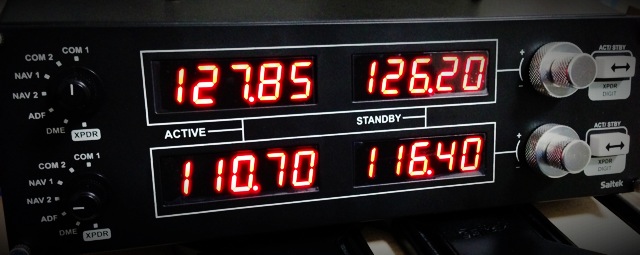
Its specific function allows you to adjust the following frequencies: COM1/COM2/NAV1/NAV2, DME/ADF/XPDR. Each frequency features ACTIVE and STANDBY displays, and you can swap between them using the toggle button on the right.
The reason I bought this device is that I found it very inconvenient to adjust frequencies with a mouse while constantly checking the flight chart. With this gadget, I get a complete sense of operating independently of the computer, which significantly enhances the realism of the flight again.
-
Carenado's Christmas Sale, Purchase of PA28 181 Archer II, and First Flight
I was away on business trips for three weeks straight in November and December. When I wasn’t traveling, I went to Kyoto and Nikko to see the autumn leaves, so updates to this blog have been stagnant for a long time. Sorry about that!
Carenado’s X-Plane aircraft products have always had an excellent reputation, but I hadn’t bought any before because the price was a bit high. Fortunately, they are currently having a sale. If you are interested, do not miss this great opportunity. (Don’t get me wrong, I’m really not advertising for them)
-
Tokyo Chofu Airport (Chofu Hikojō, Chofu Airport) Shooting Notes
Chofu Airport is the only general aviation airport within Tokyo, located in the city of Chofu in the western part of the metropolis. Its code is RJTF. It features a single 17/35 Runway measuring 800 meters in length and 30 meters in width. It lacks ILS equipment, operating under VFR (Visual Flight Rules) only, and caters exclusively to propeller aircraft.
Every year, the airport opens to the public for a day to host a small air show. There are simple flight performances and static aircraft displays on the ground. They sell aviation-related books and goods, hold aviation awareness lectures for children—such as a flight simulation class—and offer local snacks and specialties from various regions. All in all, it’s a lively event. Among the aviation items, there are some unique finds, such as old instrument panels and broken propellers—fresh curiosities that you generally can’t buy on the open market.
-
Title: A Log of Riding on the Boeing 787
I rarely take domestic flights in Japan. Recently, however, I took the opportunity of a business trip to skip the Shinkansen and fly an All Nippon Airways (ANA) Boeing 787 from Tokyo to Osaka instead. Below is a brief summary.
I booked the ticket via the ANA website. After entering my membership number and password, and selecting the date as well as the departure and arrival airports, I could see the schedule for the day’s flights from Tokyo Haneda International Airport to Osaka Itami International Airport. I selected the flight that suited me best based on the schedule, price, and aircraft type, then made the reservation, selected my seat, and entered credit card information. It was very simple. I then received an email containing a link; a single tap on my iPhone displayed the boarding pass in Passbook.
 This meant there was no need to print an e-ticket; I could board directly with my phone.
 -
Title: Secrets of Airliner Flying 4.5 About Cruising Speed
Just like cruise altitude, cruise speed must also consider fuel economy.
Similar to how a car’s performance is often judged by how many kilometers it can travel on one liter of fuel, for an aircraft, this performance can be expressed as the flight distance per unit of fuel. This is called Specific Range.
Specific Range refers to the flight distance per unit of fuel in a windless condition (e.g., data at 10,000 lbs, or approx. 4.5 tons). The value is calculated by dividing the TAS (True Airspeed) by the fuel flow.
-
Title: New Aircraft: Piper PA-32-300 Cherokee Debuts
The Piper PA-32-300 Cherokee is a very common single-engine piston general aviation aircraft. Yesterday, I found a free version of it on x-plane.org. Out of my fondness for Piper products, I immediately downloaded it to give it a try.
Download Link <a href=http://forums.x-plane.org/index.php?app=downloads&showfile=17608>http://forums.x-plane.org/index.php?app=downloads&showfile=17608 Of course, if you don’t have an x-plane.org account, you’ll need to register one first—it’s free anyway. Just click the Download button on the page.
Installation The installation method is very simple. Unzip the downloaded archive
Piper PA32-300 Cherokee.zipto generate aPiper PA32-300 Cherokeedirectory. Copy the entire directory toX-Plane 11/Aircraft/General Aviation/. -
Title: X-Plane Simulates Fuel Consumption from Left and Right Tanks Realistically
There was a discussion on a BBS I frequent regarding fuel consumption between the left and right fuel tanks. One user observed that after flying a Cessna 172 for a period, the remaining fuel levels in the left and right tanks were unbalanced.
A pilot explained that if the aircraft cannot maintain Level Flight during cruise and constantly wobbles left and right, it will cause an imbalance in fuel consumption between the tanks.
-
Title: Exploring the Cockpit of Airliners 4.4 About Cruise Altitude
Generally speaking, the cruise altitude for short-haul domestic flights remains constant. As mentioned in previous sections, after entering the cruise phase, the aircraft maintains this altitude until the Descent and landing, barring severe weather or emergencies. However, for long-haul international routes, particularly over oceans, “Step Climb” is often employed—a method of gradually increasing the cruise altitude. Let’s look at an example of a Boeing 777-300ER flight from Tokyo to New York to see how altitudes are scheduled.
-
Cloud Color Adjustment
If you think the clouds in X-Plane always look dark and unattractive, try the following settings. I suspect that when cloud layers are set thick and there are many layers, they tend to turn into gloomy dark clouds.
First, check the cloud layer settings on the left side of the Weather menu.
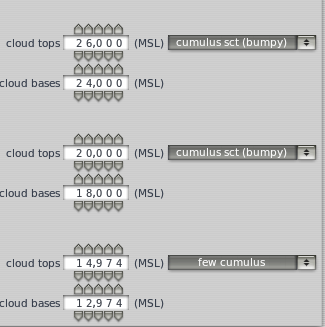 In the three altitude layers, I set a small amount, fewer, and fewer cumulus clouds respectively,
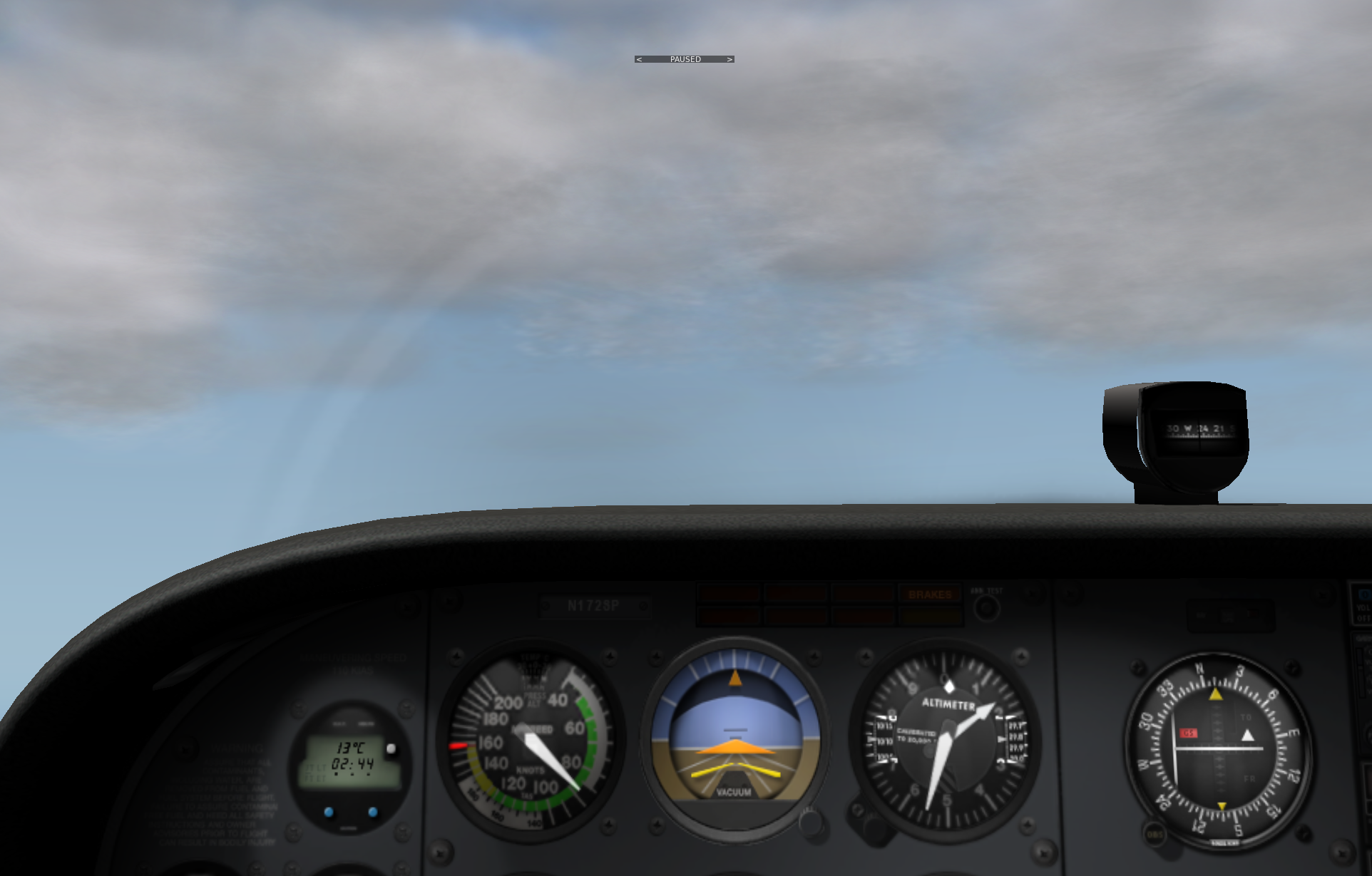
but from the cockpit, the clouds still feel quite gloomy.
In the three altitude layers, I set a small amount, fewer, and fewer cumulus clouds respectively,
but from the cockpit, the clouds still feel quite gloomy.
-
Title: Secrets of Airliner Cockpits 4.3 Flight Altitude, Air Pressure, and Maximum Flight Altitude
The previous section covered speed metrics; this section explains data regarding altitude.
There are two types of Altimeter on an aircraft: the barometric Altimeter and the radio Altimeter. Let’s look at the barometric Altimeter first.
We all know that as altitude increases, air density decreases, and atmospheric pressure drops accordingly. By measuring atmospheric pressure and comparing it with standard values, the absolute altitude (elevation above sea level) of the measurement location can be determined. This is the basic working principle of the barometric Altimeter. The advantage of using pressure for measurement is that the Altimeter is compact and simple in structure; however, the disadvantage is that besides altitude, changes in temperature and water vapor density also affect pressure changes. Therefore, pilots must calibrate the Altimeter based on local atmospheric conditions. This is indispensable before takeoff and landing, as the danger of landing without an accurate grasp of altitude goes without saying.
-
Huangyan Dao Patrol?
Last time I visited the Senkaku Islands in a flight sim, so can I also fly to Huangyan Island (Scarborough Shoal), which is also disputed with the Philippines? I checked today and found that the X-Plane world map is quite impressive; it was very easy to find. Below is a report on the flight situation.
First, I checked the approximate location of Huangyan Island on Google Maps.
-thumb-640x474.png)
-
NaturalPoint TrackIR 5 & TrackClip Pro Head Tracking System Setup
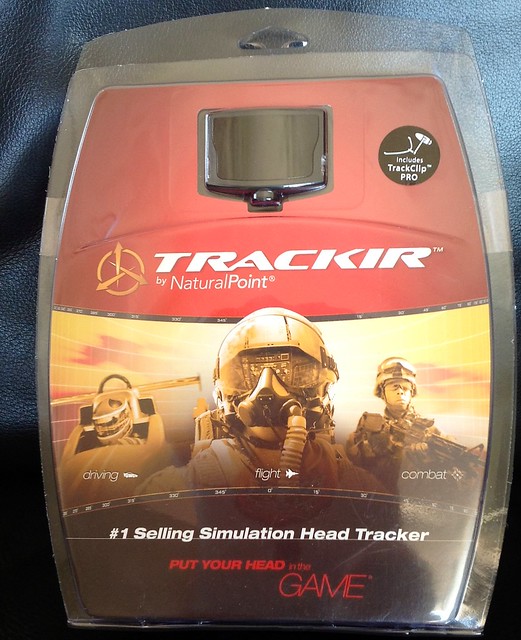
After hesitating for a while, I finally bought the TrackIR 5 & TrackClip Pro. Below is a brief summary of the installation and usage on Mac. (For Windows, you can download the drivers and configuration software from the official website, but since there is no Mac version, we have to look for some Open Source alternatives.)
First, the product introduction. The TrackIR 5 is a head tracking system composed of two components: the TrackClip Pro (emitting part) and the TrackIR 5 (receiving part). When you use the 3D cockpit mode in X-Plane, simply moving your head slightly up, down, left, or right will automatically switch the view according to the movement, eliminating the trouble of using buttons or the keyboard to control it. This is especially true in the traffic pattern during landing, where you need to constantly check the position of the aircraft and the runway. With this peripheral, the realism of the flight simulation is greatly improved. Highly recommended!