A Flight Sim Enthusiast's Notebook
-
China AIP AMD1304
The official website of the Air Traffic Management Bureau of the Civil Aviation Administration of China (ATMB) Aeronautical Information Service Center, aischina.com, recently released AMD1304.
I have merged the latest data into AIP China. Please continue to use it.
The major updates this time include the aerodrome information for: ZUUU ZULS ZSSS ZSDQ ZBAA ZLXY ZLLL ZBHH ZBAA etc.
End
-
Airliner Cockpit Secrets 5.1 Descent Preparation
As the aircraft continues to approach the destination airport, the Captain and the First Officer must begin preparing for the Descent.
Generally, Descent preparation and the Approach/Go-around Briefing should be completed within 10 minutes prior to the Top of Descent (TOD) to avoid missing the optimal timing to begin the descent.
First, it is necessary to understand information regarding the destination. If local weather conditions are severe, such as a typhoon making landing impossible, or if an earthquake has just occurred making it impossible to ensure the safety of the airport Runway, the crew must consider diverting to an Alternate Airport.
-
Hiroshima Airport Shooting Notes
Recently, I traveled to Hiroshima for sightseeing. On my way back home, I took a JAL flight from Hiroshima Airport to Tokyo and took the opportunity to look around the airport vicinity and take some photos. Here is a brief summary.
The way to get to the airport is by taking the airport bus from the North Exit of Hiroshima Station; it takes about 45 minutes to arrive.
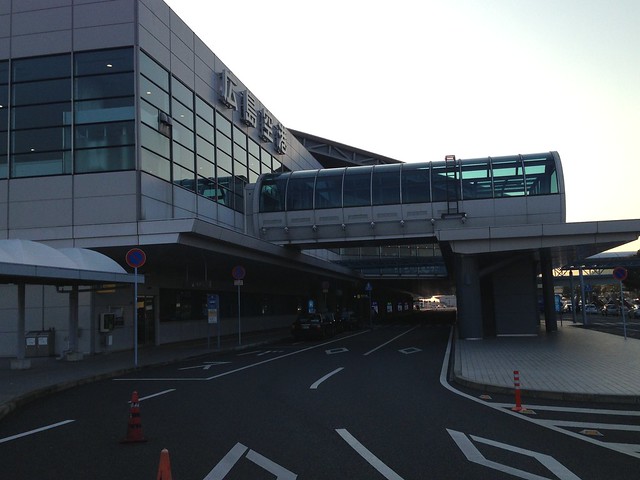
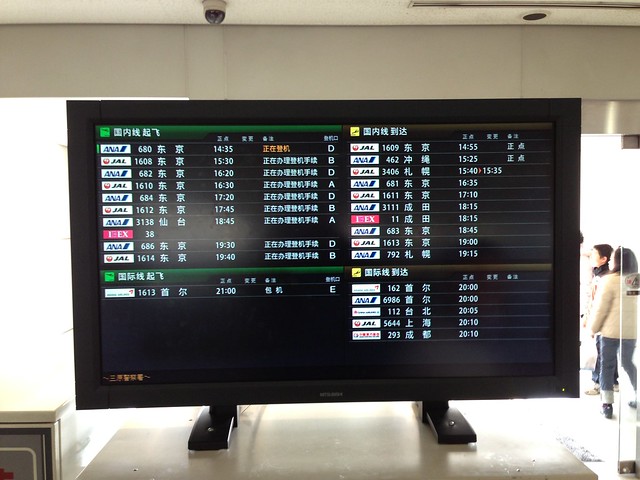 Since Hiroshima Airport has international flights to China, the information displays also show information in Chinese, which is nice.
Upon entering the airport, I headed straight for the observation deck on the 3rd floor. Only after coming up did I realize that there is an admission fee; it is a coin-operated entrance, costing 100 yen per person. Well, I was already there, so I paid to enter. From my impression, not many airports charge for the observation deck; I seem to have only encountered this in Okinawa and Hokkaido.
-
MVFR and LIFR
- VFR (Visual Flight Rules, 目视飞行规则) conditions: Visibility 5 miles or more, ceiling 3,000 feet or higher
- MVFR (Marginal VFR, 临界VFR) conditions: Visibility 3-5 miles, ceiling 1,000-3,000 feet
- IFR (Instrument Flight Rules, 仪表飞行规则) conditions: Visibility less than 3 miles, ceiling 1,000 feet or lower
- LIFR (Low IFR): Visibility 1 mile or less, ceiling 500 feet or lower
-
China Aviation Flight Technical Manual FCOM FCTM AFM QRH
I discovered that Shanghai Airlines’ Aircraft Technical Manual is actually publicly available online for anyone to view—what a find.
I opened a few files to take a look, and sure enough, they are authentic and valuable resources. Furthermore, the update dates are very recent, making them well worth studying for aviation enthusiasts.
Below are a few screenshots of the website. You can see that it includes manuals for aircraft types such as the A321, B737, B757, B767, and CRJ200.
-
Best of the year 2012 - Winners
The most popular plugins of 2012 have been announced on x-plane.org, and they are all free—be sure to download and try them out.
Best Aircraft
- x737project Boeing 737-800/BBJ2 by bstratmann
- Boeing B-17G for Xplane10 by K&A
- SBACH 300 by XPFR
- SSG Boeing 747-8 Freighter by stekeller
- Zenith Aircraft CH650 S-LSA by Hydroz.net
Other popular aircraft:
- Learjet 35 by FlyingPenguin711
- Cessna Skylane Turbo 182RG by nicolas
- Caudron Simoun C630 & C635 by benead
- Piper PA-32-300 Cherokee by nicolas
- Boeing B-377 Stratocruiser by ScifiX
- Dassault Mystere IVA by Gasthood
- Grumman F6F-5 Hellcat by ScifiX
- F14B Tomcat by Sailor
- Breguet Provence 763 by Nicolas
- Messerschmitt Bf.108 Taifun by Paolo
- Super King Air B-200 by matt66
- ELA07-S Autogyro 1.0 by awall86
- SPAD S.XIII 1 by Paolo
- Caproni Ca.33 by Paolo
-
What to do when image files are not visible Flickr connection issues
If you can see the text content of this site but cannot see the images, it is very likely that your network cannot connect to Flickr for some reason.
If you cannot see the images, understanding the text alone will certainly not be effective, so it is recommended that you try the methods below to see if they can resolve the issue. If there is no effect, please contact me. Thanks.
-
''New Sky Colors "Final"'
Previously, in the article How to make the sky bluer in X-Plane 10? Sky color settings, I introduced a method to change the sky color settings. The downside to this method is that the X-Plane system cannot save this setting automatically, so you have to reset it every time you restart X-Plane, which is quite troublesome. Today, I found out that there is actually a simpler method: the “New Sky Colors Final” Plugin/Addon, which can save you the trouble of setting it every time. Below is a brief introduction to the installation method.
-
SimHeaven Scenery Plugin
If you are very dissatisfied with the wilderness scenery in X-Plane, but don’t want to spend money on expensive, exquisite scenery plugins, then the free scenery from SimHeaven might satisfy you.


simHeaven is based on Open Street Maps, and its scenery files are very small, making it very suitable for users with average hardware configurations. Below are some download links; I highly recommend you give them a try. <a href=http://simheaven.com/?page_id=25&wpfb_list_page=2>OSM country sceneries OSM continent sceneries
-
A Discussion on Trim Tab Control Methods
1. What is Trim?
Trim tabs are devices used to fine-tune the three primary flight controls (Ailerons, Rudder, Elevator). While large aircraft typically feature all three types, small aircraft are often only equipped with Elevator Trim. By adjusting the position of the trim tab, the control pressure on the three controls can be reduced to zero. This means the pilot no longer feels any resistance in their hands—a state known as being “trimmed out.” This serves to reduce fatigue during flight. At this point, even if the pilot removes their hands from the yoke, the aircraft will continue to fly normally and stably.
-
Introduction to Official Websites for Airport and Route Information — ATMB of CAAC, Aviation Information Service Center, aischina.com
The Air Traffic Management Bureau of the Civil Aviation Administration of China (CAAC ATMB), abbreviated as the “ATMB”, is responsible for formulating rules, regulations, and technical standards for civil aviation air traffic management and operations in China. The main documents include:
- Aeronautical Information Publication of China Civil Aviation (NAIP)
- Aeronautical Information Publication of China Civil Aviation Amendments
- Aeronautical Information Publication of China Civil Aviation Supplements
- Aeronautical Information Circulars (AIC)
- etc.
The NAIP is divided into GEN (General), ENR (En-route), and AD (Aerodrome). It includes Aerodrome Charts, Parking Position Charts, Standard Instrument Arrival Charts (STAR), Instrument Approach Charts, Standard Instrument Departure Charts (SID), Aerodrome Obstacle Charts, Precision Approach Terrain Charts, En-route Charts, Area Charts, Air Corridor Charts, Fuel Dumping Areas, and other information.
-
Scandinavia3D Scenery
If you are interested in simulating flight over the Scandinavian Peninsula, you should try this Scandinavia3D 1.7 scenery package, which includes Norway, Sweden, Denmark, Iceland, and Finland.
This scenery Plugin uses OSM data from the famous online map collaboration project OpenStreetMap, providing 3D buildings, ground classifications, roads, and more. After downloading the archive from the link below, simply extract it and copy the respective directories into the “Custom Scenery” folder. Also, here is the configuration file
scenery_packs.ini: SCENERY_PACK Custom Scenery/iceland/ SCENERY_PACK Custom Scenery/sweden/ SCENERY_PACK Custom Scenery/norway/ SCENERY_PACK Custom Scenery/finland/ SCENERY_PACK Custom Scenery/denmark/ -
Hongqiao Airport (ZSSS) Scenery
The famous scenery for Hongqiao Airport has also received its new version 2.0. You simply must have this. Moreover, the author’s Chinese blog provides us with detailed installation instructions, which saves me from waffling on too much here.
One small thing to add: the download link for this Russian Ruscenery library is right here. Just click the link to download and copy it to the Custom Scenery directory.
Therefore, after installing the library and the scenery, you should add these two lines to
scenery_packs.ini: -
The x737project Boeing 737 Aircraft Plugin Now Supports 64-bit X-Plane
The free x737 is a well-known Boeing 737 aircraft plugin in X-Plane, and it offers 150 types of liveries. In the latest version 4.7.5, they also support X-Plane 10.20 64-bit, so I updated it to give it a try.

The download link is here. There are two buttons, of course, choose this one: Download the x737project aircraft for X-Plane 10.20b9+, all platforms 32/64bit
After downloading the ZIP file, extract it and move the entire
x737_800_BBJ2_XP1020_basedirectory toAircraft/Heavy Metal/in your main directory. -
Exploring Airliner Flying 4.9 Inside the Cockpit
Once the aircraft enters the cruise phase, although the pilot must still continuously monitor various flight data, the atmosphere in the cockpit is certainly more relaxed than during the takeoff phase. Before reaching the next checkpoint, the pilot can use the short break time to eat, get some drinks, use the bathroom, or just chat.
One thing to know about pilot food is that the Captain and the First Officer are absolutely not allowed to eat the same type of in-flight meal. This is mainly to prevent a situation where, in the event of an accident like food poisoning, both pilots cannot continue to perform the flying duties. Of course, there is generally no problem with the quality of the in-flight meals provided by airlines nowadays, but this rule is strictly enforced for safety reasons. Therefore, when a flight attendant comes to the cockpit to ask the pilots, for example, if today’s in-flight meals are Chinese and Western, if the Captain decides to order the Chinese meal, then the First Officer automatically gets the Western meal.
-
Summary of Peripherals I Use in X-Plane 10 (Yoke, Throttle, Pedal, Trim, TrackIR, Radio Panel)
I use a 27-inch iMac myself. It started with 4GB of RAM, which I later upgraded to 12GB, and 1GB of video memory. It’s a completely standard configuration. This hardware is basically sufficient, but since the iMac’s built-in graphics card isn’t great, I can only say it’s “adequate.” With the 3D cockpit enabled, the display speed generally hovers around 20-40 fps.
Regarding peripherals, because I place a lot of importance on the realism of flight, I bought the following specialized Saitek peripherals.
-
Regarding the use of X-Plane 10.20 beta 64-bit on macOS
X-Plane 10.20beta 64-bit version has been out for a while now. I have downloaded it several times to try (on macOS), but every time, the application would quit unexpectedly within a second of launching, making it completely unusable. It was quite frustrating. I wonder if any friends have encountered the same issue?
I also tried sending the error report back to the developer, but it was like sending a message into a void with no reply. Helplessly, I had to reinstall the stable version 10.11 and continue using it.
-
Exploring the Cockpit of Airliners 4.8: Weather and Turbulence (Continued)
In the previous section, when explaining the causes of turbulence, I didn’t mention Cumulonimbus clouds, so I’d like to add a supplement here.
 Cumulonimbus clouds are visually spectacular and very attractive as a natural landscape, but for an aircraft, flying into a Cumulonimbus cloud is a very dangerous matter. This is because there are very strong updrafts and downdrafts interacting within Cumulonimbus clouds, and their energy can cause huge damage to the aircraft body or even lead to the disaster of hull loss and fatalities. Even without flying into the Cumulonimbus, just flying over the cloud layer or passing by the side can cause severe turbulence that injures passengers. In addition, hail in the clouds and lightning near the cloud layer can also cause damage to the aircraft body.
Pilots mainly use weather radar to avoid Cumulonimbus clouds. However, if they encounter a giant high wall standing in front of the airway, it is impossible to adopt the method of significantly changing the route introduced in the previous section. Therefore, the pilot will turn on the cabin seatbelt sign, requiring passengers and flight attendants to sit tight in their seats. At this time, the pilot mainly uses manual control, concentrating on finding gaps in the clouds, weaving left and right, trying to find airspace with less turbulence, until passing through the cloud area. Sometimes, after a struggle, the pilot safely passes through the cloud area without any turbulence inside. Conversely, passengers unaware of the inside story might complain, “You made us sit still in our seats, but it didn’t shake at all,” as if the pilot’s prediction was inaccurate. Little do they know that this is the result of the pilot’s hard work; everyone, please do not misunderstand.
-
E6B Flight Computer App on iOS -- iE6-B
This is the third blog post about the E6B. The more I learn and use it, the more I realize the E6B is truly a great tool. I hope everyone can learn how to use it. After all, the principles aren’t too difficult; just use it frequently, and you’ll naturally remember it.
Alright, back to business. You can now use the E6B on iPhone/iPad. This is the iE6-B app. You can find it by searching the App Store. This software is paid, costing $1.99. I think it’s good value for money, so I’m recommending it to everyone.
-
Rewriting the X-Plane 10 Beginner's Guide
The article “X-Plane 10简介 入手方法 安装方法 飞行控制入门攻略 教程” was written a year ago. I found that some of the instructions were a bit outdated and differ from the latest version in some places. So today, I spent half a day rewriting it. The main updates cover the installation method and a detailed list of keyboard controls. I hope this helps everyone.
End