X-Plane Plugins
-
Issue with Mac.xpl Plugin Not Launching on MacOS
I hadn’t used these external devices for a long time. Occasionally, I took them out for a test flight to see if they still worked.
 I reinstalled the Xsaitekpanels (lin+win+mac+32/64) Plugin mentioned before.
After launching X-Plane, I got an error saying the Plugin’s Mac.xpl had a security issue.
I reinstalled the Xsaitekpanels (lin+win+mac+32/64) Plugin mentioned before.
After launching X-Plane, I got an error saying the Plugin’s Mac.xpl had a security issue.So, I checked online articles and found this one – Mac.xpl Not Starting
 It turns out that you just need to allow Mac.xpl in the system security settings.
-
GPS Flightplan Input via Keyboard
The G530 navigator and G1000 navigator in X-Plane 11 are excellent, but there is an inconvenience: it is not easy to input Waypoints. Dragging that tiny knob with a mouse is really not a good user experience.
Fortunately, I discovered this Plugin: Gps Flightplan Input via Keyboard, which allows you to input Waypoints directly using the keyboard. This should make utilizing the G530 and G1000 much more convenient.

However, looking at the instructions:
-
XTouchDownRecorder V5
5 years ago, I introduced the X-Plane Landing Speed Plugin for displaying and evaluating landing speeds, but this plugin hasn’t been updated for a long time, so I haven’t installed it on X-Plane 11. Recently, I discovered this XTouchDownRecorder V5, which has more functions, including:
- Touchdown time recording
- Recording Descent rate, fuselage attitude, G-force, touchdown speed
- Landing log
- Automatically pops up window during taxiing after landing
- Configurable hotkeys And so on. Here is a brief introduction.
The installation method is very simple. Download the compressed package from the webpage above and unzip it, then copy the XTouchDownRecorder directory to X-Plane 11\Resources\plugins.
-
Making Plugin Management Easy with X-Updater
How to upgrade aircraft addons and other plugins purchased from x-plane.org?
Redownloading everything is indeed a pain, so using the X-Updater tool is a great solution.
Here is how to use X-Updater. First, visit http://update.x-plane.org/, where you will see the text:
Download the latest version of the X-Updater client. download
Click download to get the X-Updater-Client.jar file.Then, double-click X-Updater-Client.jar, and the following window will pop up.
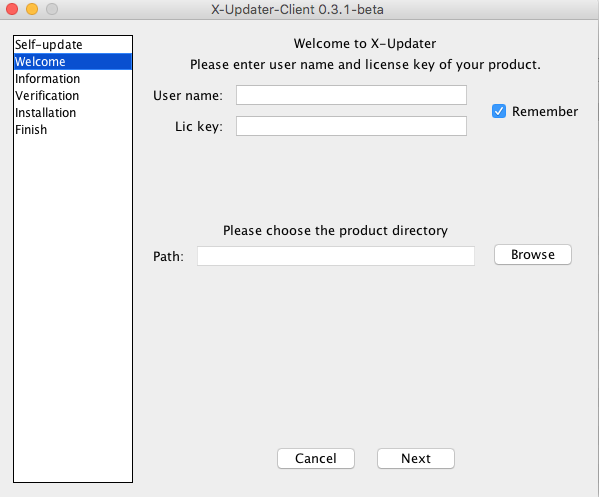 (If your jar file cannot be executed, please check here for instructions on installing the Java Runtime Environment)
 -
Forward: X-Plane Scenery Development Recent Updates on ZBAA
Looking forward to this Beijing Capital International Airport scenery currently under development by ShaneMontoya. Keep it up, author! [X-Plane Scenery Development] Recent updates on ZBAA
This is a photo taken in the winter of 2010 before landing on Runway 01. You can see the iconic dragon scale and dragon spine design on the roof of Terminal 3.
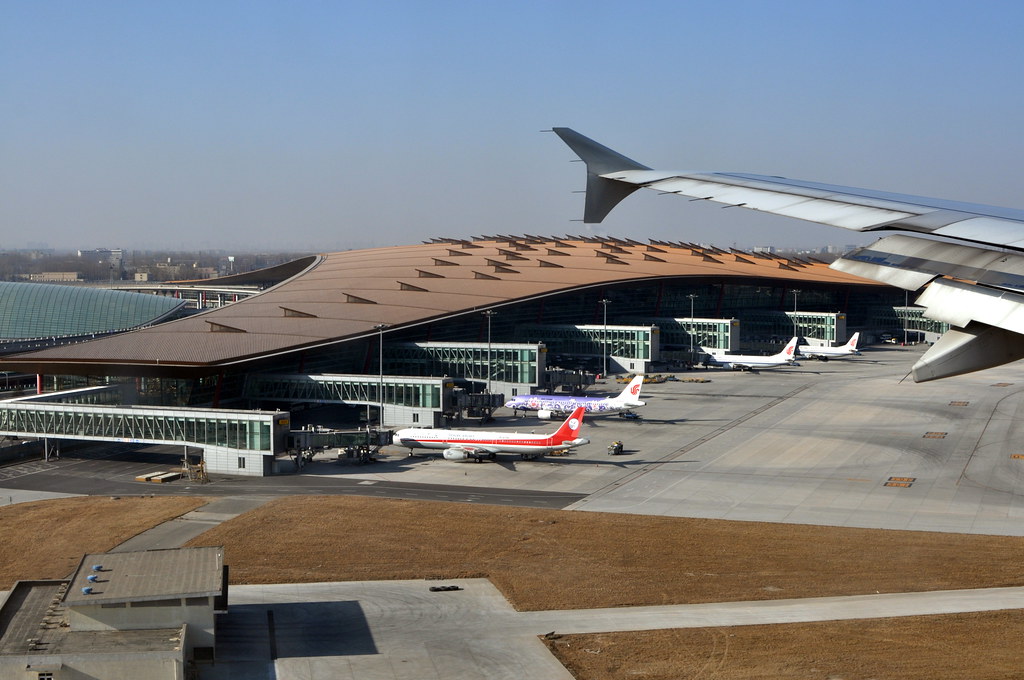 Hope to experience this magnificent architecture in the flight simulator soon as well.
 -
X-Life Traffic Plugin
It’s been over a month since I last wrote about X-Plane topics. Today, I’ll briefly introduce this X-Life traffic addon, which was just released recently. This is a product by the renowned JARDesign, and while it is still in the beta stage, it is completely free! Here is its slogan: X-Plane 10 traffic addon Windows / MAC OS 64 bit Plugin by JARDesign Group … You Are Not Alone In The Sky!
-
Carenado PA28 181 ARCHER II V3.2
I hadn’t noticed that Carenado’s X-Plane product line had been upgraded, after reading Aircraft Update : Carenado v3.1 X-Plane Fleet Overview, I immediately went to download it, only to find that the latest version of the PA28 181 ARCHER II is V3.2.
Compared to V3.0 from over a year ago, there don’t seem to be many visual improvements, the biggest surprise should be the addition of an autopilot. After adding xap/panels/2 to the keyboard customization, this window can be popped up,
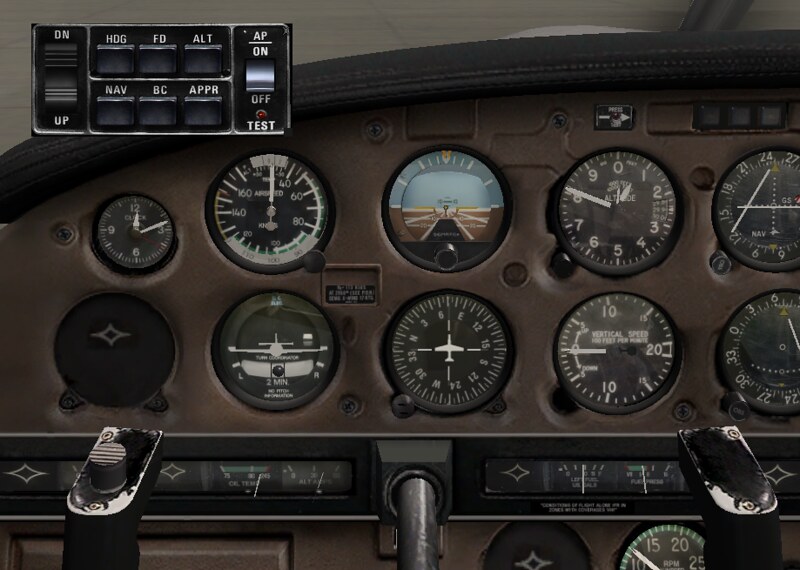 Although the functions are still very simple, it can at least perform automatic straight Level Flight,
making casual flying in the sky more enjoyable.
Although the functions are still very simple, it can at least perform automatic straight Level Flight,
making casual flying in the sky more enjoyable. -
X-Plane Abnormal Exit Issues on MacOS
This issue has been around for a while. My friend pigaFly even asked about it previously: when selecting a different aircraft model, X-Plane would unexpectedly quit. The cause was not found for a long time, but fortunately, the official blog provided a solution yesterday—just upgrade the SASL plugin in the aircraft files.
The specific method is to download the latest version from the SASL website; for example, the current version is SASL-v2.4.0, which provides the SASL compressed file. Then locate the SASL plugin directory within the aircraft, such as
./Aircraft/General Aviation/Carenado PA28 Archer II v3/plugins/sasl. After overwriting the old version with the latest version, this issue is resolved. -
Installation and Testing of GMAP FOR X-PLANE 2.0 New Version
A long time ago, I wrote an article introducing the plugin: Google Map Display GMAP FOR X-PLANE (FREE MOVING MAP). However, since this plugin has been updated, the installation method is now significantly different from before, so here is a brief record of how to use the new version.
First, download the communication plugin Network Pack X-Plane Plugin 1.1. Click the link for Network Pack X-Plane Plugin 1.1 to get the download package. After unzipping, you will find a directory named FSWidgetsGMap. Move this directory to the X-Plane plugins directory: X-Plane/Resources/plugins. The path will look like this: X-Plane/Resources/plugins/FSWidgetsGMap.
-
The Powerful Tool X-Plane Control Pad App is Finally Released
Great news!! The long-awaited <a href=https://itunes.apple.com/us/app/x-plane-control-pad/id961801382?mt=8>X-Plane Control Pad is finally released. You can now use an iPhone or iPad to directly control X-Plane, and it is free!
In the past, when visiting pilot simulator training sessions or doing my own simulator practice, I always saw a console like this. The instructor could directly change the flight location, payload and Center of Gravity (CG), weather, system failures, and many other settings on it, used for training pilots under various special conditions.
-
Scenery for 25000 small airports
For beginners, the most incomprehensible thing about X-Plane is that it occupies dozens of gigabytes of hard drive space, yet most airports are empty, basically just a Runway and wasteland, which is a huge disappointment.
As you gradually get used to it, you will learn to download and install various Scenery Addons and move past the beginner stage.
However, today I discovered a pretty impressive Plugin, Scenery for 25000 small airports.
-
Matsumoto Airport Scenery RJAF
Nagano is a region in Japan that became famous for hosting the 1998 Winter Olympics. With snow-capped mountains exceeding 3000 meters in elevation and pleasant scenery, it is a paradise for hiking and skiing enthusiasts. I usually visit Nagano once a year, but my main purpose is to enjoy the hot springs.
With the release of the Matsumoto Airport Scenery, naturally I couldn’t miss it. Download the package from x-plane.org, and after extracting, move the
RJAF Matsumoto jpdirectory toCustom Scenery. Then, add the following line toscenery_packs.ini: SCENERY_PACK Custom Scenery/RJAF Matsumoto jp/ That’s it. -
Overview of the Best Free Addons of the Month on X-Plane.Org Forum
I have covered this topic irregularly in the past, such as x-plane.org August 2014 Most Popular Free Addons x-plane.org April 2014 Most Popular Free Addons x-plane.org March 2014 Most Popular Free Addons x-plane.org February 2014 Most Popular Free Addons and so on.
However, I always forgot to update it, so today I will simply list the overview URL. If you are interested, you can go and find the latest ones yourself.
In addition, the best addons from January to March 2015 are as follows:
-
HeadShake: A Realism Enhancement Plugin
I’ve been using the HeadShake view enhancement plugin for a long time, but I haven’t introduced it until now, so let’s fix that today.
HeadShake is a free plugin that enhances the realism of the pilot’s perspective. Its main features include: Simulating the effect of G-forces on the pilot’s head position, causing the view to sway with head movement or be pressed to one side by G-force Simulating uneven ground surfaces during taxiing, creating a bumpy effect in the viewpoint Simulating the aircraft’s vibration the moment it touches down The vibration sensation of piston engines The vibration sensation of helicopter rotors And so on.
-
Introducing More Free Scenery: Shizuoka, Hokkaido, Europe, USA
China Eastern Airlines recently started operating charter flights from Ningbo to Shizuoka starting March 29th. For friends interested in Shizuoka Airport, you can download the airport scenery from here.
 Please note that it requires OpenSceneryX to be installed in advance.
Nowadays, more and more people are vacationing in Hokkaido, and the <a href=http://forums.x-plane.org/index.php?app=downloads&showfile=26029>Sapporo Airport scenery looks really high quality.
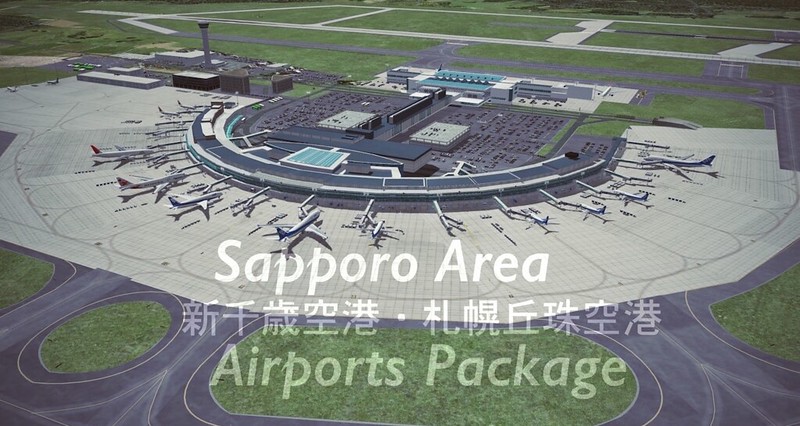 It also requires Open Scenery X,
and also needs <a href=http://forums.x-plane.org/index.php?app=downloads&showfile=17090>Flags of the World , a plugin featuring national flags from around the world.
If you want to see the snowy vastness of Hokkaido, you can try <a href=http://forums.x-plane.org/index.php?app=downloads&showfile=18061>Simple Season,
it can simulate the changes of the four seasons on top of the default scenery.
It also requires Open Scenery X,
and also needs <a href=http://forums.x-plane.org/index.php?app=downloads&showfile=17090>Flags of the World , a plugin featuring national flags from around the world.
If you want to see the snowy vastness of Hokkaido, you can try <a href=http://forums.x-plane.org/index.php?app=downloads&showfile=18061>Simple Season,
it can simulate the changes of the four seasons on top of the default scenery. -
Ted's Scenery Updates for X-Plane 10
Ted’s scenery is quite well-known; I have used his airports in Japan and some in the US before.
This time, the official website has released a list of updated files for X-Plane 10. We can see that airports in Japan such as Tokyo, Kansai, and Chubu are included, as well as most famous airports in the US like New York, San Francisco, Los Angeles, Chicago, and Atlanta. Furthermore, the file sizes are only a few megabytes, making them suitable for downloading. If you haven’t already, give them a try.
-
Super Ultra High Definition Mesh Scenery X-Plane 10 UHD Mesh Scenery v1
Just over a month ago, I introduced the latest version of the high-definition scenery addon, HD Mesh Scenery V3. Surprisingly, the developer immediately released an even more impressive Ultra High Definition version, X-Plane 10 UHD Mesh Scenery v1. Furthermore, it continues to be free to download and use—what a conscientious developer! Therefore, if you can afford it, please visit the webpage above and donate to show your appreciation.

Currently, the resolution of the Ultra High Definition (UHD) scenery has reached 30 meters in Kyoto. It covers 5 regions, all of which are famous scenic areas: Europe - Alps USA - Colorado Mountains (parts of New Mexico) USA - Canyons and Mountains in Arizona / Nevada USA - Mountains in Montana (5×5 degree area) USA - Sierra Nevada (Yosemite etc.) So, friends who enjoy sightseeing from the air should download and give it a try. Official screenshots are available <a href=https://picasaweb.google.com/101666907909842492197/UHDMeshSceneryV1FINAL?feat=directlink>here.
-
Winter Snow Scenery Addon XFlyer's Winter Package 1.1
This is also an amazing Plugin/Addon that can transform the Scenery into winter mode, featuring landscapes covered in heavy snow, Winter_Package 1.1.


The download address is available here.
-
HD Mesh Scenery V3
I have previously highly recommended the high-definition HD Mesh Scenery V2 addon. Recently, I discovered that a V3 version has been released. Compared to V2, this version includes numerous improvements, and the download size has been reduced by nearly half. Therefore, I am recommending it once again.
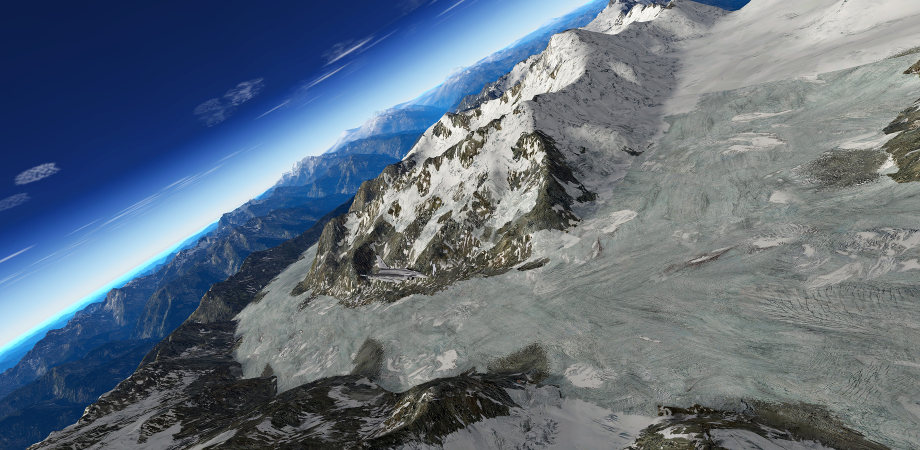
Currently, V3 provides Scenery for the following regions: Europe, including the Canary Islands North America, including the United States, Canada, and Alaska Japan Hawaii Australia
-
Highly Recommended X-Camera Plugin for View Settings
The name of the X-Camera Plugin makes it look like a screenshot tool, but it isn’t. It is simply a camera view Plugin for X-Plane that allows you to define your own favorite views for use in 3D mode. I tried it once and loved it immediately.
The installation method is very simple. Just click the green “Download X-Camera” button on the official website download page, then extract the files and copy them to X-Plane 9\Resources\plugins.