X-Plane 12 Version Info
-
X-Plane 12.4.0 Official Version Release
According to the X-Plane 12.4.0 Release Notes, the official version of X-Plane 12.4.0 has finally been released. I upgraded immediately to give it a test and didn’t find any issues, so everyone can use it with confidence.

Additionally, I remembered I have a 15-inch Lepow Portable Monitor Z1 that I haven’t used in a long time. I decided to use it as a secondary screen, so I set it up.
-
X-Plane 12.4.0beta Released
The beta version of X-Plane 12.4.0 was officially released before the end of the year, and of course, I upgraded immediately to test it. But first, let me copy down the introduction from the official Laminar Research website.
“Development of X-Plane 12.4.0 has been a long journey, bringing some fundamental improvements to the engine. I am naming this version C-Check, as it best summarizes the work we have done. We replaced core components of the simulator, improved systems, and addressed numerous bug reports. X-Plane 12.4.0 is not about adding flashy new features, but about preparing for the future and refining existing functionality.”
-
New Features in X-Plane 12.3.0
Overview
Weather is critical to safety in aviation.
In X-Plane 12.3.0, the weather system has been elevated to new heights. This update brings one of the most anticipated features: a brand-new, fully simulated Weather Radar. Combined with the Synthetic Vision on the X1000, flying is safer, more immersive, and more realistic than ever before.

In addition, the Airbus A330-300 has been fully overhauled. Every subsystem has been re-polished to make the flight experience smoother and more precise.
-
X-Plane 12.2.1 Release Notes
X-Plane 12.2.1 was released this week, so here is a brief translation of the release notes.
New Features
Airport Added custom airport: Zermatt Helipad (LSEZ) Updated versions of our “Gateway Airports” Added many library objects for airport designers: • Fire truck • Cherry Picker • Construction vehicles • Police SUV • Grass Runway markings • Compass Roses • Colored polygons • Hangars and tool sheds • Class F Jet Bridge • New Apron lighting • Movable helicopter platforms • Sloped roofs • Added weather effects to all flat roofs
-
Testing X-Plane 12.2.0 beta
X-Plane 12.2.0 beta is out, so I immediately upgraded to test it. I found that the cockpit instruments are much easier to read, and the rendering speed has improved, so I am extremely satisfied with the overall performance boost.
What’s new in X-Plane 12.2.0? X-Plane 12.2.0 Release Notes

Below is an excerpt from the official website introduction.
We strive to make X-Plane more immersive, realistic, and visually stunning with every update, but this update truly hits the mark. X-Plane 12.2.0 represents twelve months of meticulous improvements to cloud rendering, lighting, environmental effects, and graphics performance. If you’re interested in better cockpit lighting, improved sky colors, or our revamped cloud system, read on.
-
X-Plane Official User Manual
<a href="https://www.x-plane.com/support/manuals/" target="_blank">User Manuals</a> X-Plane 12 Quick Start Manual Online Version <a href="http://x-plane.com/manuals/desktop/">English Version</a> X-Plane 11 Quick Start Manual PDF <a href="https://www.x-plane.com/wp-content/uploads/2017/04/Manual_XPlane11_de_web.pdf?v=2024-02-09">German Version</a> <a href="https://www.x-plane.com/wp-content/uploads/2017/04/Manual_XPlane11_fr_web.pdf?v=2024-02-09">French Version</a> <a href="https://www.x-plane.com/wp-content/uploads/2017/04/Manual_XPlane11_sp_web.pdf?v=2024-02-09">Spanish Version</a> <a href="https://www.x-plane.com/wp-content/uploads/2017/04/XPlane11_QuickStart_japanese.pdf?v=2024-02-09">Japanese Version</a> <a href="https://www.x-plane.com/wp-content/uploads/2017/06/Manual_X-Plane11_Chinese.pdf?v=2024-02-09">Chinese Version</a> Navigation/Autopilot Operation Manual <li><a href="https://www.x-plane.com/manuals/S-TEC_Autopilot_Manual.pdf?v=2024-02-09">S-TEC 55 manual</a> (PDF)</li> <li><a href="http://x-plane.com/manuals/G430_Manual.pdf?v=2024-02-09">X-Plane G430 manual</a> (PDF)</li> <li><a href="http://x-plane.com/manuals/G530_Manual.pdf?v=2024-02-09">X-Plane G530 manual</a> (PDF)</li> <li><a href="http://x-plane.com/manuals/G1000_Manual.pdf?v=2024-02-09">X-Plane G1000 manual</a> (PDF) <a href="https://www.x-plane.com/wp-content/uploads/2021/06/X-Plane11_G1000_Manual_Chinese.pdf?v=2024-02-09">Chinese Version</a></li> <li><a href="http://x-plane.com/manuals/FMS_Manual.pdf?v=2024-02-09">X-Plane FMS manual</a> (PDF) <a href="https://www.x-plane.com/wp-content/uploads/2021/06/X-Plane11_FMS_Manual_Chinese.pdf?v=2024-02-09">Chinese Version</a></li> <li><a href="https://www.x-plane.com/manuals/Airbus_MCDU_Manual.pdf?v=2024-02-09">Airbus MCDU manual</a> (PDF)</li> <li><a href="https://www.x-plane.com/manuals/Citation_FMS_Manual.pdf">Cessna Citation X Honeywell FMS manual</a> (PDF)</li> Pilot Operating Handbooks <li><a href="https://www.x-plane.com/manuals/A330_Pilot_Operating_Manual.pdf?v=2024-02-09">Airbus A330-300 POH</a> (PDF)</li> <li><a href="http://x-plane.com/manuals/Baron_Pilot_Operating_Manual.pdf?v=2024-02-09">Beechcraft Baron 58 POH</a> (PDF)</li> <li><a href="http://x-plane.com/manuals/C90B_Pilot_Operating_Manual.pdf?v=2024-02-09">Beechcraft King Air C90B POH</a> (PDF)</li> <li><a href="http://x-plane.com/manuals/737_Pilot_Operating_Manual.pdf?v=2024-02-09">Boeing 737-8000 POH</a> (PDF)</li> <li><a href="http://x-plane.com/manuals/B747_Pilot_Operating_Manual.pdf?v=2024-02-09">Boeing 747-400 POH</a> (PDF)</li> <li><a href="https://www.x-plane.com/manuals/C172_Pilot_Operating_Manual.pdf?v=2024-02-09">Cessna 172 SP POH</a> (PDF)</li> <li><a href="https://x-plane.com/manuals/Citation_X_Pilot_Operating_Manual.pdf?v=2024-02-09">Cessna Citation X POH</a> (PDF)</li> <li><a href="https://www.x-plane.com/manuals/Cirrus_SR22_Pilot_Operating_Manual.pdf?v=2024-02-09">Cirrus SR 22 POH</a> (PDF)</li> <li><a href="https://www.x-plane.com/manuals/SF50_Pilot_Operating_Manual.pdf?v=2024-02-09">Cirrus Vision SF50 POH</a> (PDF)</li> <li><a href="https://www.x-plane.com/manuals/Lancair_Evo_Pilot_Operating_Manual.pdf?v=2024-02-09">Lancair Evolution POH</a> (PDF)</li> <li><a href="https://www.x-plane.com/manuals/MD-82_Pilot_Operating_Manual.pdf?v=2024-02-09">McDonnell Douglas MD-82 POH</a> (PDF)</li> <li><a href="https://www.x-plane.com/manuals/PA18_Super_Cub_Pilot_Operating_Manual.pdf?v=2024-02-09">Piper PA-18 Super Cub POH</a> (PDF)</li> <li><a href="https://www.x-plane.com/manuals/R22_Pilot_Operating_Manual.pdf?v=2024-02-09">Robinson R22 Beta II POH</a> (PDF)</li> <li><a href="https://www.x-plane.com/manuals/RV-10_Pilot_Operating_Manual.pdf?v=2024-02-09">Van's Aircraft RV-10 POH</a> (PDF)</li> -
X-Plane ATC System Manual-6
Special Takeoff Situations
X-Plane offers several special takeoff situations that do not directly correspond to the real world, such as Air Start and Runway Start. In reality, you would not enter an aircraft already parked on an active Runway, so in the eyes of Air Traffic Control (ATC), these flights are already considered in operation.
For a Runway Start, if the airport has a Tower controller, you will be handed off to the Tower, since under normal circumstances, an aircraft cannot be stopped on an active Runway without permission from the Tower. In this situation, you are considered cleared for takeoff, even though this is an unscheduled flight. Since a flight plan cannot be entered in the main menu, this status is logical: you are already on the Runway, so you must be cleared for takeoff, but ATC does not know your Route.
-
X-Plane ATC System Manual-5
A Typical Planned Flight
Vancouver Intl Delivery, N750XP, request IFR clearance to Whitehorse Erik Nielsen Intl. The flight plan has been filed via the ATC dialogue function, flying from Vancouver International Airport to Whitehorse Erik Nielsen International Airport, following a series of waypoints. The simulator assumes the Clearance Delivery controller has the routing form, so the pilot does not need to repeat the routing information at this stage; this is purely to confirm the filed flight plan.
-
X-Plane ATC System Manual-4
VFR Flight
If you do not wish to formally follow a flight plan and be fully controlled, you can still use ATC services. You can request a VFR departure instead of filing a plan. Once you are out of the immediate vicinity of the airport, you are free to choose any route you decide.
If you take off from a fully controlled airport, when you are handed over to the Center controller, you will automatically receive Flight Following service (also known as a Traffic Service), otherwise it is up to you to contact them and request it.
-
X-Plane ATC System Manual-3
SIDs/STARs
Support for SID/STAR procedures has been added starting with X-Plane 12.2.0. These are published Arrival and Departure routes covering many airports worldwide. The purpose is to reduce radio communication and reduce the workload for controllers and pilots by using common, known routes that do not require vectors for every turn. These procedures cover the basics of the route, but may also specify minimum or maximum speeds and altitudes, turn directions, and more. Once you are told which procedure to use, you should fly that procedure accurately, requiring little further instruction.
-
X-Plane ATC System Manual-2
Main ATC Window

General Functions
The main ATC window contains three tabs, the most commonly used being the first: the Communications tab. This tab is divided into two areas:- Upper area: Displays a scrollable message history, allowing you to view previous messages.
- Lower area: Displays a list of requests or replies relevant to the current situation.
You can use the splitter bar to adjust the size ratio of the two areas. Note that the request list may contain more items than the visible area, so you will need to scroll to see all options. Typically, the most relevant requests appear at the top of the list.
-
X-Plane ATC System Manual-1
With the official release of the X-Plane 12 ATC System Manual, let’s take a moment to study it and translate it into Chinese along the way. (Actually, this is a paraphrase by ChatGPT)
Overview
The ATC (Air Traffic Control) system is designed to ensure your safety and that of other air users by coordinating aircraft movements and transmitting necessary information. Whether you are using a flight plan and flying along a predetermined route, or flying randomly, you can use ATC services. ATC is an indispensable component of almost all real-world flight scenarios. Please remember that to operate an aircraft in reality, you need a flight radio license and a pilot license.
-
Test X-Plane 12.1.0
Upgraded X-Plane to 12.1.0-beta-2 over the weekend and flew around Yosemite for a while. Found it to be fundamentally stable, with no bugs appearing, so I’m quite satisfied.
The startup screen has changed to a KLM Boeing 737, and the startup time seems a bit longer.

Check the version info

Opened the settings screen; it doesn’t feel like much has changed. Turned on RCAS to see how it works. Also selected the new HUD.

-
X-Plane 12.1.0 (Beta 1) Release Notes
X-Plane 12.1.0 Beta 1 is finally here. Looking at the lengthy Release Notes, there are quite a few feature improvements. Below is a translation of excerpts that I am particularly interested in.
General Updates
- Clouds are now blended at the voxel level rather than the METAR level, fixing issues with pyramids, cubes, and other distinct shapes.
- Weather near METAR stations uses softened Voronoi diagrams for blending instead of the lever method, resulting in METAR conditions at airports that are closer to reality.
- Refactored internal code to streamline the interaction between envelopes, moments, and simulation.
- The downloader has been rewritten to download current weather faster.
- Enabled new weather servers that make METAR data more resilient and allow for debugging of past weather via replay support tags.
World Space Cloud Shadows
-
XP12 A330 Takeoff Configuration
I’ve been reviewing the A330 in X-Plane 12 for the past few days in order to use the miniFCU peripheral. Here are a few notes I’ve written regarding the takeoff setup.
First, check the upper ECAM status section as follows:

So, set the Auto Brk to Max;

To arm the spoilers (GND SPLRS ARM), pull the handle up;

The Flaps Config T.O. setting is located in the FMC’s Prop page (R3 position); set it to deploy the flaps;

-
Detailed Explanation of 12.1.0
As everyone knows, the X-Plane team is growing at an unprecedented rate. One result of this is larger updates with more content covering more aspects of the X-Plane experience, and 12.1.0 is no exception!
While initially envisioned as a graphics-focused release, our team has also implemented new aircraft systems, flight model improvements, weather, ATC system improvements, enhancements for X-Plane Professional, and a physics-based camera that makes you feel like you’re truly moving along with the aircraft. This version is currently undergoing internal testing, and we look forward to releasing it as a public beta as soon as possible.
-
Regarding the Upcoming Versions 12.1.0 and 12.2.0
The development plans for versions 12.1.0 and 12.2.0 have been disclosed on the official website. Below is the translation. Blog Post Walk of Shame
Two Quick Store Notes:
We announced the X-Plane store plan in Montreal; Dellanie has a great FAQ there, but for developers, I want to highlight two points:
-
We will not wall off X-Plane. I fully understand why people might think we would, since the iPhone App Store is (1) a very prominent way to do in-app purchases, and (2) the iPhone is a walled garden. But we won’t do that. Your way of importing everything into X-Plane will still work, including addon installers, dragging folders, etc. Purchasing through the store is not mandatory, and all existing ways of working will continue to function. You won’t have to pay for free software or re-buy anything.
-
-
Introduction to the X-Plane Store
The X-Plane official website introduced the upcoming “X-Plane Store” feature. This is great news that will save users the trouble of managing Addons, and it is something to look forward to.
Introducing: The X-Plane Store
Below is a translation of the original text using ChatPGT, with the following Prompt:
You are a professional Chinese-English translator. Please prompt the questioner and translate the English question into Chinese. The translation process involves two steps: first, translate using literal translation, and second, paraphrase the literal translation result into natural Chinese.
Introducing: The X-Plane Store!
-
Features of X-Plane 12.0.8, Prospects for 12.1.0, and Pricing Plans
Coming in X-Plane 12.0.8 and beyond - Roadmap Update
Our team is currently preparing the beta for X-Plane 12.0.8 - we expect to have something ready within the next week or two. This update focuses on improving X-Plane’s flight model (the math used to determine how planes actually fly in the sim), networking/multi-monitoring, and tools for using X-Plane with projectors.
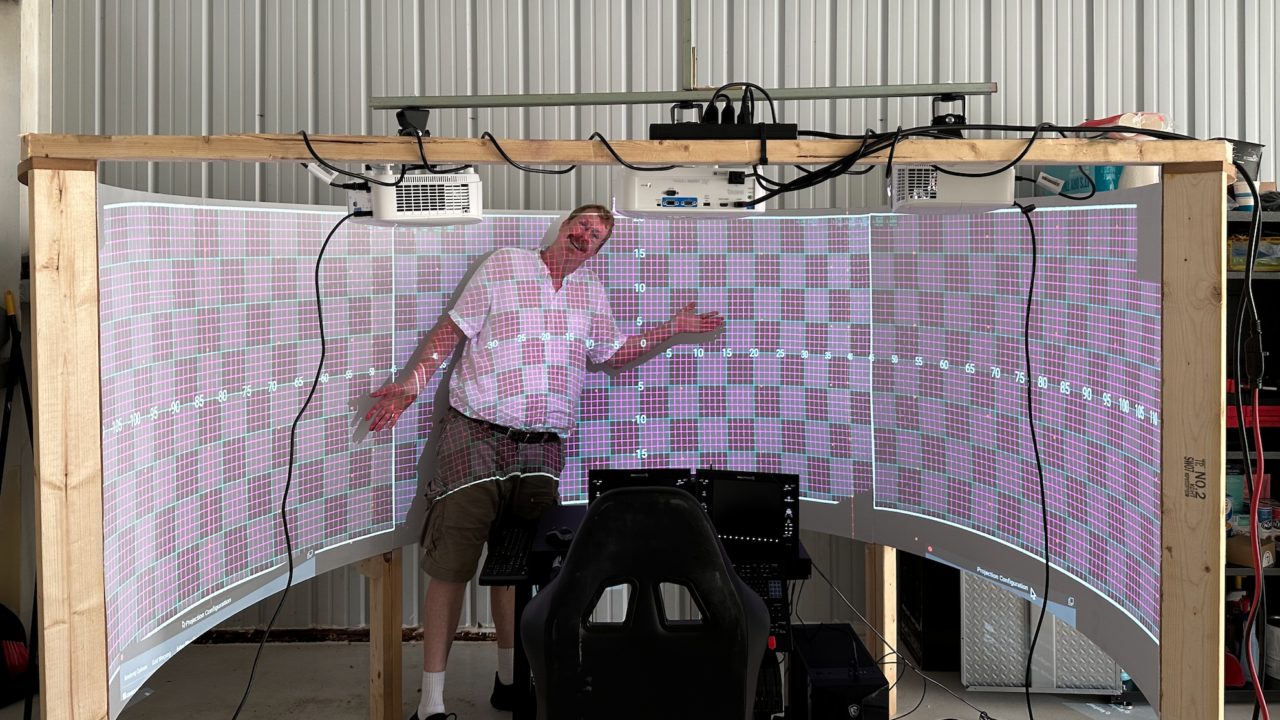
Projector Correction/Blending Using multiple projectors to display the world around you is the gold standard in flight simulation. But there is a catch - when you aim multiple projectors at a curved screen, the image from each projector looks weirdly distorted. We solve this by rearranging the pixels X-Plane sends to the projector itself - resulting in a visually correct image. Behind the scenes, this is powered by various trig and calculations, but the end-user just needs to align a grid pattern with their display, and they are good to go! This feature will be available in our X-Plane Professional Licenses.
-
Massive New Features in X-Plane 12.06
X-Plane 12.06 Is Full of Many Things
The content was translated from English to Chinese with the assistance of ChatGPT.
I tested it after the upgrade.
 I am very satisfied with the new clouds; they display more realistically and perform well, with no drop in frame rate.
Clouds and Weather Since the release of X-Plane 12.0, we have been working on improving the performance, accuracy, and quality of the cloud and weather systems. Version 12.06 implements the first two stages of this multi-step process: