Shopping with the Garmin D2 Delta PX Titanium Aviator Watch and Garmin Pay
Saw on the Garmin Japan official website that Japan Net Bank starts supporting Garmin Pay, I happened to have an account and VISA card with this bank, so I immediately set it up and tested it out with a purchase.
Launched the Garmin Connect App on my iPhone, found the Garmin Pay settings page,

 selected VISA, entered the card number and expiration date; the setup was very simple.
After filling in the details, a confirmation email was sent to the Japan Net Bank email address. The screen looked like this:
selected VISA, entered the card number and expiration date; the setup was very simple.
After filling in the details, a confirmation email was sent to the Japan Net Bank email address. The screen looked like this:
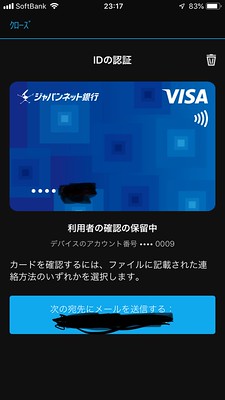 Once confirmed, the VISA card setup is complete.

At the same time, it synced to the watch. A message appeared after the setup was finished,

 Launching the e-wallet on the Garmin D2 Delta PX, the VISA card is also displayed on the watch.

Then I went to a nearby Lawson convenience store to buy some random items,
opened the e-wallet, and the watch prompted me to enter my Japan Net Bank account password,
 After entering the password, a “Please approach NFC receiver” message appeared,
 Next, I held the watch close to the receiver on the convenience store’s POS machine,
The payment was finished in less than a second,
The shopping experience was very smooth.
Next, I held the watch close to the receiver on the convenience store’s POS machine,
The payment was finished in less than a second,
The shopping experience was very smooth.
Opened Garmin Connect on the phone,
Found the VISA card in the Garmin Pay menu,
I could see the transaction history displayed at the bottom of the screen,
 It looks like using Garmin Pay for cashless payments might become a new habit in the future.
I noticed in the screen above that the last 4 digits of the credit card number are displayed as 0009 during payment,
so I checked the Lawson receipt,
 The last 4 digits were indeed 0009.