Thoughts on Using the Garmin D2 Delta PX Titanium Aviator Watch
I have been using the D2 Delta PX for over half a year now, so I think it’s time to summarize my thoughts on it.
First of all, the design of the outer bezel has improved significantly compared to the D2 Charlie.
The color of the outer ring matches the Watch Face, giving it a more harmonious overall feel.
Additionally, the outer ring has a slight slope,
which improves the issue of frequently bumping into things when wearing the D2 Charlie.

Because the D2 Delta has added a wrist-based blood oxygen detection feature, power consumption has increased considerably compared to the D2 Charlie. I used to charge my D2 Charlie once every 5 days on average, but now I need to charge the D2 Delta every 3 days. It took some getting used to at first, but after using it for a while, I’ve adapted to it.
After the Garmin D2 software update, it can automatically download the Navigation Database. This is the feature that users are most satisfied with, as previously it was necessary to connect the D2 to a computer and use PC-based software to transfer the database to the watch, which was very inconvenient.
But now with the update,
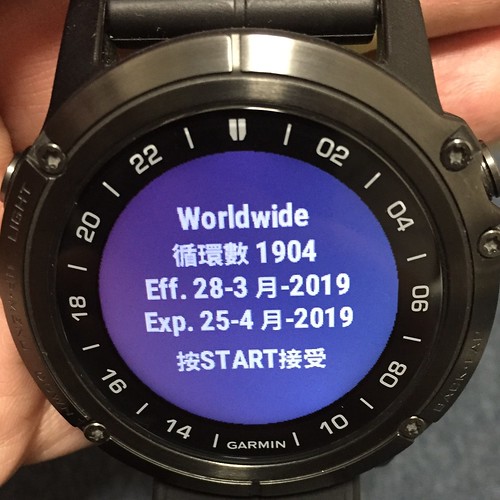 a prompt appears on the Watch Face; just press the Start button to accept,
 this process is very simple and refreshing.
For installing Watch Faces, Widgets, and other applications,
Garmin has launched the Connect IQ mobile app,
 it is like the App Store on iOS, or Google Play on Android.
Users can easily find the APPs, Widgets, or Watch Faces they need and download them,
while also facilitating the management of watch APPs.
it is like the App Store on iOS, or Google Play on Android.
Users can easily find the APPs, Widgets, or Watch Faces they need and download them,
while also facilitating the management of watch APPs.

Speaking of which, due to the increased power consumption of the D2 Delta,
I specifically installed this Battery Widget,
 through which I can know the watch’s hourly power consumption,
as well as predictions on how much time is left to use.
It is very useful.
through which I can know the watch’s hourly power consumption,
as well as predictions on how much time is left to use.
It is very useful.
Regarding Watch Faces, I will introduce a few that I use frequently recently.
One is SR2,
 and the other is Instinct Face2,
 their common features are beautiful fonts, large font size, and a lot of information without looking cluttered.
There is also Infocal; I prefer the white background design,
their common features are beautiful fonts, large font size, and a lot of information without looking cluttered.
There is also Infocal; I prefer the white background design,
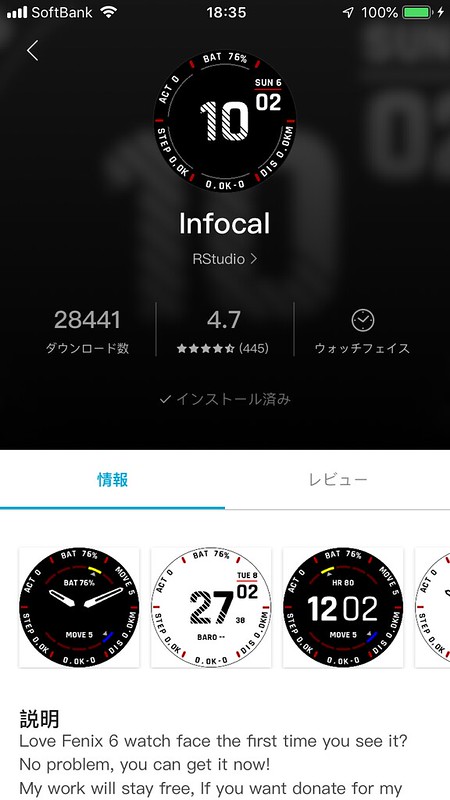 the design is simple and easy to identify.
There is also a CASIO III,, mimicking Casio watches,

 it has a very nostalgic feel.
Past Comments
軍師 - 11/23/2019 12:14:42 PM
Hello~ May I ask I recently purchased the D2 DELTA PX and updated it to the latest version, but there are several Watch Faces that cannot be downloaded. Display: Installing this app requires updating D2 Delta PX APAC first. Please use Garmin Express to update D2 Delta PX APAC. (But I have updated to the latest version available) I called customer support and was told that some versions are the US version, and the Taiwan update hasn’t reached that version yet, so some might not be available (I was originally convinced)
But after seeing your post recommending the Battery Widget as useful~ installing this also displays: Installing this app requires updating D2 Delta PX APAC first. Please use Garmin Express to update D2 Delta PX APAC.
That’s strange~ you can install it, but I can’t.
May I ask~ do you know the reason? Please let me know, thanks.