Renewing the Let's Encrypt Certificate
The electronic certificate is about to expire, so I’m playing with Let’s Encrypt again.
First, execute the command: $ certbot –config-dir ~/letsencrypt/etc –work-dir ~/letsencrypt/lib –logs-dir ~/letsencrypt/log certonly –manual -d yinlei.org -d www.yinlei.org -d yinlei.net -d www.yinlei.net Then, just like last time, a prompt will appear asking you to create the authentication file under .well-known/acme-challenge/ on the server. Once done, you get the following information: IMPORTANT NOTES:
- Congratulations! Your certificate and chain have been saved at ~/letsencrypt/etc/live/yinlei.org/fullchain.pem. Your cert will expire on 2017-06-28. To obtain a new or tweaked version of this certificate in the future, simply run certbot again. To non-interactively renew all of your certificates, run “certbot renew”
Let’s look under etc/live/yinlei.org/ $ ls -l total 32 lrwxr-xr-x 1 laoyanhunhua staff 34 3 30 19:07 cert.pem -> ../../archive/yinlei.org/cert2.pem lrwxr-xr-x 1 laoyanhunhua staff 35 3 30 19:07 chain.pem -> ../../archive/yinlei.org/chain2.pem lrwxr-xr-x 1 laoyanhunhua staff 39 3 30 19:07 fullchain.pem -> ../../archive/yinlei.org/fullchain2.pem lrwxr-xr-x 1 laoyanhunhua staff 37 3 30 19:07 privkey.pem -> ../../archive/yinlei.org/privkey2.pem
It turns out that new files like cert2.pem were generated.
Next, upload the new certificate to the server. First, upload the new private key file private2.pem.
Then copy the new certificate cert2.pem over.
Finally, upload the new intermediate certificate chain2.pem.
(SSL Server Certificate → Domain Settings → SSL Certificate Update → Create new settings including private key →
Upload private key → Install certificate → Install intermediate certificate)
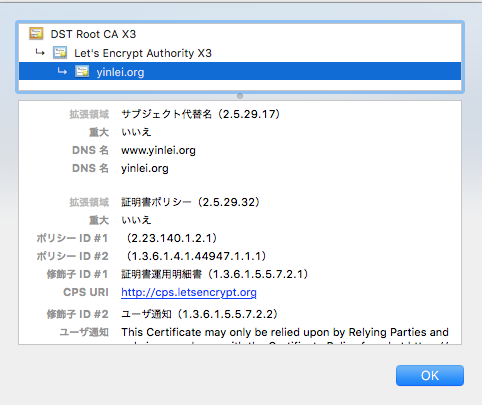
Check it in the browser, and sure enough, the certificate’s validity period has been changed to 3 months later.
Note:
Let’s Encrypt electronic certificates do not support wildcards for multiple domains, but they do support SAN (Subject Alternative Name).
Therefore, one certificate can include multiple domains; use the -d option in the command to specify yinlei.org and www.yinlei.org.
Of course, wildcards would be best, so you don’t have to list subdomains one by one, but it’s not too much trouble since this site only has 2.