Gqrx 20150906 Upgrade
The Gqrx version update adds the long-awaited bookmark feature, making it increasingly convenient to listen to the radio and ATC on the computer.
The specific installation method is as follows:
1 sudo port -v selfupdate 2 sudo port -v upgrade outdated
Encountering a “gnuradio-analog not found” error here, I executed:
3 sudo port install gnuradio
to install gnuradio, and then executed command 2 again.
2 sudo port -v upgrade outdated
The upgrade completed successfully.
Then, locate gqrx.app from Applications/MacPorts/Qt4 in Finder and run it.
Select a device and click OK.
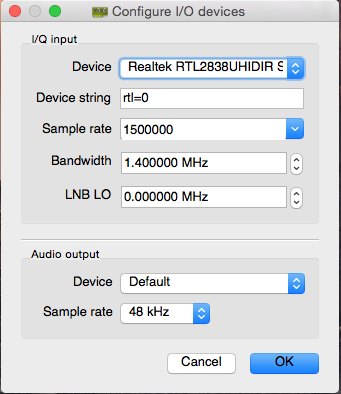
The subsequent UI looks similar to the previous version, but features a new Bookmarks bar.
You can right-click to add the currently used frequency to the Bookmarks, and set a title and tags.
After adding a few FM and ATC frequencies, the result is as follows:
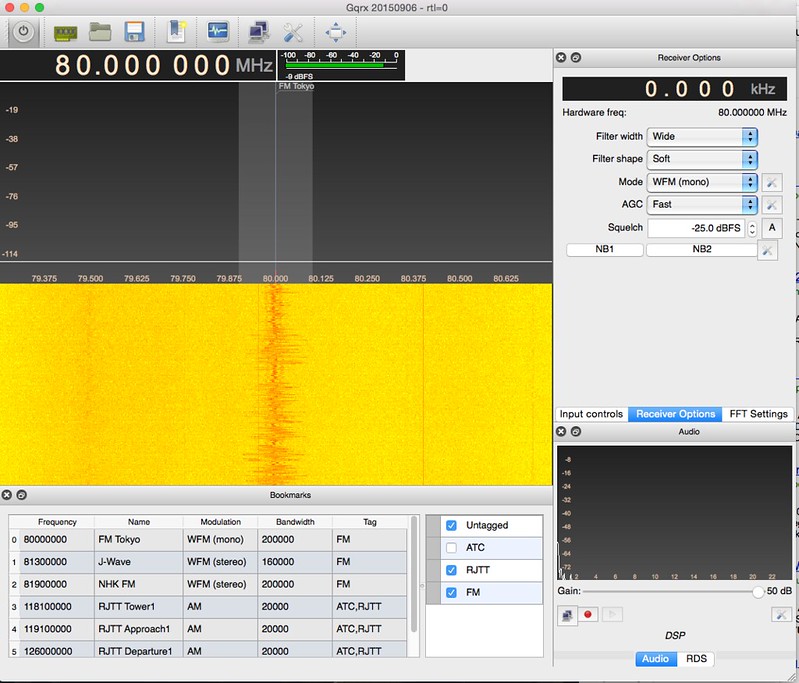
Simply double-clicking a preset item in the list allows you to change channels immediately; it is truly very useful.
The new features and improvements in this upgrade are as follows:
   NEW: Bookmarks.
   NEW: FM RDS decoder using gr-rds.
   NEW: Frequency tooltips on the FFT area (disabled on Mac).
   NEW: Filter shape selector (soft, normal, sharp).
   NEW: Zoom slider to aid zooming on the frequency axis.
   NEW: RFSpace Cloud-IQ support.
   NEW: OIRT stereo decoder (Daniil Cherednik).
 FIXED: Prevent crash due to device errors while starting the application.
 FIXED: Use hardware frequency in IQ file names.
 FIXED: FFT averaging (it can now be disabled).
 FIXED: "Could not resolve pattern10600" error messages in the terminal.
 FIXED: Antenna selection error with USRP B210 (Ethan Trewhitt).
IMPROVED: Fractional PPM correction. IMPROVED: AGC peformance. IMPROVED: FFT performance.
Please refer to this site’s old article for instructions on how to use Gqrx.
End