Add-on Management xaddonmanager
When using X-Plane 10, you will certainly make extensive use of Addons, such as aircraft, Scenery, airports, and so on. However, managing them can become troublesome once the number of Addons increases. For example, I might have several versions of the new Hong Kong airport; sometimes I want to use A, sometimes B, and switching between them is inconvenient. Today, I recommend a small utility for managing Addons called xaddonmanager, which allows you to easily select which Addon to use.
The official website for xaddonmanager is here. You can see that this is quite an old piece of software, version 2.0, and it hasn’t been updated since 2010. However, as long as it’s functional, that’s enough.
Here is how to use it. First, download it from here. Launch the executable (on MacOS it is XAddonManager.app) and select the directory where X-Plane 10 is installed. Then, the management screen will appear:
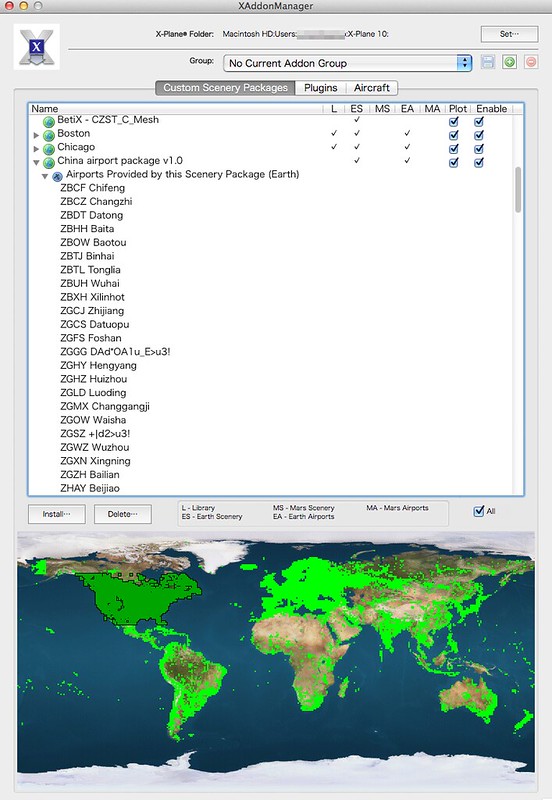
The options in xaddonmanager are simple, with 3 main categories: Scenery, Plugin, and Aircraft. Each category lists a view of the currently installed Addons. Taking the Scenery category above as an example, the property definitions for each scenery are as follows: L – Library ES – Earth Scenery MS – Mars Scenery EA – Earth Airport MA – Mars Airport
Then, use the Plot option to customize whether to display that scenery, or use Enable to temporarily stop loading that scenery.

When you choose not to load the scenery, you can see that xaddonmanager automatically creates a “Custom Scenery (disabled)” directory and moves the scenery into it. By moving infrequently used scenery, X-Plane does not need to scan that directory during startup, thereby saving memory and speeding up the startup process.
That concludes the introduction to using xaddonmanager. I hope this is helpful to everyone.