Using phpVMS and xacars to Log Flight Records
XACARS is a free plugin for X-Plane. It simulates the use of the ACARS protocol to transmit basic aircraft information—such as departure and arrival airports, altitude, speed, heading, etc.—via HTTP to a web server and records it into a server-side database.
phpVMS is open-source software (a web application) for simulating virtual airlines. It allows you to open an airline on the internet where flight simulation enthusiasts can join to execute simulated commercial flight missions and continuously improve their flight ratings.
XACARS and phpVMS can be used simultaneously. This allows you to automatically transmit your flight information from X-Plane to the virtual airline in real-time, giving you a clear view of the entire company’s flight status on a Google Map.
I am not particularly interested in virtual airlines, but using these two free software tools allows me to upload my flight logs to a server and view my flight records anytime, anywhere. It feels quite a bit like a cloud service, which is really attractive. So, I spent half a day today installing these two programs and basically got the plugin and the website running. Below is a brief record of the installation process.
Download the XACARS plugin from here. After decompressing the file, copy XACARS.xpl to the Resources/plugins directory. Create an XAcars directory inside the plugins directory and place the configuration file XACARS.ini in it. The content is roughly as follows: [Server] Address = http://host/vms1/action.php/acars/xacars/acars PIREP = http://host/vms1/action.php/acars/xacars/pirep FlightInfo = http://host/vms1/action.php/acars/xacars/data User = admin Password = 123456
[ACARS] POSReportTime = 1 EnableLiveACARS = 1 EnablePIREP = 1 AutoPIREP = 1
The usage of XACARS is very simple, so I won’t explain it in detail here.
If you are not very familiar with it, you can refer to this introduction.

Simply put, press the Start ACARS button while the engine is not started. After landing, shut down the engine and then submit the PIREP (Pilot report) to the server.
Next, I will introduce the installation of phpVMS. Since it requires UNIX server management knowledge, I won’t go into further detail here. The method basically involves installing MYSQL and then using the installation scripts included in the system to install the web application. However, due to PHP version issues and some minor bugs, I encountered many errors and warnings along the way, which cost me some time. Fortunately, I was able to find various solutions on Google to resolve them.
Additionally, there is a debug mode in the program. Set debug to on in the configuration file, then track the log files under core/logs/ and debug the code slightly yourself.
One more thing: navigation data like VORs and airways is downloaded from here. It has over 90,000 entries, but the data is quite old, seemingly from 2011, and a lot of waypoint information is missing. So I looked around online and saw that the data here is good, from July 2013. With this, all the information was complete, with 280,000 entries. That’s really great!
Below are some URLs for troubleshooting for your reference.
The official instructions, this is what I used for installation http://forum.phpvms.net/page/index.html/_/getting-started/installation-r2
Source code wget http://downloads.phpvms.net/phpvms.full.zip
Installation scripts, for example http://host/vms1/install/checkinstall.php http://host/vms1/install/install.php Note that you need to clear core/local.config.php to execute.
Below are solutions to some problems. They aren’t difficult, just requiring modifications to a few lines of PHP code. http://forum.phpvms.net/topic/20629-most-common-fixes-phpvms-installation/ http://forum.phpvms.net/topic/8920-sudden-problem/ http://stackoverflow.com/questions/16765158/date-it-is-not-safe-to-rely-on-the-systems-timezone-settings-in-codeigniter http://forum.phpvms.net/topic/17290-solvedpilot-list-empty/#entry93430
After installation, set the airline name, airports, aircraft types, and other information, then add pilot information.
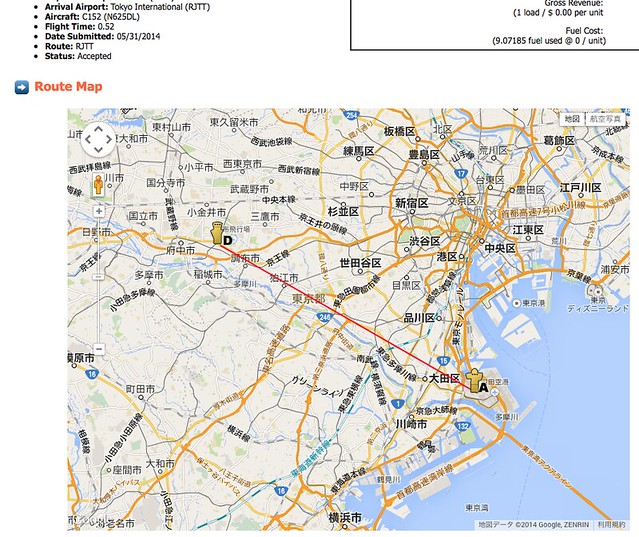
I launched XP and flew a few round trips between Chofu Airport and Haneda Airport. It looks like the server-side is working fine.

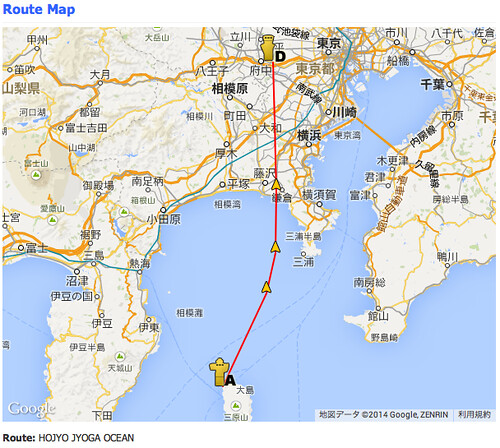
This is the route from Chofu Airport to Oshima Airport. You can see that the 3 waypoints in between are all displayed.
#TODO https://github.com/nshahzad/phpvms_navdata
End