Helicopter Flight Tutorial in Flight Simulator
Note: This article uses U.S.-manufactured single-rotor helicopters as examples, meaning the rotor rotates counter-clockwise. European-manufactured aircraft generally rotate clockwise; to counteract the rotational torque, the operation of the anti-torque pedals (tail rotor) is the opposite of U.S. aircraft.
To practice helicopter flying, I recently bought a joystick
CH Products Fighterstick USB,

I also bought a book on helicopter flying basics to cram up on theory. After over a dozen hours of practice, I’ve finally made some progress. Let me explain it step by step.
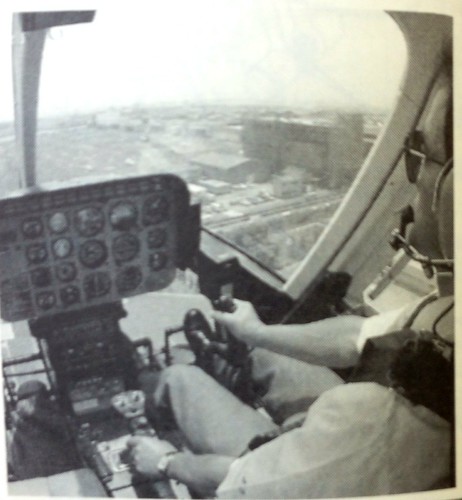
First, we need to know that helicopter controls are very different from fixed-wing aircraft. Look at the image below:
 The key points are:
-
The Captain’s seat is on the right side.
-
Helicopters do not have a control Yoke like a Cessna 172.
-
The pilot’s right hand controls the cyclic stick (Cyclic Control), managing the aircraft’s pitch and roll attitudes.
 Note that moving the helicopter forward and backward requires changing the aircraft’s pitch attitude. Pushing the stick forward lowers the nose, and the aircraft flies forward, as shown below:

-
The pilot’s left hand operates the Collective Pitch Control, raising and lowering the aircraft by changing the rotor’s angle of attack.
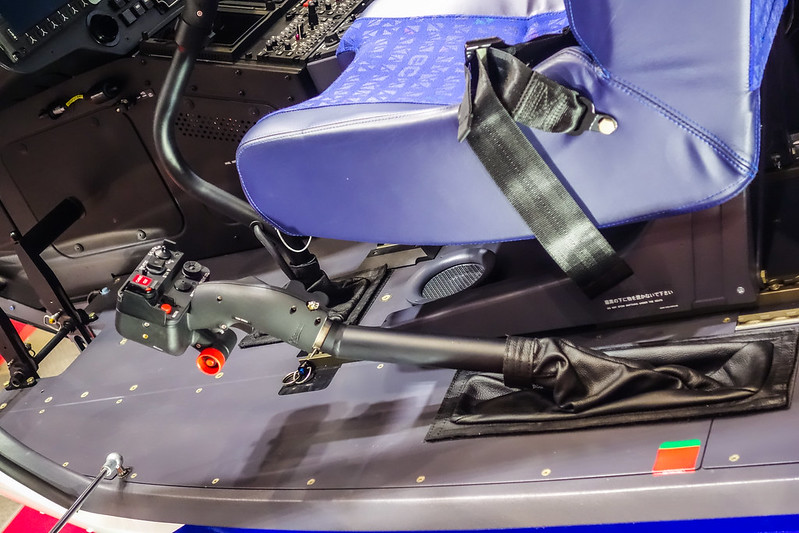 When the pilot pulls the collective lever up, the blade pitch increases by the same angle simultaneously, increasing rotor Lift; conversely, Lift decreases.
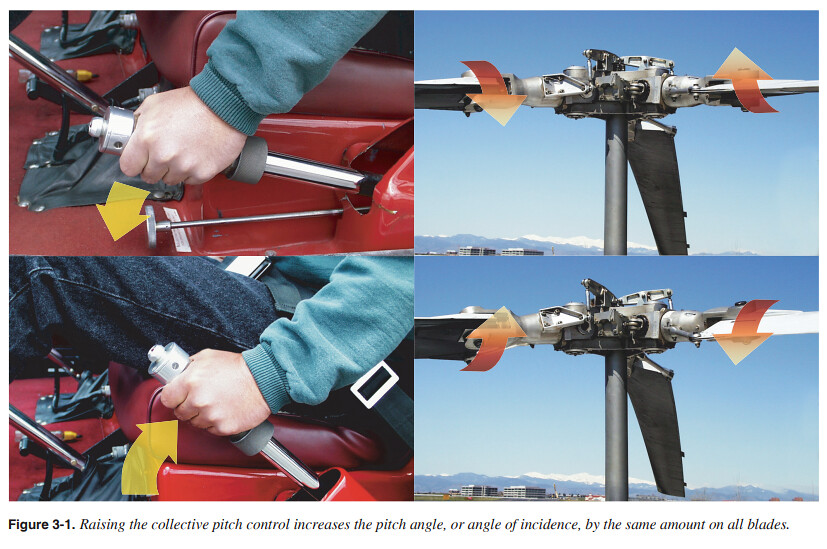
Usually, a twist-grip throttle control is also set on the collective lever handle, similar to a motorcycle’s throttle control, used to adjust the engine throttle; therefore, this lever is also referred to as the throttle collective.
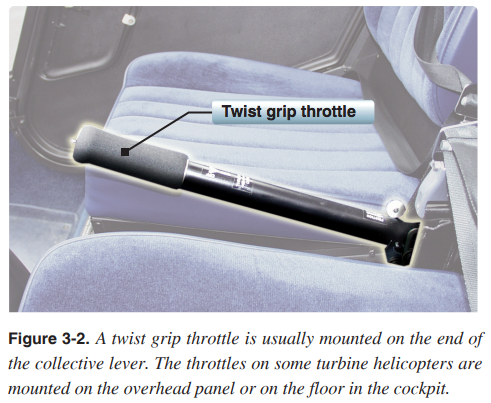
- Anti-torque Pedals are also essential, used to control the aircraft’s yaw attitude, which is the same as in fixed-wing aircraft.

Wikipedia’s helicopter explanation states:
For single-rotor helicopters with tail rotors, the pedals are connected via a control linkage to the tail rotor's pitch control mechanism. By controlling the magnitude of the tail rotor pitch, the lateral force produced by the tail rotor is adjusted, achieving the purpose of controlling Heading. For single-rotor helicopters without tail rotors (NOTAR), the pedals control the amount of air emission from the tail boom to adjust lateral force. For twin-rotor helicopters, the pedals control the differential between the total pitch of the two rotors; increasing one and decreasing the other causes the counter-torques to become unbalanced, thereby causing the fuselage to yaw.
Next, let’s look at the hardware setup in X-Plane.
The settings under the menu Settings / Joystick & Equipment / Axis are as follows:
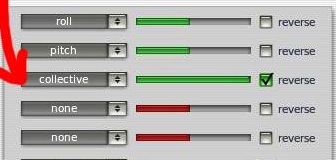 Just like with fixed-wing aircraft, the settings for pitch, roll, and yaw axes remain unchanged, but you need to add the collective part (yaw is not shown in the image above).
Another point to note: some helicopter models have a Governor switch.
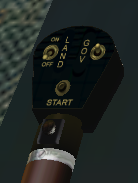 Turning on GOV enables auto-throttle, so you don’t need to control the throttle manually; the throttle axis is no longer needed.
My CH Fighterstick has 3 axes, so I set the stick to pitch and roll, and simply changed the left throttle knob to collective. For pedals, I’m still using my existing Saitek Pro Flight Rudder Pedals. The setup items are quite simple. Also, this joystick has hardware trim buttons for the pitch and roll axes, which is very useful for helicopter flying.
Alright, time to introduce how to fly. Today I’ll only cover the most standard takeoff mode. Don’t forget to set the collective to the lowest position before starting the engine. Also, just like fixed-wing aircraft, helicopters need to take off into the wind.
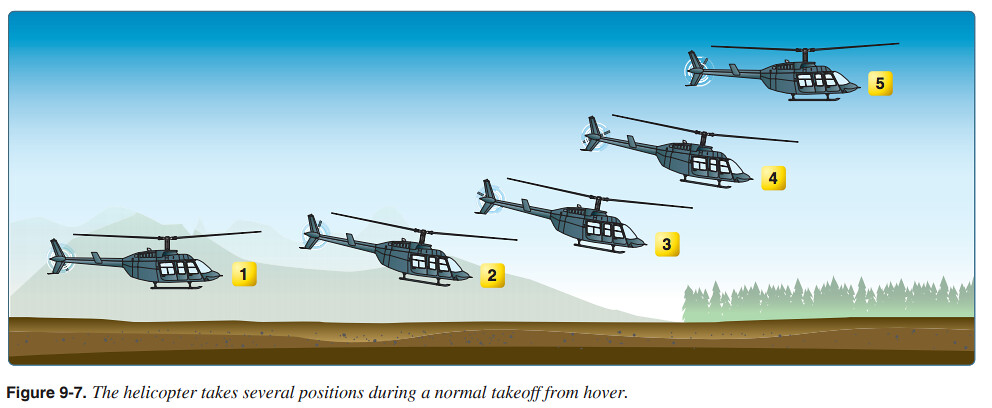
Takeoff Procedure:
- Very carefully and slowly increase the collective, while simultaneously applying slight left pedal input coordinated with the collective amount. Pedal control relies mainly on experience; the standard is to keep the nose pointing straight ahead, preventing the aircraft from drifting left or right. After a few flights, you will naturally memorize the amount of collective and pedal input required.
After the collective reaches a certain amount, the aircraft gains enough Lift, and the fuselage will rise slightly. At this moment, you must control the pedals well to keep the fuselage facing straight ahead. At the same time, watch the Attitude Indicator and adjust the cyclic stick accordingly to keep the fuselage balanced and not tilted. After a few flights, you will master exactly how much collective is needed for the aircraft to rise; you might consider marking that position on the stick. Once the stick position is mastered, the hardware pitch and roll trim buttons come in handy. Just adjust to a stable position, and thereafter you basically won’t need to move the stick much.
Keep the aircraft hovering at around 1.5 meters.
-
Lightly push the cyclic stick forward, and the helicopter will start forward flight; the greater the pitch angle, the greater the speed. Pay attention to the Airspeed Indicator and Attitude Indicator. If the altitude drops slightly, you can appropriately increase the collective and apply slight left pedal to maintain height and balance.
-
Upon reaching a certain speed, relax the stick slightly and pull the nose up, gradually increasing forward speed while controlling the aircraft to climb.
-
After the speed reaches a certain value, the airflow stabilizes, and you can slowly release the left pedal.
-
Hold the stick to maintain Level Flight at a certain altitude.
At this point, the takeoff phase is complete. For beginners just starting to fly, maintaining stability is a difficult hurdle. The instructions here look simple, but actual control is not easy. It requires subtle manipulation and patient practice over a certain amount of time.
Next, let’s look at turning while hovering.
 To turn left, of course, you press the left pedal, but to prevent sideslip, you must also tilt the cyclic stick slightly to the left; similarly, for a right turn, while operating the right pedal, the stick must also be tilted to the right.
Below is a summary of stick operations:
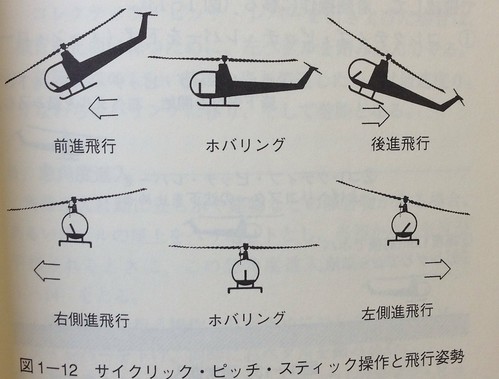 Top Left: Stick tilted forward, fly forward;
Top Right: Pull stick back, fly backward;
Center: Stick in neutral position, hover;
Bottom Left: Stick tilted left, fly left;
Bottom Right: Stick tilted right, fly right.
Top Left: Stick tilted forward, fly forward;
Top Right: Pull stick back, fly backward;
Center: Stick in neutral position, hover;
Bottom Left: Stick tilted left, fly left;
Bottom Right: Stick tilted right, fly right.
Finally, let me introduce the landing method.
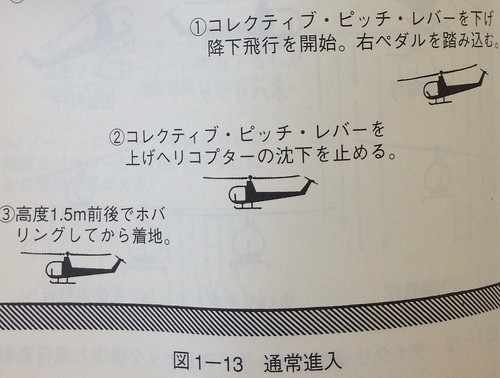
- Gradually lower the collective lever to reduce flight altitude. At the same time, due to the reduction in rotor torque, to prevent the fuselage from spinning, you must also reduce the tail rotor’s lateral force. Therefore, lightly press the right pedal to maintain the heading.
The descent gradient for helicopters is generally 10 degrees. We know that fixed-wing aircraft usually have a 3-degree gradient, so helicopters descend much more steeply than general fixed-wing aircraft.
Speed control during descent relies on the cyclic stick; descent rate relies on the collective lever; heading direction relies on the pedals. Meanwhile, pay attention to the instruments; speed, attitude, and Heading all need to remain stable and coordinated.
-
As the helicopter approaches the Apron, you need to continuously reduce speed. However, as speed decreases, Effective Translational Lift (ETL) also decreases, so you need to pull up slightly on the collective to maintain an appropriate descent rate. When changing the collective, don’t forget to apply the corresponding pedal input; here, press the left pedal to maintain stability in the forward direction.
-
Upon reaching about 1.5 meters above the landing spot, reduce the ground speed to 0, enter a hover, and slowly land. This step might be the hardest; I can’t guarantee success every time right now, and I still need constant practice.
End
Updated October 9, 2016 Found a great tutorial: Tutorial: Flying Helicopters In X-Plane. It includes keyboard operation instructions. Here is an excerpt. Below are the default XP keys: F2 = throttle up a bit F1 = throttle down a bit F3 = collective up a bit F4 = collective down a bit F5 = Mixture down (engine shutdown) F6 = Mixture up Below are the author’s custom keys: Z = left pedal X = center the pedals C = right pedal
Updated June 9, 2017 Handbooks on the Federal Aviation Administration website: FAA-S-8083-21A, Helicopter Flying Handbook Aviation Handbooks & Manuals Aircraft Handbooks & Manuals
Handbook on x-plane.org: X-Plane Helicopter Flight School by Brett