ZBSJ Shijiazhuang Zhengding International Airport Scenery for X-Plane 10.20
常犯井的三胖 on Weibo, also known as ShaneMontoya on x-plane.org, has once again brought us a new surprise. This time, it is scenery for Shijiazhuang Zhengding International Airport. I immediately installed and gave it a try. I am very satisfied. Here is a quick introduction to everyone, with a few screenshots for the record.
This airport isn’t very large. Before departure, I boarded right in front of the terminal and loaded my luggage.
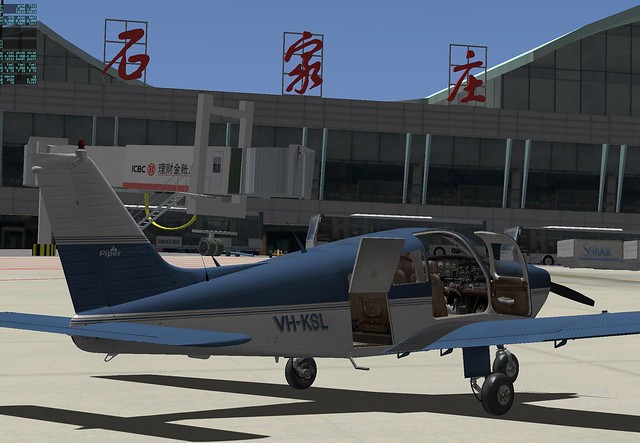 Then I took a walk around the area,
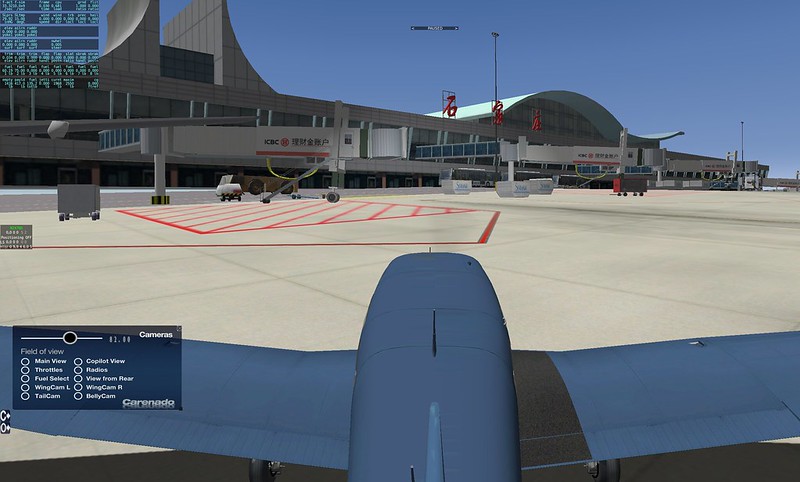 There are quite a few A320s and 737s from China Eastern and China Southern,
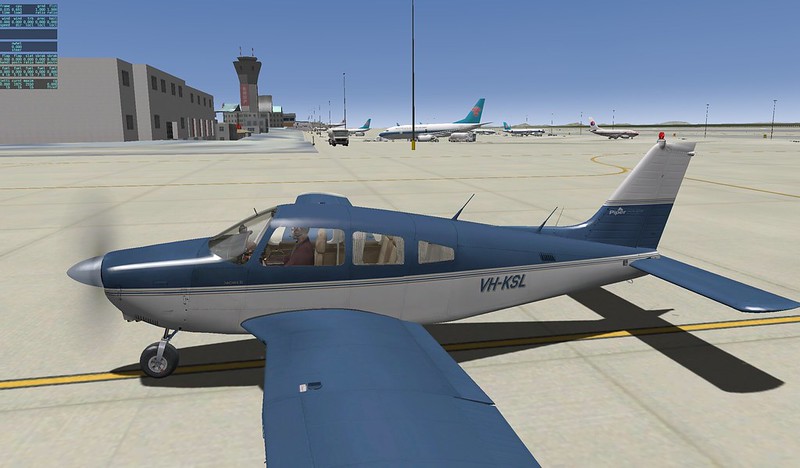 Oh, there is also a cargo office here.

I wandered over to the Runway threshold, took off, turned crosswind and then downwind,
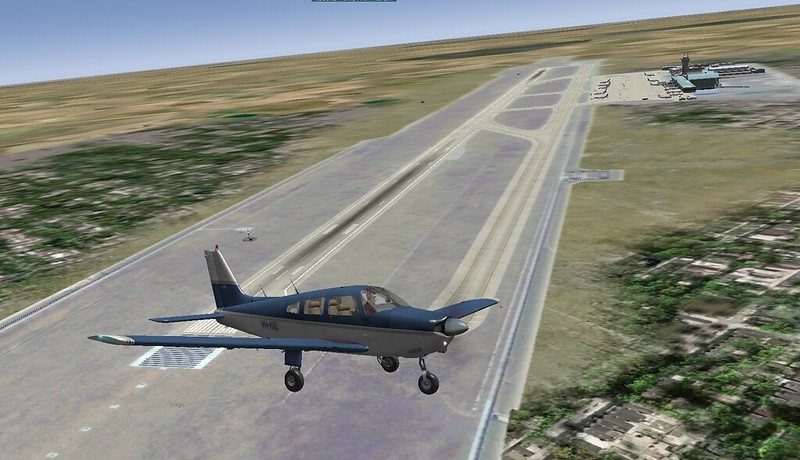 On the downwind leg, I took a careful look at the modern architecture of the terminal, as well as the parking lot and the park,
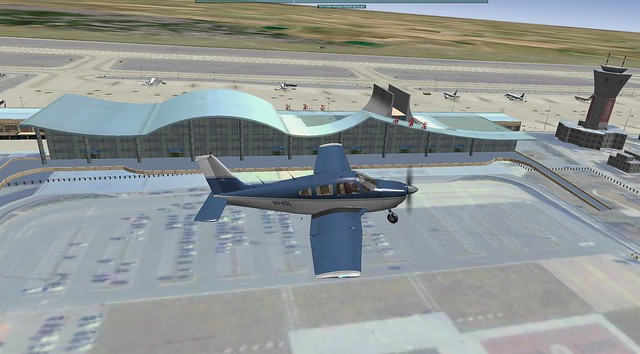 Then I turned back to take another look at this side of the terminal and the Apron from above the Runway,
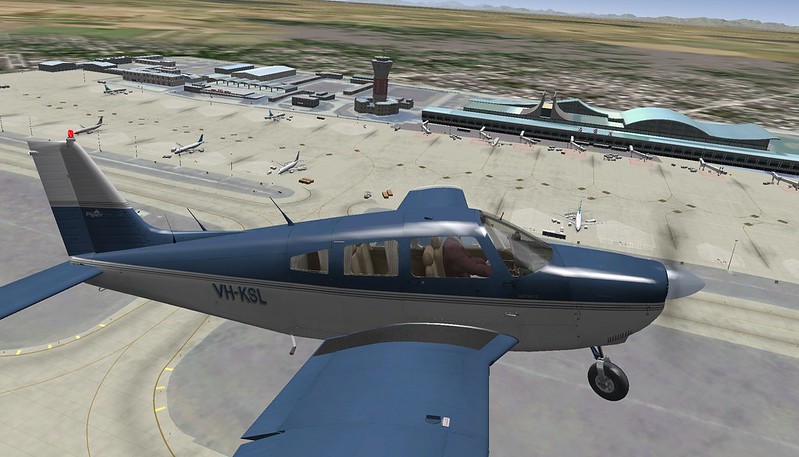 Although the airport isn’t large, the ground equipment is complete. Billboards, tow bars, fuel trucks, and cargo containers are everywhere. It really gives you the feeling of being right there in the middle of it.
I used to just fly around Beijing, but it looks like I can come to Shijiazhuang to have some fun in the future.
Although the airport isn’t large, the ground equipment is complete. Billboards, tow bars, fuel trucks, and cargo containers are everywhere. It really gives you the feeling of being right there in the middle of it.
I used to just fly around Beijing, but it looks like I can come to Shijiazhuang to have some fun in the future.
Finally, a brief explanation of the installation method. Download the installer from x-plane.org. After extracting, copy the ZBSJ_Shijiazhuang_Zhengding folder to the Custom Scenery directory. Also, don’t forget to add the following line to scenery_packs.ini: SCENERY_PACK Custom Scenery/ZBSJ_Shijiazhuang_Zhengding/ And that’s it. Very simple, right?
Once again, I’d like to thank the scenery addon author for their outstanding work. Everyone please go to x-plane.org and give it 5 stars to show your support.
End
(Self-correction during output generation: “sidebar” -> “crosswind” in pattern translation. “停机坪” -> “Apron”. “滑行道” not present but “Taxiway” noted. “跑道” -> “Runway”. “终端” -> “terminal”.)
Final Output generation.
常犯井的三胖 on Weibo, also known as ShaneMontoya on x-plane.org, has once again brought us a new surprise. This time, it is scenery for Shijiazhuang Zhengding International Airport. I installed it immediately to give it a try, and I was very satisfied. Here is a quick introduction for everyone, along with a few screenshots for the record.
This airport isn’t very large. Before departure, I boarded right in front of the terminal building and loaded my luggage,
Then I took a walk around the ground,
There are quite a few A320s and 737s from China Eastern and China Southern,
Oh, there is also a cargo office here.
I wandered over to the Runway threshold, took off, turned crosswind and then downwind,
On the downwind leg, I took a careful look at the modern architectural style of the terminal, as well as the parking lot and the park,
Then I turned back to take another look at this side of the terminal and the Apron from above the Runway,
Although the airport isn’t large, the ground equipment is complete. Billboards, tow bars, fuel trucks, and cargo containers are everywhere. It really gives you the feeling of being right there in the middle of it.
I used to just fly around Beijing, but it looks like I can come to Shijiazhuang to have some fun in the future.
Finally, a brief explanation of the installation method. Download the installation package from x-plane.org. After extracting, copy the ZBSJ_Shijiazhuang_Zhengding directory to the Custom Scenery folder. Also, don’t forget to add the following line in scenery_packs.ini: SCENERY_PACK Custom Scenery/ZBSJ_Shijiazhuang_Zhengding/ And that’s it. Very simple, right?
Once again, I’d like to thank the scenery addon author for their outstanding work. Everyone please go to x-plane.org and give it 5 stars to show your support.
End 常犯井的三胖 on Weibo, also known as ShaneMontoya on x-plane.org, has once again brought us a new surprise. This time, it is scenery for Shijiazhuang Zhengding International Airport. I installed it immediately to give it a try, and I was very satisfied. Here is a quick introduction for everyone, along with a few screenshots for the record.
This airport isn’t very large. Before departure, I boarded right in front of the terminal building and loaded my luggage,
Then I took a walk around the ground,
There are quite a few A320s and 737s from China Eastern and China Southern,
Oh, there is also a cargo office here.
I wandered over to the Runway threshold, took off, turned crosswind and then downwind,
On the downwind leg, I took a careful look at the modern architectural style of the terminal, as well as the parking lot and the park,
Then I turned back to take another look at this side of the terminal and the Apron from above the Runway,
Although the airport isn’t large, the ground equipment is complete. Billboards, tow bars, fuel trucks, and cargo containers are everywhere. It really gives you the feeling of being right there in the middle of it.
I used to just fly around Beijing, but it looks like I can come to Shijiazhuang to have some fun in the future.
Finally, a brief explanation of the installation method. Download the installation package from x-plane.org. After extracting, copy the ZBSJ_Shijiazhuang_Zhengding directory to the Custom Scenery folder. Also, don’t forget to add the following line in scenery_packs.ini: SCENERY_PACK Custom Scenery/ZBSJ_Shijiazhuang_Zhengding/ And that’s it. Very simple, right?
Once again, I’d like to thank the scenery addon author for their outstanding work. Everyone please go to x-plane.org and give it 5 stars to show your support.
End