Checking Track Using Map
Spring is a season suitable for travel, with the side effect being that this blog has been neglected for a while. My apologies. I definitely must finish the “Airliner Cockpit Exploration” series by mid-May. (The photos I took in Kyoto, Nara, Fukushima, Tokyo, Nagano, etc., turned out to be quite a substantial harvest.)
Today, I flew for about an hour or so, practicing spiral high-speed Descents and ILS approaches. After finishing, I checked my Track in map mode.
I felt the flight went pretty well, so I took a screenshot as a souvenir.
 The image above shows the Track during the spiral Descent. I maintained a 30-degree bank angle while spiraling down at high speed from over 10,000 feet,
then leveled off at 1,000 feet to enter the Downwind, Base, and finally Final for landing.
Looking at the spiral, the circles I drew were fairly regular, giving me a small sense of accomplishment.
The image above shows the Track during the spiral Descent. I maintained a 30-degree bank angle while spiraling down at high speed from over 10,000 feet,
then leveled off at 1,000 feet to enter the Downwind, Base, and finally Final for landing.
Looking at the spiral, the circles I drew were fairly regular, giving me a small sense of accomplishment.
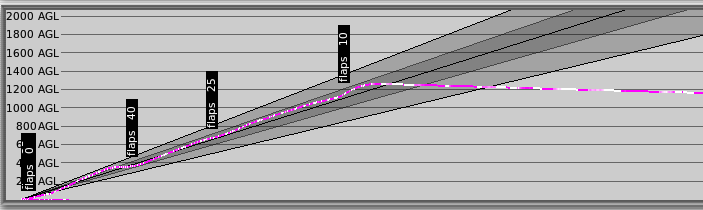 Looking at the image above, this is the Track during a 3-degree glideslope landing. The flight was relatively stable.
I managed to maintain a smooth 3-degree glideslope, keeping the PAPI at two reds and two whites the whole time,
and my altitude at the Runway threshold was correctly maintained at around 50 feet.
Finally, I flared, and the vertical touchdown speed was 110 fpm.
Although it wasn’t absolutely perfect, I was still quite satisfied with the overall landing process.
Looking at the image above, this is the Track during a 3-degree glideslope landing. The flight was relatively stable.
I managed to maintain a smooth 3-degree glideslope, keeping the PAPI at two reds and two whites the whole time,
and my altitude at the Runway threshold was correctly maintained at around 50 feet.
Finally, I flared, and the vertical touchdown speed was 110 fpm.
Although it wasn’t absolutely perfect, I was still quite satisfied with the overall landing process.
In short, making good use of the map in X-Plane is very helpful for improving flight skills. I hope everyone can make better use of this function.
End