Honolulu Intl Airport Scenery USA_HI_PHNL v 2.1
I recently found another free scenery package for Honolulu International Airport, created by the famous Freddy.
I recommend it because it features extensive details for the airport Runway and buildings. It includes not only the main terminal but also the Apron used by FedEx and other express companies on the south side, significantly enhancing the realism of the flight. Even more impressive is the inclusion of the US Air Force section; you can see military aircraft and hangars such as F15s, C17s, and DC10s, which is quite a bonus.
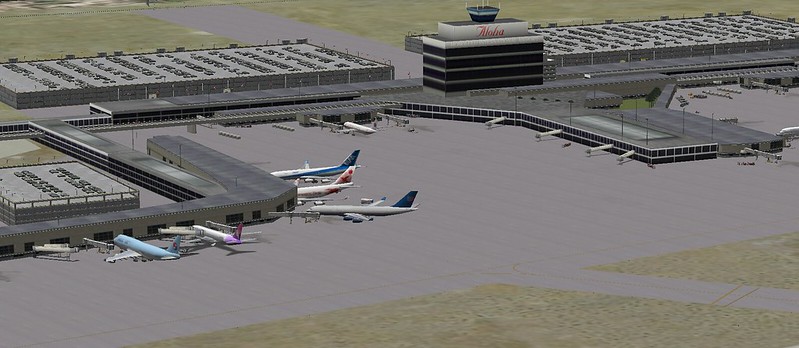
Please browse here for more photos. Below is a brief guide on how to install it.
First, take a look at Freddy’s complete list of X-Plane sceneries. It includes airports in Alaska, Florida, Hawaii, New York, New Jersey, Texas, and many other locations. You can download whichever files you like. The Honolulu International Airport scenery is here. Click this link to download the zip file, extract it, and copy the folder USA_HI_OAHU_PHNL_Honolulu Intl v2.1 into the Custom Scenery folder within your main X-Plane10 directory.
Don’t forget to modify the scenery_packs.ini file in the Custom Scenery folder by adding the following line to the end:
SCENERY_PACK Custom Scenery/USA_HI_OAHU_PHNL_Honolulu Intl v2.1/
Installation complete.
Finally, a quick tip: if you are flying in Hawaii, I highly recommend downloading the Honolulu satellite photo scenery pack from the simheaven scenery addons I mentioned previously. Installing both sceneries allows you to see 3D models of the airport and mountains, as well as actual satellite imagery of the ground, which greatly boosts realism. The scenery is especially beautiful when flying over the famous Diamond Head landmark on Oahu—it is truly breathtaking.
End