A Brief Discussion on Propeller Slipstream and P-Factor in Small Single-Engine Propeller Aircraft — Why Does My Plane Always Turn Left?
Most beginners to flight simulation encounter a common issue: after a small single-engine propeller plane accelerates on the ground, takes off, and leaves the ground, it fails to proceed in a straight line and instead veers constantly to the left. First of all, congratulations! The software you are using is authentically simulating the effects of aircraft aerodynamics. You have chosen excellent software!
Of course, X-Plane is precisely this kind of software that authentically simulates aerodynamics. You should know that its commercial version is certified by the Federal Aviation Administration (FAA) as an official simulator for pilot training. The flight control models in the home version we generally use and the commercial version of X-Plane are identical. Therefore, using X-Plane delivers an extremely realistic flying sensation, including propwash and P-Factor. In a foreign X-Plane forum I frequently follow, there was a discussion regarding realism, and some pilots with commercial licenses spoke highly of this software.
Alright, below I will attempt to explain the principles and the countermeasures, taking a right-turning propeller aircraft as an example.
Propwash is the airflow caused by the propeller blades pushing air as they rotate. On one hand, it forces air to flow backward; on the other hand, it causes the air to twist around the fuselage in the direction of the propeller’s rotation. This acceleration and twisting of the airflow caused by the propeller is called propwash.
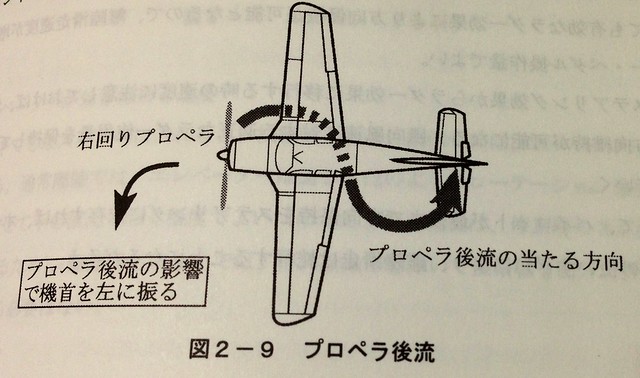
When the twisted airflow from the propeller strikes one side of the aircraft’s vertical stabilizer, the effect of the reaction force causes the aircraft’s direction to yaw. As shown in the figure above, if the propeller rotates to the right, the twisted airflow at the bottom layer twists from the right side to the left, acting on the vertical stabilizer from the left. This generates an aerodynamic force on the tail to the right, forming a right-yawing moment relative to the aircraft’s center of gravity—in other words, the nose yaws to the left. The greater the propeller speed (RPM), the more pronounced the effect of the twisted airflow on the aircraft’s directional yaw.
When the aircraft is on the ground preparing for takeoff or taxiing, propwash constantly affects the aircraft. The control input at this time is to gently apply right rudder, controlling the nose gear (or front landing gear) to turn right, carefully keeping the aircraft on the centerline of the Runway or Taxiway. The faster the aircraft taxis, the greater the speed of the backward-flowing airflow, which will gradually counteract the influence of the twisted airflow; thus, the propwash effect becomes smaller. Therefore, as taxiing speed increases, you can moderately reduce the amount of rudder input to prevent the aircraft from veering off the right side of the Runway centerline.
P-Factor is the sideslip phenomenon that occurs in propeller aircraft during flight conditions of “high angle of attack + low speed + high power."
When the aircraft has just rotated during takeoff, is flaring for landing, or is flying at low speed, the nose generally forms an upward pitch angle relative to the fuselage axis (or the ground) to obtain sufficient Lift. You can refer to the nose diagram on the right in the figure below.
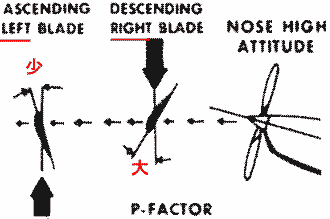 The angle of attack relative to the wind differs for the propeller blades on the left and right sides. The angle of attack on the left side is smaller, producing relatively less Thrust (left part of the figure above),
while the angle of attack on the right side is larger, producing greater Thrust (middle part of the figure above). This causes the nose to yaw to the left.
The angle of attack relative to the wind differs for the propeller blades on the left and right sides. The angle of attack on the left side is smaller, producing relatively less Thrust (left part of the figure above),
while the angle of attack on the right side is larger, producing greater Thrust (middle part of the figure above). This causes the nose to yaw to the left.
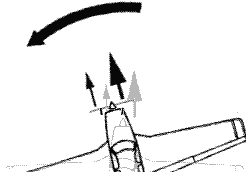 Regarding how to remember the impact of propeller effects on nose yaw, you can refer to this site’s article Basic Practice for Turns.
The main methods to counteract propwash and P-Factor during the takeoff process are as follows:
- Gradually and slowly advance the throttle to allow the aircraft to accelerate smoothly.
- As the aircraft accelerates, the nose will drift upward; apply forward pressure on the stick/yoke to control the elevator and hold the nose down.
- Observe the outside references to see if the aircraft is on the Runway centerline; if a deviation occurs, gently press the right rudder pedal to correct the direction.
- After liftoff, continue to observe external visual references; if a deviation occurs, gently press the right rudder pedal to correct the direction.
Additionally, my suggestion is that for the sake of realism, you must buy a pair of rudder pedals. This item is extremely valuable.
I am currently using the Saitek Pro Flight Rudder Pedals shown below,
Saitek Pro Flight Rudder Pedals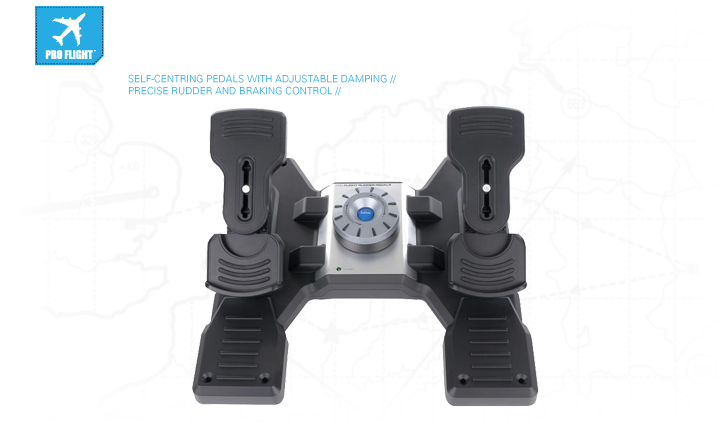

However, it is said that the CH Products Pro Pedals shown in the figure below are also very good,
CH Products Pro Pedals USB Flight Simulator Pedals ( 300-111 )<img src=http://www.chproducts.com/Pro-Pedals-v13-d-716.html?do=thumbnailer.get&src=images/chproducts/products/Simulation/PP.jpg&w=200&h=200&method=surface&quality=80>
After buying the rudder pedals, don’t forget that you need to configure them.
-thumb-640x481.png) The rudder and rudder pedals are set together, under the “yaw” item.
Then there are the left and right brakes, “left toe brake” and “right toe brake”. These 3 items are sufficient.
The rudder and rudder pedals are set together, under the “yaw” item.
Then there are the left and right brakes, “left toe brake” and “right toe brake”. These 3 items are sufficient.
Another factor affecting the stability of propeller aircraft is Gyroscopic Effect, because for the aircraft, the rotating engine can be imagined as a gyroscope. A gyroscope has two characteristics: precession and rigidity in space. When a high-speed spinning gyroscope encounters an external force, the direction of its axis does not change in the direction of the external force; instead, the axis precesses around a fixed point. If you have played with a gyroscope, you know that when it spins on the ground, its axis constantly twists; this is precession. Simply put, the gyroscopic effect is the inertia of a rotating object to maintain its direction of rotation (the direction of the rotation axis). You can consider the control forces applied by the yoke/stick to the aircraft as external forces on the gyroscope. Therefore, applying a disturbing force to the plane of rotation of the propeller at any time results in a resultant force located 90 degrees ahead of the direction of rotation, in the same direction as the applied force. This will cause a pitching motion or a yawing motion, or a combination of both, depending on the point of application.
Specifically: Pulling back on the stick to raise the nose will produce a right yaw; Pushing forward on the stick to lower the nose will produce a left yaw; Turning to the right will cause the nose to pitch down; Turning to the left will cause the nose to pitch up.
Regarding how to remember the impact of precession on nose yaw, you can refer to this site’s article Basic Practice for Turns.
Knowing the influence of the gyroscopic effect on aircraft attitude allows you to appropriately operate the elevator and rudder to prevent unnecessary pitching and yawing motions.
End