Plugin Introduction: Landing Speed Display and Evaluation X-Plane Landing Speed Plugin
Whether in real flight or flight simulation, the landing phase is basically considered the most difficult maneuver.
I discovered a nice Plugin/Addon that displays the vertical speed at touchdown and evaluates the landing operation, which is very helpful for practice. Here is an introduction.
First, regarding the installation method: download the old version from here or download the new version that supports 64-bit from here, and extract the files into the Resources/plugins directory under the main X-Plane directory.
Then, start X-Plane, open the Plugins menu, and enable the Landing Speed plugin.
Afterward, every time you complete a landing, this plugin will automatically pop up a window showing the evaluation rating and the vertical touchdown speed.
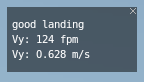 As shown in the image above, the result is “good landing,” with a vertical speed of 124 ft/min and 0.628 m/s.
I flew several times, and every time was “Good.”
As shown in the image above, the result is “good landing,” with a vertical speed of 124 ft/min and 0.628 m/s.
I flew several times, and every time was “Good.”
By the way, the evaluations are categorized as follows. Come and see what rating you can get: R.I.P. = rest in peace. Anybody Survived? = You are fired = Acceptable = hard landing = good landing = Excellent landing =
In addition, this plugin automatically generates a landing.log file in the main X-Plane directory, with the following content:
Sun Sep 2 23:32:17 2012 N172SP RJTA ‘ATSUGI NAF’ 0.745 m/s 147 fpm good landing
Sun Sep 2 23:37:13 2012 N172SP RJTA ‘ATSUGI NAF’ 0.515 m/s 101 fpm good landing
Sun Sep 2 23:43:09 2012 N172SP RJTA ‘ATSUGI NAF’ 0.628 m/s 124 fpm good landing
It is convenient for checking the history at any time.
End