Title: Summary of X-Plane 10/11 Flight Route Query and Setup Methods
User “CALL..ME..V!” asked about setting up flight routes when creating a flight plan in X-Plane. Here is a brief summary; I hope it helps.
0 How to submit a flight plan? Please refer to How to use ATC (Air Traffic Control) 1 The Issue X-Plane has built-in information for a large number of airports, Runways, and radio navigation stations (DME, VOR, NDB, ILS), and there is plenty of Waypoint information as well. However, the coverage of Waypoints used by general airlines is not very high. Therefore, if you input a route found online into the X-Plane FMC, it will likely result in an error.
2 Methods to find existing routes 2.0 simbrief.com The best tool to date, highly recommended. Please see the article on this site: The most powerful route query tool: simbrief.com.
2.1 Route Finder Personally, I usually refer to this free website, just like “CALL..ME..V!”: Route Finder http://rfinder.asalink.net/free/ However, the flight plan data provided here includes many Waypoints not supported by X-Plane. For example, for the route from Hong Kong to Guangzhou: “VHHH SID BEKOL A461 IDUMA W22 SHL STAR ZGGG” The SID is, of course, not supported, and Waypoints like BEKOL and SHL also seem to be unsupported. So, if you delete the unusable ones, there aren’t many left. It feels rather unrealistic, doesn’t it?
2.2 vataware
There are many routes logged by flight simulation players on the vataware website.
The usage method is very simple: click the “Top Routes” menu on the left side of the homepage, and input fields for the Departure and Arrival airports will appear.
Enter VHHH and ZGGG as shown below:
 Click the “Go” button to get the following result:
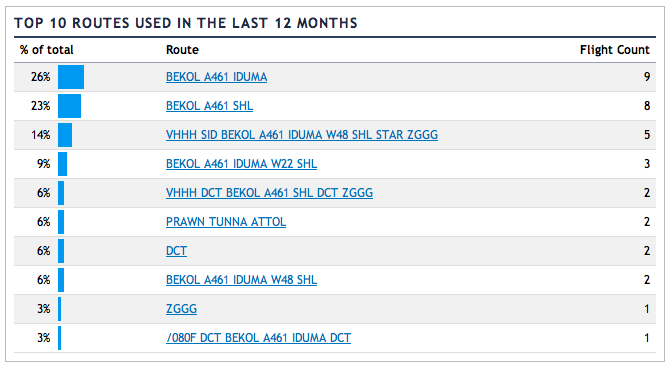 http://www.vataware.com/routes.cfm?from=VHHH&to=ZGGG
2.3 AIRCN Global Route Query System This is a Chinese route query system with a fully Chinese interface and Chinese instructions. The data is very comprehensive, so it is recommended. Since the Chinese documentation is very complete, I won’t explain it in detail here. Please check the link below. AIRCN Global Route Query System V2.0 Instructions The only downside is that it does not support the .fms file format, but a simple copy/paste solves the issue, so it’s not a major problem.
3 Several helpful websites that can generate X-Plane specific .fms flight plan files 3.1 GKP’s X-Plane Waypoint Calculator http://www.gkpnet.net/x-plane/Resources/xpwp.php The usage is simple. Take the result from Route Finder: “VHHH SID BEKOL A461 IDUMA W22 SHL STAR ZGGG” Enter it into the “Flightplan:” field, Press Enter to get the result. It can find the latitude and longitude for Waypoints like BEKOL, You can view this route on Google Maps, or download the X-Plane .fms file. I 3 version 1 5 1 VHHH 28 22.30899455 113.91461001 11 BEKOL 0 22.543333 114.133333 11 IDUMA 0 22.895 113.953333 3 SHL 0 23.09 113.853333 1 ZGGG 50 23.39243875 113.29878825 0 co Flightplan created by xpwp_v3.7a, 2012.04 co Flightplan name : VHHH-ZGGG co Entered Flightplan : VHHH SID BEKOL A461 IDUMA W22 SHL STAR ZGGG co Cruise Altitude : 0 3.2 X-Plane Flight Planner † http://xplane.anzui.de:3000/flight-planner I have introduced this site before. It allows you to manually input navigation points one by one and view them on a map. It does not support inputting the entire flight route string, and the Waypoint coverage is not very high, so it might only be suitable for players who prefer to build their own routes manually. 3.3 Google Maps Flight Planner for X-Plane † http://www.lnamanager.ch/flight-planner/ This website has more features than the one introduced in section 3.2 above, and it can also cover Waypoints like BEKOL and SHL, so it is quite recommended.
3.4 http://www.xpflightplanner.com/ http://www.xpflightplanner.com/ is a Windows and Mac application that can automatically generate route information and .fms files. The UI is nice, but this is paid software.
3.5 Official route query methods published by the ATM Bureau of the Civil Aviation Administration
3.6 Real-world route information
4 openNav If you cannot find the necessary Waypoint information on the websites above, you can consider using www.opennav.com. Personally, I find the information here very comprehensive. Generally, you can find the latitude and longitude for all Waypoints. Although it doesn’t support X-Plane directly, it’s not difficult to type the coordinates into the FMC or create your own .fms file.
The .fms file format is as follows: Type, Ident, altitude, Position North, Position West Type is likely: 1:airport, 2:NDB, 3:VOR, 11:Fix, 13:GPS waypoint For example I 3 version 1 1 1 LOWI 1906 47.260223 11.343966 11 OEV04 3506 47.278271 11.448448 2 AB 4700 47.290001 11.501667 11 OEJ00 5906 47.314503 11.602422 2 RTT 9500 47.430920 11.940053 11 KOGOL 21906 47.621387 11.368056 13 +47.72_+010.57 35000 47.723541 10.567042 3 KPT 35000 47.745831 10.349722 11 AMEMI 35000 47.894718 10.167222 3 TGO 35000 48.618408 9.259208 11 HAREM 35000 49.618332 9.414444 11 LOHRE 35000 50.066944 9.486389 11 ARNIX 35000 50.528889 9.561667 3 FUL 35000 50.592457 9.572169 11 MASEK 35000 50.729168 9.598333 11 KEMAD 35000 51.123611 9.675000 3 DLE 35000 52.250320 9.883497 11 AGATI 35000 52.911667 10.028889 11 GESTO 35000 53.174999 10.083611 3 HAM 35000 53.685577 10.204997 11 EKERN 35000 54.505833 9.863889 11 ALASA 35000 54.808613 9.961667 3 ALS 35000 54.905415 9.993378 11 ASBIL 35000 55.371944 9.993889 11 RIDSI 35000 55.591667 9.994167 11 ABINO 35000 55.968330 9.994444 11 LUTUS 35000 56.100834 9.994444 11 RADIS 35000 56.541668 9.995000 3 AAL 35000 57.103722 9.995578 13 +58.17_+010.13 35000 58.168179 10.126742 11 ARTOR 32223 58.334442 10.148889 3 TOR 18509 59.169113 10.259267 13 +59.69_+010.51 9732 59.694359 10.509038 11 SONER 6441 59.897350 10.617806 2 SLB 3000 60.012470 10.973944 11 OBW74 3000 60.070351 10.999708 11 OBW04 1930 60.124279 11.033564 11 OBW01 955 60.171787 11.063650 1 ENGM 681 60.200531 11.082699 0 —- 0 0.000000 0.000000 0 —- 0 0.000000 0.000000 0 —- 0 0.000000 0.000000 0 —- 0 0.000000 0.000000 Additionally, if you need to convert latitude and longitude from degrees, minutes, and seconds to decimal format, this free tool provided on this website is very useful.
5 Expectations I look forward to future versions of X-Plane covering more Waypoint information. It would be even better if SID (Standard Instrument Departure) and STAR (Standard Terminal Arrival Route) procedures could be included. End